
3D Secure 2.0
3D Secure 2.0
Overview
What is 3DS 2.0 ?
3DS 2.0 is an authentication protocol for payment of online transactions that has 3 levels of validation (3D): trade, brand and issuer.
It is the most current version of the 3-Domain Secure (3DS) authentication protocol, designed to authenticate e-commerce transactions with credit, debit or prepaid cards. It adds a layer of protection by requiring cardholder authentication through unique codes per transaction (such as tokens via SMS or available through the issuing bank's app), PINs, or other validation methods (such as a direct action through the app via a push). Its security protocol is used by the main card brands around the world.
In its version 2.0, the 3DS protocol brings a significant update compared to the original 3Ds version, with improvements mainly in security and user experience.
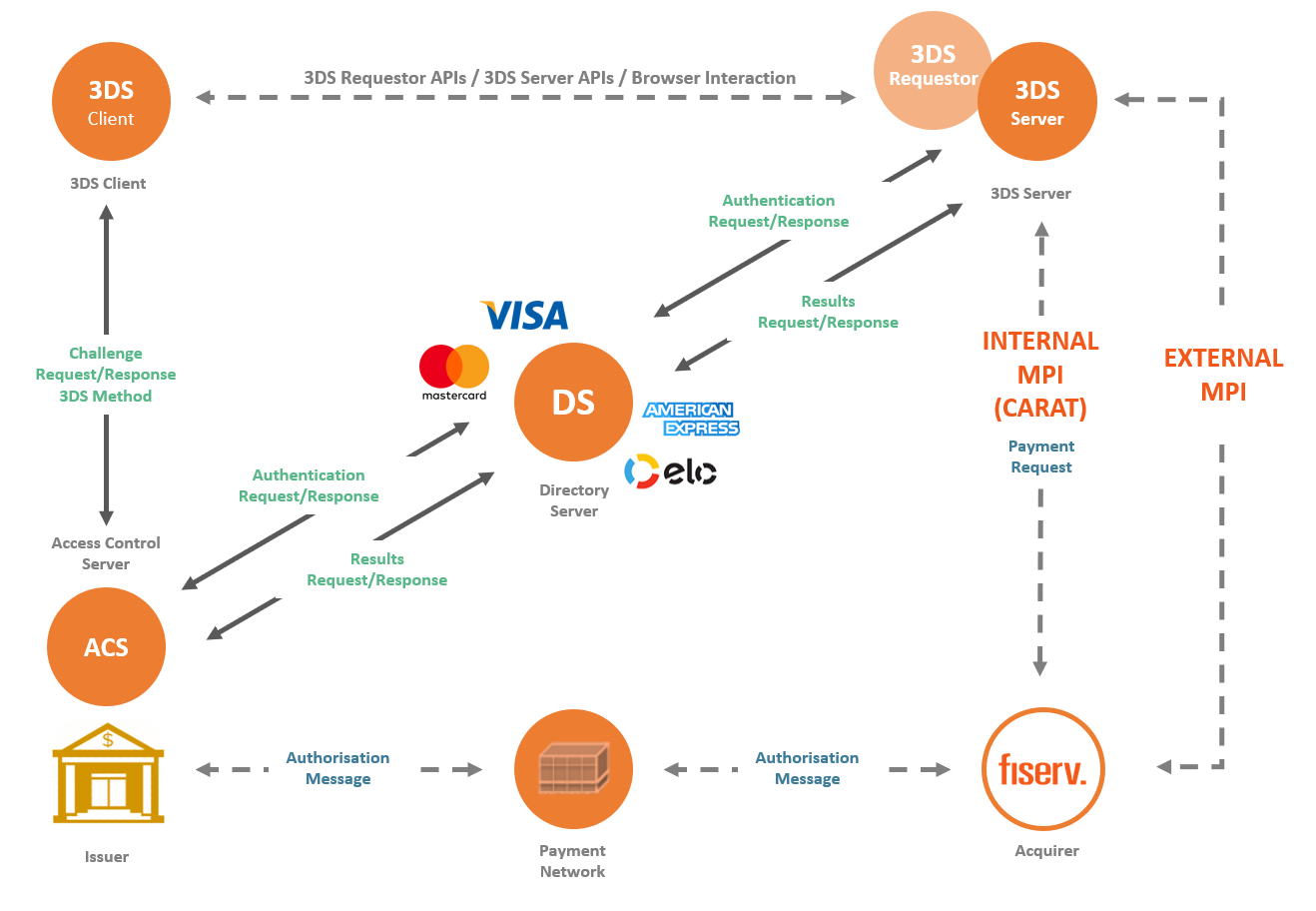
Carat offers support for 3D-Secure 2.0 transactions through two different integrations:
- 3DS Server
- Web Checkout
Some of the key improvements in 3DS 2.0 include:
- Risk-based authentication: 3DS 2.0 utilizes additional information, such as the buyer's transaction history and device information, to assess fraud risk in real-time. This enables the card issuer to evaluate risk more accurately and determine whether additional validation is necessary.
- Streamlined user experience: 3DS 2.0 offers a simplified and less intrusive authentication flow for the buyer, with fewer redirects to other pages or the need to enter passwords.
- Mobile device support: 3DS 2.0 is designed to work seamlessly on mobile devices, with features like biometric authentication that make the authentication process easier and more convenient for the buyer.
In summary, 3DS 2.0 is a significant upgrade to the 3-Domain Secure authentication protocol, making e-commerce transactions more secure and convenient for buyers.
Benefits for the consumer
- Greater acceptance of debit cards: allows the use of the card in the debit function when purchasing online.
- More security: as safe as in-person purchases with a chip/password or by contact.
- Fraud reduction: the system performs authentication to confirm that the buyer is truly legitimate, preventing card scams.
Benefits for the online retailer
- International safety standard.
- Possibility of expanding sales with debit card transactions and, in normal scenarios, greater conversion compared to the traditional process (CNP).
- Authenticated transactions prevent fraud chargebacks. The issuing bank now guarantees the transaction, as upon successful authentication there is a change of responsibility (“Liability Shift”). If the transaction is authenticated, responsibility passes from the Merchant to the Issuing Bank.
- Reduction of fraud and greater security, both on debit cards and credit cards.
- Broad integration for a better authentication experience during the purchase process.
How does 3DS 2.0 work?
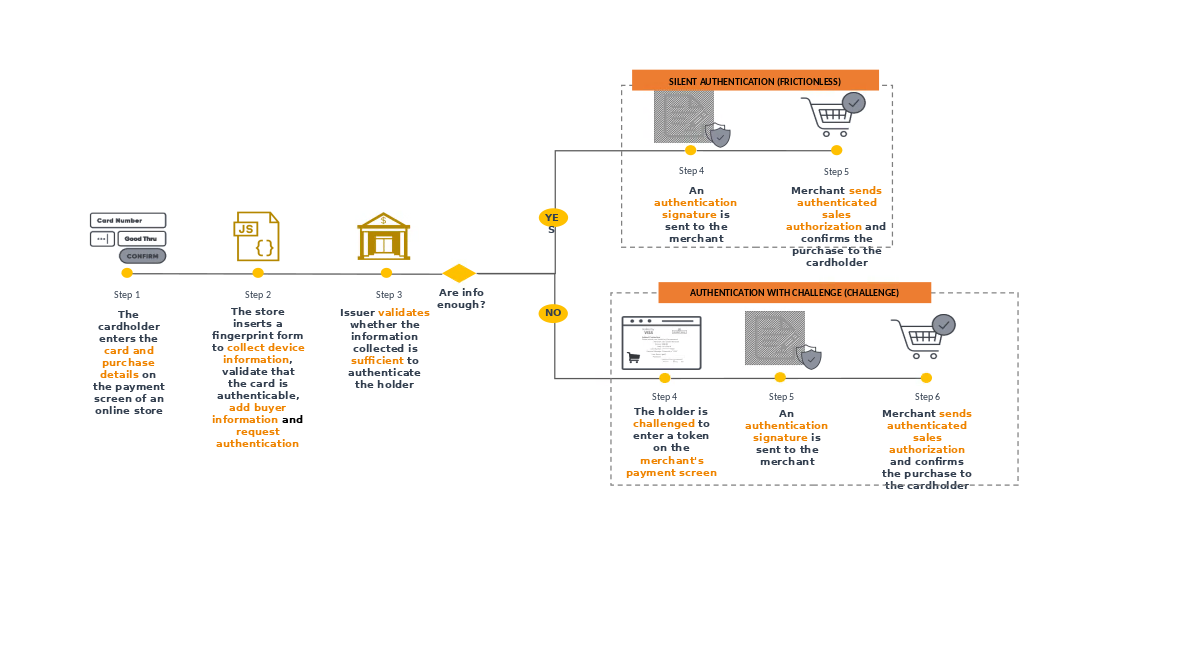
During the payment process, if the buyer's card BIN is enabled in the respective brand's 3D-Secure,
when entering the card details on the payment screen, the 3DS 2.0 APIs enable the collection of purchase
information and send the data to the Issuing Bank. This one, using the data provided, will decide whether the cardholder's identity should be verified
or not. If the data is sufficient, buyer authentication will be carried out without interaction on your part.
This is then called silentor frictionless authentication. Some of the major improvements in 3DS 2.0 include:
If, during authentication, the data is not sufficient to validate the cardholder, an additional process
(known as “step up”) requested by the issuing bank may be necessary, with the aim of verifying the identity of that cardholder.
This authentication process in which an interaction is required from the cardholder is called challenge.
In this additional step, various methods can be included, such as security code verification,
biometric authentication, token validation, approvals on the buyer's mobile device or others.
That's why, it is important to emphasize that the more data the merchant can send about the transaction
and the customer, the greater the chances of obtaining silent authentication.
What are the advantages of 3DS 2.0?
The main advantage is the Liability Shift of fraudulent chargebacks. If the transaction is authenticated, the liability shifts from the Merchant to the Issuing Bank. In other words, for authenticated transactions, the Merchant does not receive chargebacks due to fraud, thus mitigating financial losses. Additionally, there are several other benefits, such as:
- Broad support for devices and authentications
- Streamlined checkout flow
- Smarter decision-making based on risk analysis
- Higher authorization rates and fewer false positives
Authentication vs Authorization
During a payment with authentication, one might have the impression that the authorization and authentication processes are the same. However, a successful authentication does not guarantee payment authorization as these are distinct features:
- Authentication: process to ensure that the cardholder is the legitimate owner of the card.
- Authorization: process used by an Issuer to approve or decline a Purchase Transaction from a Merchant/Acquirer.
While Authentication is the process that validates the user's identity, Authorization is the process that verifies whether the presented card can be used for the purchase after the authentication is validated. It is important to be aware that these features occur in the same flow but can have different outcomes, which will reflect in the final response.
Applicability
The 3DS 2.0 protocol is valid for all online transactions with cards, both debit and credit, and for debit cards, the use of 3DS is mandatory (except for businesses registered in the “debit without password” program). in the Abecs model), and for credit cards, the use of the 3DS is optional.
The main acquirers in Brazil are available for the Fiserv Gateway, as well as the most important brands.
How to activate
The merchant must contact Fiserv's commercial representative and request the inclusion of the 3DS 2.0 service in the Carat contract.
After requesting and contracting the service, with the assistance of the implementation team, the retailer must access the Carat online documentation in the 3DS Overview section and begin the technical integration in your site.
To configure the environment, the merchant needs to provide the following information:
- Merchant ID of the acquirer: unique identification code generated by the acquirer for the merchant
- MCC (Merchant Category Code): standard code that identifies the merchant’s field of activity
If you are not a Fiserv (BIN) purchaser, also inform:
- Acquire Bin.
Acceptance
Check below is the acceptance of issuers regarding 3DS.
Important: Authentication Results.
| Issuers | Amex | Elo | Mastercard | Visa |
|---|---|---|---|---|
Banco do Brasil | - | Credit/Debit | Credit/Debit | Credit/Debit |
Bradesco | Credit | Credit/Debit | Credit | Credit/Debit |
Itaú | - | - | Credit/Debit | Credit/Debit |
Caixa | - | Credit | Credit | Credit |
Santander | - | - | Credit/Debit | Credit/Debit |
Banrisul | - | - | Credit | Credit |
Banestes | - | Crédito | No information | No information |
BMG | - | - | Credit/Debit | - |
BRB | - | - | Credit/Debit | Credit/Debit |
BV | - | - | Credit | Credit |
Safra | - | - | Credit | Credit |
Daycoval | - | - | Credit/Debit | Credit/Debit |
Banco Pan | - | - | Credit/Debit | Credit/Debit |
Nubank | - | - | Credit/Debit | - |
Original | - | - | Credit/Debit | - |
PagBank | - | - | Credit/Debit | Credit/Debit |
Neon | - | - | - | Credit/Debit |
Digio | - | - | - | Credit/Debit |
C6 Bank | - | - | Credit/Debit | - |
XP | - | - | - | Credit/Debit |
Sicredi | - | - | Credit/Debit | Credit/Debit |
Agibank | - | - | No information | No information |
Tribanco | - | - | No information | No information |
BS2 | - | - | No information | No information |
Inter | - | - | Credit/Debit | - |
BTG Pactual | - | - | Credit/Debit | - |
Carrefour | - | - | Credit | Credit |
Cetelem | - | - | - | - |
Credz | - | - | - | - |
Pernambucanas | - | Credit/Debit | - | - |
Porto Seguro | - | - | Credit | Credit |
Sicoob | - | - | Credit/Debit | Credit/Debit |
CredSystem | - | - | Credit | - |
Midway | - | - | Credit | Credit |
Unicred | - | - | - | Credit/Debit |
Banese | - | Credit | - | - |
Realize | - | - | Credit | Credit |
Crefisa | - | Credit/Debit | - | - |
Will Bank | - | - | Credit/Debit | - |
## 3DS 2.0 API Transparent Checkout ### Quick Start
This guide shows the process of a frictionless authentication, using the Software Express 3DS Server REST interface.
What you'll need
- Active account on 3DS Server's homologation environment (obtained with our support team)
- A tool capable of performing HTTP calls, such as Postman, REST Client or cURL
Creating the transaction
HTTP method: POST
URL: https://mpi-homolog.softwareexpress.com.br/3ds-server/v2/authentication
Headers:
- Content-Type:
application/json - merchant_id: {your merchant id}
- merchant_key: {your merchant key}
Request:
{
   "cardholder":{
      "acct":{
         "number":"1234123412341234"
      }
   },
   "brand_id":"2"
}
curl
--request POST "https://mpi-homolog.softwareexpress.com.br/3ds-server/v2/authentication"
--header "Content-Type: application/json"
--header "merchant_id: xxxxxxxxxxxxxxx"
--header "merchant_key: xxxxxxxxxxx"
--data-binary
{
   "cardholder":{
      "acct":{
         "number":"1234123412341234"
      }
   },
   "brand_id":"2"
}
--verbose
Response:
{
    "three_ds_method_url": "https://www.example.com",
    "three_ds_server": {
        "trans_id": "12341234-1234-1234-1234-123412341234",
        "status": "NEW"
    },
    "acs": {
        "protocol_version": {
            "start": "2.1.0",
            "end": "2.2.0"
        }
    },
    "device_channel": "02",
    "ds": {
        "protocol_version": {
            "start": "2.1.0",
            "end": "2.2.0"
        }
    },
    "message_version": "2.2.0"
}
Learn more about this service.
Performing the authentication
HTTP Method: PUT
URL: https://mpi-homolog.softwareexpress.com.br/3ds-server/v2/authentication/**{3DS Server transaction ID}**
Headers:
- Content-Type:
application/json - merchant_id: {your merchant id}
- merchant_key: {your merchant key}
Request:
{
   "three_ds_comp_ind":"Y",
   "pay_token_ind":"false",
   "notification_url":"https://www.requestor.com/notification",
   "decoupled_notification_url":"https://www.requestor.com/decoupled_notification",
   "trans_type":"01",
   "three_ds_requestor":{
      "authentication_ind":"01",
      "decoupled_max_time":"10",
      "id":"id",
      "name":"Loja de Testes",
      "url":"https://www.requestor.com"
   },
   "acquirer":{
      "bin":"2",
      "merchant_id":"00000000"
   },
   "browser":{
      "accept_header":"text/html,application/xhtml+xml,application/xml;q=0.9,image/webp,*/*;q=0.8",
      "ip":"10.20.30.40",
      "javascript_enabled":"true",
      "java_enabled":"false",
      "language":"pt-BR",
      "color_depth":"24",
      "screen_height":"864",
      "screen_width":"1536",
      "tz":"180",
      "user_agent":"Mozilla/5.0 (Windows NT 10.0; Win64; x64; rv:75.0) Gecko/20100101 Firefox/75.0"
   },
   "cardholder":{
      "card_expiry_date":"2212",
      "name":"Joaquim",
      "acct":{
         "type":"02",
         "number":"1234123412341234"
      }
   },
   "merchant":{
      "mcc":"1234",
      "country_code":"BRA",
      "name":"Loja de Teste",
   },
   "message":{
      "category":"01"
   },
   "purchase":{
      "amount":"10000",
      "currency":"986",
      "exponent":"2",
      "date":"date"
   }
}
curl
--request PUT "https://mpi-homolog.softwareexpress.com.br/3ds-server/v2/authentication/12341234-1234-1234-1234-123412341234"
--header "Content-Type: application/json"
--header "merchant_id: xxxxxxxxxxxxxxx"
--header "merchant_key: xxxxxxxxxxx"
--data-binary
{
   "three_ds_comp_ind":"Y",
   "pay_token_ind":"false",
   "notification_url":"https://www.requestor.com/notification",
   "decoupled_notification_url":"https://www.requestor.com/decoupled_notification",
   "trans_type":"01",
   "three_ds_requestor":{
      "authentication_ind":"01",
      "decoupled_max_time":"10",
      "id":"id",
      "name":"Loja de Testes",
      "url":"https://www.requestor.com"
   },
   "acquirer":{
      "bin":"2",
      "merchant_id":"00000000"
   },
   "browser":{
      "accept_header":"text/html,application/xhtml+xml,application/xml;q=0.9,image/webp,*/*;q=0.8",
      "ip":"10.20.30.40",
      "javascript_enabled":"true",
      "java_enabled":"false",
      "language":"pt-BR",
      "color_depth":"24",
      "screen_height":"864",
      "screen_width":"1536",
      "tz":"180",
      "user_agent":"Mozilla/5.0 (Windows NT 10.0; Win64; x64; rv:75.0) Gecko/20100101 Firefox/75.0"
   },
   "cardholder":{
      "card_expiry_date":"2212",
      "name":"Joaquim",
      "acct":{
         "type":"02",
         "number":"1234123412341234"
      }
   },
   "merchant":{
      "mcc":"1234",
      "country_code":"BRA",
      "name":"Loja de Teste",
   },
   "message":{
      "category":"01"
   },
   "purchase":{
      "amount":"10000",
      "currency":"986",
      "exponent":"2",
      "date":"date"
   }
}
--verbose
Response:
{
    "three_ds_server": {
        "trans_id": "12341234-1234-1234-1234-123412341234",
        "status": "AUY"
    },
    "acs": {
        "operator_id": "acsOperatorID",
        "reference_number": "acsReferenceNumber",
        "trans_id": "43214321-4321-4321-4321-432143214321"
    },
    "eci": "05",
    "device_channel": "02",
    "authentication": {
        "value": "1234567890123456789012345678"
    },
    "broad_info": "broadInfo",
    "ds": {
        "reference_number": "dsReferenceNumber",
        "trans_id": "56785678-5678-5678-5678-567856875678"
    },
    "transaction": {
        "status": "Y"
    },
    "message_version": "2.2.0"
}
Learn more about this service.
Transaction Creation Service
import ApiDoc from '../../../../../src/components/api-doc/ApiDoc';
This call is required to obtain the 3DS Method URL corresponding to the card, besides creating a 3DS Server transaction, which will be used in the following steps of the flow.
Important: The value of the message_version field returned in the response must be used in the CREQ step (for challenge transactions).
Call details
- Resource:
/v2/authentication - HTTP Method:
POST - Request format:
JSON - Response format:
JSON - Header parameters:
| Parameter | Description | Format | Mandatory |
|---|---|---|---|
merchant_id | Merchant code on 3DS Server. The production and certification codes will be different. | < 15 AN | YES |
merchant_key | Merchant authentication key on 3DS Server. The production and certification keys will be different. | < 80 AN | YES |
Content-Type | Fixed value application/json. | = 15 AN | YES |
Authorization | Merchant's signature in the Bearer {signature} format. Example: Bearer JHVGytfdgauygdauiw78264284527852897hagdg. | < 2000 AN | COND.* |
carat_merchant_id | Carat merchant code must be sent only if the token field is sent in the request | < 15 AN | COND. |
carat_merchant_key | The authentication key of the Carat merchant must be sent only if the token field is sent in the request | < 80 AN | COND. |
* Note: For security reasons, for transaction authentication to be performed, it is recommended to inform a value for
Authorizationfield.
If the store has registered its public key through the Carat Portal, this field is mandatory.
Available authorizers
| ID | Name |
|---|---|
1 | Visa |
2 | Mastercard |
41 | Elo |
3 | Amex |
Signature generation
To generate the value to be sent in the Authorization header, it is necessary:
- Generate public and private keys
- See the Signature authentication page, section Creating private and public keys.
- Send only the public key to our support team, who will internally associate that key with your store's registration.
- Follow the signature generation instructions described on Signature authentication page, section Signature algorithm, except the subsection Second part (payload), which will be different in this case - see more details below.
Payload
It is possible to generate the signature using 2 different payloads:
- Payload using card number for this functionality must have the following format:
{
  "merchant_id": "XXXXX",
  "merchant_key": "XXXXXXXXXXXXXXX",
  "cartao": "5555555555555555",
  "timestamp": "1620952402824"
}
- Payload using token for this functionality must have the following format:
{
  "merchant_id":"XXXXX",
  "merchant_key": "XXXXXXXXXXXXXXX",
  "token": "er334gvdgdf5dfgdfg63456363434tre345353rg34tb4576jfgrtu464jj56j56u56u56ghhrthrhrthrth467",
  "timestamp": "1620952402824"
}
Payload Base64:
eyJhbGciOiJSUzI1NiJ9.eyJtZXJjaGFudF9pZCI6IkRBVEFPTkxZT04iLCJtZXJjaGFudF9rZXkiOiI5QUM0RjVEQTk0NDExODJDMUNEODJEMzlDNDg2ODYzOTNBRkZDNjlGQzRFMDczM0VFNDgyNjRDNjNCODZENUVFIiwiY2FydGFvIjoiNDExMTEyMDAwMDAwMDAwMCIsInRpbWVzdGFtcCI6IjE2MjA5NTEyNDA5NzUifQ.oYlyOKPsJ9aOCrmJcOq024FGnKReevWdSbKXTcopNqp8AT_4dERYD9G4v-h7pq-xbZOGUOO7YpNmGIqmC-oWHLHGdDGenM7bJyuq1QUff3D9WoMNLeBk5wyguVPoaH7QApksWJllp4fUfLz_BDjw5xwc8ksrDQu1M8w-_PP8wWv9f1_A34Lo7dk1FTQwuFNO4ZBfnkTRLfn0_pIypU9h42Sh9Nr4V8_9Xz0TZvbSw5_FNFY_iQAwXs1Ipr0tGHNL1fvKBlgXfB06ouenHIFNhvzdgPjwGZToJo5hG3NSLsRAI-OiXEkK9loPNNNldkSTzbrtYYTD8gDL90dbQe8fIE3fir-48dsGCzyqO7dZigSbSXxRZkHC6ArfIY6MtY9C4pD8Ero4kOXjAMfxfJq7fhsTh7wrnUhkU-hZxl4nGH_0BPWAe7vBqdCw2agOpUzixY1rLtlQlJ41W42rbIL7lSW6zPF1oLtYG73hUjlcmW8aAdoJlQANWK9_dv6gHv0PjV-BS6jZsLT2aL5Mqgi8DCVPg6cRwAfv2DXSizcSX-6a6mpfQ7ZgR0eU0vHgopX_t6jnO3O3v6Lp2vIArrsH8SW0LT1oBDn-9p-SvtMIJQDhejkPuzrVmwNNXMy8Sb6c8LmhfnPhmyeObUbk1I1iCcbIrCdvqteZdrlGMCImo2M
Payload composition
| Parameter | Description | Format | Mandatory |
|---|---|---|---|
merchant_id | Merchant code on Carat Portal. | = 15 AN | YES |
merchant_key | Merchant authentication key on Carat Portal. | < 80 AN | YES |
cartao | Customer's card number (PAN), the card or token field must always be sent in the payload | < 19 AN | COND |
token | HASH of a card stored in Carat, the card or token field must always be sent in the payload | = 88 AN | COND |
timestamp | Represents the moment the signature is generated in milliseconds. The timestamp field has a validity limit of 10 minutes. | < 13 N | YES |
Examples
Below are some examples of the transaction creation service using the cURL tool.
Request with card number:
To use this example, don't forget to define the variable {{url}} with the value
curl
--request POST "https://mpi-homolog.softwareexpress.com.br/3ds-server/v2/authentication"
--header "Content-Type: application/json"
--header "merchant_id: xxxxxxxxxxxxxxx"
--header "merchant_key: xxxxxxxxxxx"
--header 'Authorization: Bearer eyJhbGciOiJSUzI1NiJ9.eyJtZXJjaGFudF9pZCI6IkRBVEFPTkxZT04iLCJtZXJjaGFudF9rZXkiOiI5QUM0RjVEQTk0NDExODJDMUNEODJEMzlDNDg2ODYzOTNBRkZDNjlGQzRFMDczM0VFNDgyNjRDNjNCODZENUVFIiwiY2FydGFvIjoiNDExMTEyMDAwMDAwMDAwMCIsInRpbWVzdGFtcCI6IjE2MjA5NTEyNDA5NzUifQ.oYlyOKPsJ9aOCrmJcOq024FGnKReevWdSbKXTcopNqp8AT_4dERYD9G4v-h7pq-xbZOGUOO7YpNmGIqmC-oWHLHGdDGenM7bJyuq1QUff3D9WoMNLeBk5wyguVPoaH7QApksWJllp4fUfLz_BDjw5xwc8ksrDQu1M8w-_PP8wWv9f1_A34Lo7dk1FTQwuFNO4ZBfnkTRLfn0_pIypU9h42Sh9Nr4V8_9Xz0TZvbSw5_FNFY_iQAwXs1Ipr0tGHNL1fvKBlgXfB06ouenHIFNhvzdgPjwGZToJo5hG3NSLsRAI-OiXEkK9loPNNNldkSTzbrtYYTD8gDL90dbQe8fIE3fir-48dsGCzyqO7dZigSbSXxRZkHC6ArfIY6MtY9C4pD8Ero4kOXjAMfxfJq7fhsTh7wrnUhkU-hZxl4nGH_0BPWAe7vBqdCw2agOpUzixY1rLtlQlJ41W42rbIL7lSW6zPF1oLtYG73hUjlcmW8aAdoJlQANWK9_dv6gHv0PjV-BS6jZsLT2aL5Mqgi8DCVPg6cRwAfv2DXSizcSX-6a6mpfQ7ZgR0eU0vHgopX_t6jnO3O3v6Lp2vIArrsH8SW0LT1oBDn-9p-SvtMIJQDhejkPuzrVmwNNXMy8Sb6c8LmhfnPhmyeObUbk1I1iCcbIrCdvqteZdrlGMCImo2M'
--data-binary
{
   "cardholder":{
      "acct":{
         "number":"1234123412341234"
      }
   },
   "brand_id":"2"
}
--verbose
Response:
{
  "three_ds_method_url": "https://www.example.com",
  "three_ds_server": {
    "trans_id": "12341234-1234-1234-1234-123412341234",
    "status": "NEW"
  },
  "acs": {
    "protocol_version": {
      "start": "2.1.0",
      "end": "2.2.0"
    }
  },
  "device_channel": "02",
  "ds": {
    "protocol_version": {
      "start": "2.1.0",
      "end": "2.2.0"
    }
  },
  "message_version": "2.2.0"
}
Request with token:
To use this example, don't forget to define the variable {{url}} with the value
curl
--request POST "https://mpi-homolog.softwareexpress.com.br/3ds-server/v2/authentication"
--header "Content-Type: application/json"
--header "merchant_id: xxxxxxxxxxxxxxx"
--header "merchant_key: xxxxxxxxxxx"
--header "carat_merchant_id: yyyyyyyyyyyyyyy"
--header "carat_merchant_key: zzzzzzzzzzzzzz"
--header 'Authorization: Bearer eyJhbGciOiJSUzI1NiJ9.eyJtZXJjaGFudF9pZCI6IkRBVEFPTkxZT04iLCJtZXJjaGFudF9rZXkiOiI5QUM0RjVEQTk0NDExODJDMUNEODJEMzlDNDg2ODYzOTNBRkZDNjlGQzRFMDczM0VFNDgyNjRDNjNCODZENUVFIiwiY2FydGFvIjoiNDExMTEyMDAwMDAwMDAwMCIsInRpbWVzdGFtcCI6IjE2MjA5NTEyNDA5NzUifQ.oYlyOKPsJ9aOCrmJcOq024FGnKReevWdSbKXTcopNqp8AT_4dERYD9G4v-h7pq-xbZOGUOO7YpNmGIqmC-oWHLHGdDGenM7bJyuq1QUff3D9WoMNLeBk5wyguVPoaH7QApksWJllp4fUfLz_BDjw5xwc8ksrDQu1M8w-_PP8wWv9f1_A34Lo7dk1FTQwuFNO4ZBfnkTRLfn0_pIypU9h42Sh9Nr4V8_9Xz0TZvbSw5_FNFY_iQAwXs1Ipr0tGHNL1fvKBlgXfB06ouenHIFNhvzdgPjwGZToJo5hG3NSLsRAI-OiXEkK9loPNNNldkSTzbrtYYTD8gDL90dbQe8fIE3fir-48dsGCzyqO7dZigSbSXxRZkHC6ArfIY6MtY9C4pD8Ero4kOXjAMfxfJq7fhsTh7wrnUhkU-hZxl4nGH_0BPWAe7vBqdCw2agOpUzixY1rLtlQlJ41W42rbIL7lSW6zPF1oLtYG73hUjlcmW8aAdoJlQANWK9_dv6gHv0PjV-BS6jZsLT2aL5Mqgi8DCVPg6cRwAfv2DXSizcSX-6a6mpfQ7ZgR0eU0vHgopX_t6jnO3O3v6Lp2vIArrsH8SW0LT1oBDn-9p-SvtMIJQDhejkPuzrVmwNNXMy8Sb6c8LmhfnPhmyeObUbk1I1iCcbIrCdvqteZdrlGMCImo2M'
--data-binary
{
   "cardholder":{
      "acct":{
         "token":"er334gvdgdf5dfgdfg63456363434tre345353rg34tb4576jfgrtu464jj56j56u56u56ghhrthrhrthrth467"
      }
   },
   "brand_id":"2"
}
--verbose
Response:
{
    "three_ds_method_url": "https://www.example.com",
    "three_ds_server": {
        "trans_id": "12341234-1234-1234-1234-123412341234",
        "status": "NEW"
    },
    "acs": {
        "protocol_version": {
            "start": "2.1.0",
            "end": "2.2.0"
        }
    },
    "device_channel": "02",
    "ds": {
        "protocol_version": {
            "start": "2.1.0",
            "end": "2.2.0"
        }
    },
   "message_version": "2.2.0"
}
Request parameters
The table below describes the request parameters of the transaction creation service:
| Parameter | Description | Format | Mandatory |
|---|---|---|---|
brand_id | Brand ID. Learn more. | = 4 N | YES |
| cardholder.acct | |||
number | Customer's card number (PAN), the number or token field must always be sent in the request | < 19 N | COND |
token | HASH of a card stored in Carat, the number or token field must always be sent in the request | = 88 AN | COND |
| message | |||
version | 3DS message version: 2.1.0 or 2.2.0. | < 8 AN | NO |
Response parameters
If successful, the HTTP response code will be 201. Any other code must be interpreted as an error. The table below describes the response parameters of the transaction creation service:
| Parameter | Description | Format |
|---|---|---|
three_ds_method_url | Invisible frame URL to be displayed on the customer's browser | < 256 AN |
device_channel | Device channel.
| < 2 N |
message_version | Transaction Version (This version must be used on CRes request) | < 8 AN |
| three_ds_server | ||
trans_id | 3DS Server transaction ID | < 8 AN |
status | 3DS Server Status. Learn more. | = 3 AN |
| acs.protocol_version | ||
start | The earliest (i.e. oldest) active protocol version that is supported by the ACS. | < 8 AN |
end | The most recent active protocol version that is supported by the ACS. | < 8 AN |
| ds.protocol_version | ||
start | The earliest (i.e. oldest) active protocol version that is supported by the DS. | < 8 AN |
end | The most recent active protocol version that is supported by the DS. | < 8 AN |
| error | ||
code | Error code. Learn more. | < 3 N |
component | Indicates which component identified the error.
| = 1 AN |
description | Error description | < 2048 AN |
detail | Error details | < 28 AN |
Data Only - Mastercard and Visa
"Data Only" is the term used to describe a transaction flow in which a merchant shares only the data of a transaction with the Issuer through the 3DS rail, without presenting a challenge to the cardholder. This can be influenced by the level of challenges requested by an Issuer and has the following characteristics:
- Always frictionless. The Issuer cannot enforce a challenge for the cardholder in a Data Only transaction.
- There is no liability shift, meaning the merchant remains responsible for potential fraud in this case, not the issuer.
- Depending on the risk of the transaction (e.g., isolated lower-value transactions) or for issuers with a low level of frictionless or technical issues in the authentication process, higher approval rates can be achieved. More information aids in decision-making.
For more details on the official documentation, please contact the card networks Mastercard and VISA and enter "visa secure documentation."
Autentication
To use Identity Check Insights you need to send the value 80 in message.category in the authentication operation.
The Identity Check Insights authentication response has the following characteristics:
three_ds_server.status:AUUECI:04transaction.status:Utransaction.status_reason:80
Success example
Request:
To use this example, don't forget to define the variable {{url}} with the value
curl
--request PUT "https://mpi-homolog.softwareexpress.com.br/3ds-server/v2/authentication/12341234-1234-1234-1234-123412341234"
--header "Content-Type: application/json"
--header "merchant_id: xxxxxxxxxxxxxxx"
--header "merchant_key: xxxxxxxxxxx"
--data-binary
{
   "three_ds_comp_ind":"Y",
   "pay_token_ind":"false",
   "notification_url":"https://www.requestor.com/notification",
   "decoupled_notification_url":"https://www.requestor.com/decoupled_notification",
   "trans_type":"01",
   "three_ds_requestor":{
      "authentication_ind":"01",
      "decoupled_max_time":"10",
      "id":"id",
      "name":"Loja de Testes",
      "url":"https://www.requestor.com"
   },
   "acquirer":{
      "bin":"2",
      "merchant_id":"00000000"
   },
   "browser":{
      "accept_header":"text/html,application/xhtml+xml,application/xml;q=0.9,image/webp,*/*;q=0.8",
      "ip":"10.20.30.40",
      "javascript_enabled":"true",
      "java_enabled":"false",
      "language":"pt-BR",
      "color_depth":"24",
      "screen_height":"864",
      "screen_width":"1536",
      "tz":"180",
      "user_agent":"Mozilla/5.0 (Windows NT 10.0; Win64; x64; rv:75.0) Gecko/20100101 Firefox/75.0"
   },
   "cardholder":{
      "card_expiry_date":"2212",
      "name":"Joaquim",
      "acct":{
         "type":"02",
         "number":"1234123412341234"
      }
   },
   "merchant":{
      "mcc":"mcc",
      "country_code":"BRA",
      "name":"Loja de Teste",
   },
   "message":{
      "category":"80"
   },
   "purchase":{
      "amount":"10000",
      "currency":"986",
      "exponent":"2",
      "date":"date"
   }
}
--verbose
Response:
{
   "three_ds_server":{
      "trans_id":"12341234-1234-1234-1234-123412341234",
      "status":"AUU"
   },
   "acs":{
      "operator_id":"acsOperatorID",
      "reference_number":"acsReferenceNumber",
      "trans_id":"43214321-4321-4321-4321-432143214321"
   },
   "eci":"04",
   "device_channel":"02",
   "broad_info":"broadInfo",
   "ds":{
      "reference_number":"dsReferenceNumber",
      "trans_id":"56785678-5678-5678-5678-567856875678"
   },
   "transaction":{
      "status":"U",
      "status_reason":"80"
   }
}
Authentication Failure
If there is any failure in the Identity Check Insights authentication operation, the response must have the following characteristics:
ECIwill not be returned- A response message will be returned containing a
MAIQ responsename extension in themessage.extensionobject
More details in the official documentation.
Example
Response
{
  "three_ds_server" : {
    "trans_id" : "71b92918-967e-499f-9371-eec6f4736739",
    "status" : "AUU"
  },
  "acs" : {
    "operator_id" : "acsOperatorID",
    "reference_number" : "acsReferenceNumber",
    "trans_id" : "61491484-029e-48d1-96ec-9cb57a0ec136"
  },
  "device_channel" : "02",
  "broad_info" : "broadInfo",
  "ds" : {
    "reference_number" : "dsReferenceNumber",
    "trans_id" : "550be910-99c9-4676-9fed-2fd33d057727"
  },
  "message" : {
    "extension" : [ {
      "criticality_indicator" : "false",
      "data" : "{\"A000000004-maiqRes\": {\"status\": \"fail\"}}",
      "id" : "A000000004-maiqRes",
      "name" : "MAIQ response"
    } ]
  },
  "transaction" : {
    "status" : "U",
    "status_reason" : "80"
  }
}
Decoupled Notification
During the decoupled authentication process, 3DS Server will send a notification to the 3DS Requestor informing the authentication result. This notification is performed with an HTTP POST on the URL informed on the authentication service (decoupled_notification_url field), in the application/x-www-form-urlencoded format. The 3DS Requestor mut respond to this call with HTTP code 200.
Below are the parameters of this notification:
| Parameter | Description | Format |
|---|---|---|
three_ds_server_status | 3DS Server transaction status. Learn more. | = 3 AN |
three_ds_server_trans_id | 3DS Server transaction ID. | = 36 AN |
eci | Electronic Commerce Indicator. | = 2 N |
authentication_value | Payment System-specific value provided by the ACS or the DS using an algorithm defined by Payment System. Authentication Value may be used to provide proof of authentication (CAVV). | = 28 AN |
Transaction Query Service
import ApiDoc from '../../../../../src/components/api-doc/ApiDoc';
This call allows 3DS Requestor to query the status of a transaction. This operation must be used by 3DS Requestor in case of problems receiving the CRes. We will return status, ECI and CAVV, which are necessary to proceed with an authorization.
Call details
- Recurso:
/v2/transaction/{3DS Server Transaction Id} - HTTP Method:
GET - HTTP Response OK:
200 - Request format: there are no request parameters
- Response format:
JSON - Header parameters:
| Parameter | Description | Format | Mandatory |
|---|---|---|---|
merchant_id | Merchant code on 3DS Server. The production and certification codes will be different. | < 15 AN | YES |
merchant_key | Merchant authentication key on 3DS Server. The production and certification keys will be different. | < 80 AN | YES |
Examples
Below is an example of the transaction query service call using the cURL tool.
Request:
To use this example, don't forget to define the variable {{url}} with the value
curl
--request GET "https://mpi-homolog.softwareexpress.com.br/3ds-server/v2/transaction/123456789-aaaa-bbbb-cccc-ddddddddddd"
--header "merchant_id: xxxxxxxxxxxxxxx"
--header "merchant_key: xxxxxxxxxxx"
--verbose
Response:
{
    "three_ds_server": {
        "trans_id": "12345678-1234-1234-1234-123456789012",
        "status": "AUY"
    },
    "brand_id": "2",
    "eci": "05",
    "device_channel": "02",
    "authentication": {
        "value": "1234567890123456789012345678"
    },
     "message_version": "2.2.0"
}
Examples with challenge cancel
Below is an example of the transaction query service call using challenge cancel in response
Requisição:
curl
--request GET "https://mpi-homolog.softwareexpress.com.br/3ds-server/v2/transaction/123456789-aaaa-bbbb-cccc-ddddddddddd"
--header "merchant_id: xxxxxxxxxxxxxxx"
--header "merchant_key: xxxxxxxxxxx"
--verbose
Resposta:
{
    "three_ds_server": {
        "trans_id": "12345678-1234-1234-1234-123456789012",
        "status": "AUY"
    },
    "brand_id": "2",
    "challenge_cancel": "01",
    "eci": "05",
    "device_channel": "02",
    "authentication": {
        "value": "1234567890123456789012345678"
    },
     "message_version": "2.2.0"
}
Response parameters
If successful, the HTTP response code will be 200. Any other code must be interpreted as an error. The table below describes the response parameters of the transaction query service:
| Parameter | Description | Format |
|---|---|---|
brand_id | Brand ID | < 4 N |
eci | Electronic Commerce Indicator | < 2 N |
device_channel | Device channel.
| < 2 N |
challenge_cancel | Indicator that informs the ACS and DS that the authentication has been canceled.
| = 2 AN |
message_version | Transaction Version (This version must be used on CRes request) | < 8 AN |
| three_ds_server | ||
trans_id | 3DS Server ID transaction | = 35 AN |
status | 3DS Server Status. Learn more. | = 3 AN |
| authentication | ||
value | Authentication value (CAVV) | < 28 AN |
| error | ||
code | Error code. Learn more. | < 3 N |
component | Indicates which component identified the error.
| = 1 AN |
description | Error description | < 2048 AN |
detail | Error details | < 28 AN |
Authentication Result
Authentication in the context of 3D-Secure has several possible outcomes, depending on the authentication protocol used and the
card issuer requirements. Here are some of the key results of an authentication:
- Authentication Passed: Transaction authentication is successful
either automatically (frictionless) or by flag, using a similar process
to ‘stand-in’, known as attempt. - Authentication Denied: Authentication fails, and is denied. This may occur if the cardholder
entering incorrect information if additional authentication is not completed correctly
or if there is a problem connecting to the authentication server. In this case,
Anti fraud settings can be made to complement the analyzes and
allow other ways of validating these challenges. - Challenged Authentication: In some cases, authentication may be
challenged, which means you need to provide additional information or go through
an additional authentication step to confirm the legitimacy of the transaction. This may involve
the use of passwords, PINs, security codes sent via SMS or other authentication methods. - Authentication rejected by the Issuer: In this case, the issuer, by having specific rules for
validate authentication, you can reject the authentication for reasons ranging from card status or
specific validations per client. Each issuer may have specific rules for these validations.
It is important to note that the results of an authentication may vary depending on the rules and
policies established by the card issuer, as well as the specific implementation of 3D-Secure by the merchant and the card brand.
Remembering that after the authentication process, we still have every step related to authorization of the transaction,
which would be the approval, or not, of the transaction, according to the rules of each issuer.
ECI Table
The ECI (Electronic Commerce Indicator) is a code returned by card networks and indicates the result of the cardholder's 3DS authentication with the issuer or card network. Check the following table for the corresponding ECIs for each card network and the authentication result.
| Mastercard | Visa | Elo | Amex | Authentication Result | Was the transaction authenticated? |
|---|---|---|---|---|---|
| 02 | 05 | 05 | 05 | Authenticated by the issuer - chargeback risk becomes the responsibility of the issuer. | Yes |
| 01 | 06 | 06 | 06 | Authenticated by the card network - chargeback risk becomes the responsibility of the issuer. | Yes |
| Diferente de 01, 02, 04 | Diferente de 05 e 06 | Diferente de 05 e 06 | Diferente de 05 e 06 | Not authenticated - chargeback risk remains with the merchant. | No |
| 04 | - | - | - | Not authenticated, transaction characterized as Data Only - chargeback risk remains with the merchant. | No |
Initiating a 3DS Method
The "3DS Method" is a script call, only present in the Browser channel, provided by the 3DS Server and placed on the merchant's website to capture additional browser information, aiming to facilitate risk-based decision-making (RBA-Risk Based Analysis), increasing the chances of obtaining a challenge-free authentication.
Upon transaction creation, the 3DS Server returns the URL of the "3DS Method" in the three_ds_method_url field if device fingerprint capture is enabled for the card's BIN used. This indicates that an invisible frame should be rendered on the buyer's screen pointing to this URL. To achieve this, an HTTP POST in the application/x-www-form-urlencoded format is required, passing the threeDSMethodData field, which is a Base64-encoded JSON.
The return from the "3DS Method" call may take a few seconds. Therefore, for a better user experience, it is recommended to make this call soon after entering the card number. This way, while the user fills in the other checkout details, the "3DS Method" call will have already finished.
When the "3DS Method" call is successfully completed, the authentication request (AREQ) should be sent with the three_ds_comp_ind field set to "Y".
threeDSMethodData object parameters
threeDSMethodData object parameters| Parameter | Description | Format | Mandatory |
|---|---|---|---|
threeDSMethodNotificationURL | The URL that will receive the notification of 3DS Method completion from the ACS. | < 256 AN | YES |
threeDSServerTransID | 3DS Server transaction ID. | = 36 AN | YES |
Examples
threeDSMethodData JSON:
{
   "threeDSServerTransID":"12341234-1234-1234-1234-123412341234",
   "threeDSMethodNotificationURL":"threeDSMethodNotificationURL"
}
threeDSMethodData Base64:
ewogICAidGhyZWVEU1NlcnZlclRyYW5zSUQiOiIxMjM0MTIzNC0xMjM0LTEyMzQtMTIzNC0xMjM0MTIzNDEyMzQiLAogICAidGhyZWVEU01ldGhvZE5vdGlmaWNhdGlvblVSTCI6InRocmVlRFNNZXRob2ROb3RpZmljYXRpb25VUkwiCn0=
HTML form:
<form name="frm" method="POST" action="Rendering URL">
    <input type="hidden" name="threeDSMethodData" value="ewogICAidGhyZWVEU1NlcnZlclRyYW5zSUQiOiIxMjM0MTIzNC0xMjM0LTEyMzQtMTIzNC0xMjM0MTIzNDEyMzQiLAogICAidGhyZWVEU01ldGhvZE5vdGlmaWNhdGlvblVSTCI6InRocmVlRFNNZXRob2ROb3RpZmljYXRpb25VUkwiCn0=">
</form>
<iframe name="threeDsMethodFrame" height="1px" width="1px" frameborder="0"></iframe>
<script>
		console.log('3DS Method');
		document.forms.threeDsMethodForm.submit();
</script>
3DS Method notification
This call will be performed by the ACS on the URL informed by the 3DS Requestor (threeDSMethodNotificationURL field) using the same format of the form described above. This call is important for sending the three_ds_comp_ind field on the authentication service.
Authentication Service
import ApiDoc from '../../../../../src/components/api-doc/ApiDoc';
After creating the transaction, it's necessary to call the authentication service to continue the flow. If the AUC status is returned, a challenge must be initiated. For the AUD status, the "decoupled" flow must be followed. Otherwise, further calls won't be required.
Call details
- Resource:
/v2/authentication/{3DS Server Transaction ID} - HTTP Method:
PUT - Request format:
JSON - Response format:
JSON - Header parameters:
| Parameter | Description | Format | Mandatory |
|---|---|---|---|
merchant_id | Merchant code on 3DS Server. The production and certification codes will be different. | < 15 AN | YES |
merchant_key | Merchant authentication key on 3DS Server. The production and certification keys will be different. | < 80 AN | YES |
Content-Type | Fixed value application/json. | = 15 AN | YES |
carat_merchant_id | Carat merchant code must be sent only if the token field is sent in the request | < 15 AN | COND. |
carat_merchant_key | The authentication key of the Carat merchant must be sent only if the token field is sent in the request | < 80 AN | COND. |
Example
Below are some examples of the authentication service call using the cURL tool.
Frictionless Flow
Request with card number:
To use this example, don't forget to define the variable {{url}} with the value
curl
--request PUT "https://mpi-homolog.softwareexpress.com.br/3ds-server/v2/authentication/12341234-1234-1234-1234-123412341234"
--header "Content-Type: application/json"
--header "merchant_id: xxxxxxxxxxxxxxx"
--header "merchant_key: xxxxxxxxxxx"
--data-binary
{
   "three_ds_comp_ind":"Y",
   "pay_token_ind":"false",
   "notification_url":"https://www.requestor.com/notification",
   "trans_type":"01",
   "three_ds_requestor":{
      "authentication_ind":"01",
      "id":"id",
      "name":"Loja de Testes",
      "url":"https://www.requestor.com"
   },
   "acquirer":{
      "bin":"2",
      "merchant_id":"00000000"
   },
   "browser":{
      "accept_header":"text/html,application/xhtml+xml,application/xml;q=0.9,image/webp,*/*;q=0.8",
      "ip":"10.20.30.40",
      "javascript_enabled":"true",
      "java_enabled":"false",
      "language":"pt-BR",
      "color_depth":"24",
      "screen_height":"864",
      "screen_width":"1536",
      "tz":"180",
      "user_agent":"Mozilla/5.0 (Windows NT 10.0; Win64; x64; rv:75.0) Gecko/20100101 Firefox/75.0"
   },
   "cardholder":{
      "card_expiry_date":"2212",
      "name":"Joaquim",
      "acct":{
         "type":"02",
         "number":"1234123412341234"
      }
   },
   "merchant":{
      "mcc":"1234",
      "country_code":"BRA",
      "name":"Loja de Teste",
   },
   "message":{
      "category":"01"
   },
   "purchase":{
      "amount":"10000",
      "currency":"986",
      "exponent":"2",
      "date":"date"
   }
}
--verbose
Response:
{
  "three_ds_server": {
    "trans_id": "12341234-1234-1234-1234-123412341234",
    "status": "AUY"
  },
  "acs": {
    "operator_id": "acsOperatorID",
    "reference_number": "acsReferenceNumber",
    "trans_id": "43214321-4321-4321-4321-432143214321"
  },
  "eci": "05",
  "device_channel": "02",
  "authentication": {
    "value": "1234567890123456789012345678"
  },
  "broad_info": "broadInfo",
  "ds": {
    "reference_number": "dsReferenceNumber",
    "trans_id": "56785678-5678-5678-5678-567856875678"
  },
  "transaction": {
    "status": "Y"
  },
  "message_version": "2.2.0"
}
Request with token:
To use this example, don't forget to define the variable {{url}} with the value
curl
--request PUT "https://mpi-homolog.softwareexpress.com.br/3ds-server/v2/authentication/12341234-1234-1234-1234-123412341234"
--header "Content-Type: application/json"
--header "merchant_id: xxxxxxxxxxxxxxx"
--header "merchant_key: xxxxxxxxxxx"
--data-binary
{
   "three_ds_comp_ind":"Y",
   "pay_token_ind":"false",
   "notification_url":"https://www.requestor.com/notification",
   "trans_type":"01",
   "three_ds_requestor":{
      "authentication_ind":"01",
      "id":"id",
      "name":"Loja de Testes",
      "url":"https://www.requestor.com"
   },
   "acquirer":{
      "bin":"2",
      "merchant_id":"00000000"
   },
   "browser":{
      "accept_header":"text/html,application/xhtml+xml,application/xml;q=0.9,image/webp,*/*;q=0.8",
      "ip":"10.20.30.40",
      "javascript_enabled":"true",
      "java_enabled":"false",
      "language":"pt-BR",
      "color_depth":"24",
      "screen_height":"864",
      "screen_width":"1536",
      "tz":"180",
      "user_agent":"Mozilla/5.0 (Windows NT 10.0; Win64; x64; rv:75.0) Gecko/20100101 Firefox/75.0"
   },
   "cardholder":{
      "card_expiry_date":"2212",
      "name":"Joaquim",
      "acct":{
         "type":"02",
         "token":"er334gvdgdf5dfgdfg63456363434tre345353rg34tb4576jfgrtu464jj56j56u56u56ghhrthrhrthrth467"
      }
   },
   "merchant":{
      "mcc":"1234",
      "country_code":"BRA",
      "name":"Loja de Teste",
   },
   "message":{
      "category":"01"
   },
   "purchase":{
      "amount":"10000",
      "currency":"986",
      "exponent":"2",
      "date":"date"
   }
}
--verbose
Response:
{
  "three_ds_server": {
    "trans_id": "12341234-1234-1234-1234-123412341234",
    "status": "AUY"
  },
  "acs": {
    "operator_id": "acsOperatorID",
    "reference_number": "acsReferenceNumber",
    "trans_id": "43214321-4321-4321-4321-432143214321"
  },
  "eci": "05",
  "device_channel": "02",
  "authentication": {
    "value": "1234567890123456789012345678"
  },
  "broad_info": "broadInfo",
  "ds": {
    "reference_number": "dsReferenceNumber",
    "trans_id": "56785678-5678-5678-5678-567856875678"
  },
  "transaction": {
    "status": "Y"
  },
  "message_version": "2.2.0"
}
Challenge Flow
Request:
To use this example, don't forget to define the variable {{url}} with the value
curl
--request PUT "https://mpi-homolog.softwareexpress.com.br/3ds-server/v2/authentication/12341234-1234-1234-1234-123412341234"
--header "Content-Type: application/json"
--header "merchant_id: xxxxxxxxxxxxxxx"
--header "merchant_key: xxxxxxxxxxx"
--data-binary
{
   "three_ds_comp_ind":"Y",
   "pay_token_ind":"false",
   "notification_url":"https://www.requestor.com/notification",
   "trans_type":"01",
   "three_ds_requestor":{
      "authentication_ind":"01",
      "id":"id",
      "name":"Loja de Testes",
      "url":"https://www.requestor.com"
   },
   "acquirer":{
      "bin":"2",
      "merchant_id":"00000000"
   },
   "browser":{
      "accept_header":"text/html,application/xhtml+xml,application/xml;q=0.9,image/webp,*/*;q=0.8",
      "ip":"10.20.30.40",
      "javascript_enabled":"true",
      "java_enabled":"false",
      "language":"pt-BR",
      "color_depth":"24",
      "screen_height":"864",
      "screen_width":"1536",
      "tz":"180",
      "user_agent":"Mozilla/5.0 (Windows NT 10.0; Win64; x64; rv:75.0) Gecko/20100101 Firefox/75.0"
   },
   "cardholder":{
      "card_expiry_date":"2212",
      "name":"Joaquim",
      "acct":{
         "type":"02",
         "number":"1234123412341234"
      }
   },
   "merchant":{
      "mcc":"1234",
      "country_code":"BRA",
      "name":"Loja de Teste",
   },
   "message":{
      "category":"01"
   },
   "purchase":{
      "amount":"10004",
      "currency":"986",
      "exponent":"2",
      "date":"date"
   }
}
--verbose
Response:
{
  "three_ds_server": {
    "trans_id": "12341234-1234-1234-1234-123412341234",
    "status": "AUC"
  },
  "acs": {
    "challenge_mandated": "Y",
    "operator_id": "acsOperatorID",
    "reference_number": "acsReferenceNumber",
    "trans_id": "43214321-4321-4321-4321-432143214321",
    "url": "https://www.acs.com/challenge"
  },
  "device_channel": "02",
  "authentication": {
    "type": "01"
  },
  "broad_info": "broadInfo",
  "ds": {
    "reference_number": "dsReferenceNumber",
    "trans_id": "56785678-5678-5678-5678-567856875678"
  },
  "transaction": {
    "status": "C"
  },
  "message_version": "2.2.0"
}
Request parameters
The table below describes the request parameters of the authentication service:
| Parameter | Description | Format | Mandatory |
|---|---|---|---|
device_channel | Indicates the type of channel interface being used to initiate the transaction. Default value: 02corresponds to Browser (BRW). Learn more. | = 2 N | YES |
three_ri_ind | Indicates the type of 3RI request.
device_channel = 03. | = 2 N | COND. |
three_ds_comp_ind | Indicates whether the 3DS Method successfully completed.
device_channel = 02. | = 1 A | COND. |
pay_token_ind | A value of true indicates that the transaction was de-tokenised prior to being received by the ACS. | < 5 AN | NO |
pay_token_source | Indicates where the de-tokenisation occurs.
| = 2 N | NO |
notification_url | Fully qualified URL of the 3DS Requestor to receive the CRes message. Mandatory for device_channel = 02. | < 256 AN | COND. |
trans_type | Identifies the type of transaction being authenticated.
| = 2 N | YES |
broad_info | Unstructured information sent between the 3DS Server, the DS and the ACS. | Object | NO |
| three_ds_requestor | |||
authentication_ind | Indicates the type of Authentication request.
| = 2 N | YES |
challenge_ind | This field signals the merchant's preference for the completion (or not) of the challenge, but unless the parties are aligned, the issuer may not comply with this request. If this field is not sent, it will be interpreted as "01 = No preference."
| = 2 N | NO |
id | DS assigned 3DS Requestor identifier. | < 35 AN | YES |
name | DS assigned 3DS Requestor name. | < 40 AN | YES |
url | Fully qualified URL of 3DS Requestor website or customer care site. | < 2048 AN | YES |
| three_ds_requestor. authentication_info | Information about how the 3DS Requestor authenticated the cardholder before or during the transaction. | ||
data | Data that documents and supports a specific authentication process. | < 20000 AN | NO |
method | Mechanism used by the Cardholder to authenticate to the 3DS Requestor.
| = 2 N | NO |
timestamp | Date and time in UTC of the cardholder authentication in YYYYMMDDHHMM format. | = 12 N | NO |
| three_ds_requestor. prior_authentication_info | Information about how the 3DS Requestor authenticated the cardholder as part of a previous 3DS transaction. | ||
data | Data that documents and supports a specific authentication process. | < 2048 AN | NO |
method | Mechanism used by the Cardholder to previously authenticate to the 3DS Requestor.
| = 2 N | NO |
timestamp | Date and time in UTC of the prior cardholder authentication in YYYYMMDDHHMM format. | = 12 N | NO |
reference | This data element provides additional information to the ACS to determine the best approach for handing a request. | < 36 AN | NO |
| acquirer | |||
bin | Acquiring institution identification code as assigned by the DS receiving the AReq message. | < 11 AN | YES |
merchant_id | Acquirer-assigned Merchant identifier. | < 35 AN | YES |
| browser | These parameters are mandatory if device_channel = 02. | ||
accept_header | Exact content of the HTTP accept headers as sent to the 3DS Requestor from the Cardholder’s browser. | < 2048 AN | COND. |
ip | IP address of the browser as returned by the HTTP headers to the 3DS Requestor. | < 45 AN | COND. |
java_enabled | Boolean that represents the ability of the cardholder browser to execute Java. Value is returned from the navigator.javaEnabled property. | < 5 AN | COND. |
javascript_enabled | Boolean that represents the ability of the cardholder browser to execute JavaScript. | < 5 AN | COND. |
language | Value representing the browser language as defined in IETF BCP47. Returned from navigator.language property. | < 8 AN | COND. |
color_depth | Value representing the bit depth of the colour palette for displaying images, in bits per pixel. Obtained from Cardholder browser using the screen.colorDepth property.
Example: 30 will be chosen as 24. | < 2 N | COND. |
screen_height | Total height of the Cardholder’s screen in pixels. Value is returned from the screen.height property. | < 6 N | COND. |
screen_width | Total width of the cardholder’s screen in pixels. Value is returned from the screen.width property. | < 6 AN | COND. |
tz | Time-zone offset in minutes between UTC and the Cardholder browser local time. Value is returned from the getTimezoneOffset() method. | < 5 AN | COND. |
user_agent | Exact content of the HTTP user-agent header. | < 2048 AN | COND. |
| cardholder | |||
card_expiry_date | Expiry Date of the PAN or token supplied to the 3DS Requestor by the Cardholder in YYMM format. | = 4 N | YES |
addr_match | Indicates whether the Cardholder Shipping Address and Cardholder Billing Address are the same.
| = 1 AN | NO |
email | While not mandatory, it is advisable to send this field as it aids in risk assessment, increasing the likelihood of obtaining a silent authentication. | < 256 AN | YES |
name | Name of the Cardholder. | < 45 AN | YES |
| cardholder. home_phone | The home phone number provided by the Cardholder. | ||
cc | Country Code | < 3 N | YES |
subscriber | Subscriber | < 15 N | YES |
| cardholder. mobile_phone | It is advisable to send this field, as it aids in risk assessment, increasing the chances of obtaining a silent authentication. | ||
cc | Country Code | < 3 N | YES |
subscriber | Subscriber | < 15 N | YES |
| cardholder. work_phone | The work phone number provided by the Cardholder. | ||
cc | Country Code | < 3 N | YES |
subscriber | Subscriber | < 15 N | YES |
| cardholder. acct | |||
type | Indicates the type of account. For example, for a multi-account card product.
| = 2 N | YES |
number | Customer's card number (PAN), the number or token field must always be sent in the request | < 19 N | COND |
token | HASH of a card stored in Carat, the number or token field must always be sent in the request | = 88 AN | COND |
id | Additional information about the account optionally provided by the 3DS Requestor. | < 64 AN | NO |
| cardholder. acct. info | |||
ch_acc_age_ind | Length of time that the cardholder has had the account with the 3DS Requestor.
| = 2 N | NO |
ch_acc_change | Date that the cardholder’s account with the 3DS Requestor was last changed, including Billing or Shipping address, new payment account, or new user(s) added, in YYYYMMDD format. | = 8 N | NO |
ch_acc_change_ind | Length of time since the cardholder’s account information with the 3DS Requestor was last changed, including Billing or Shipping address, new payment account, or new user(s) added.
| = 2 N | NO |
ch_acc_date | Date that the cardholder opened the account with the 3DS Requestor in YYYYMMDD format. | = 8 N | NO |
ch_acc_pw_change | Date that cardholder’s account with the 3DS Requestor had a password change or account reset in YYYYMMDD format. | = 8 N | NO |
ch_acc_pw_change_ind | Indicates the length of time since the cardholder’s account with the 3DS Requestor had a password change or account reset.
| = 2 N | NO |
nb_purchase_account | Number of purchases with this cardholder account during the previous six months. | < 4 N | NO |
provision_attempts_day | Number of Add Card attempts in the last 24 hours. | < 3 N | NO |
txn_activity_day | Number of transactions (successful and abandoned) for this cardholder account with the 3DS Requestor across all payment accounts in the previous 24 hours. | < 3 N | NO |
txn_activity_year | Number of transactions (successful and abandoned) for this cardholder account with the 3DS Requestor across all payment accounts in the previous year. | < 3 N | NO |
payment_acc_age | Date that the payment account was enrolled in the cardholder’s account with the 3DS Requestor in YYYYMMDD format. | = 8 N | NO |
payment_acc_ind | Indicates the length of time that the payment account was enrolled in the cardholder’s account with the 3DS Requestor.
| = 2 N | NO |
ship_address_usage | Date when the shipping address used for this transaction was first used with the 3DS Requestor in YYYYMMDD format. | = 8 N | NO |
ship_address_usage_ind | Indicates when the shipping address used for this transaction was first used with the 3DS Requestor.
| = 2 N | NO |
ship_name_indicator | Indicates if the Cardholder Name on the account is identical to the shipping Name used for this transaction.
| = 2 N | NO |
suspicious_acc_activity | Indicates whether the 3DS Requestor has experienced suspicious activity (including previous fraud) on the cardholder account.
| = 2 N | NO |
| cardholder. bill_addr | |||
city | The city of the Cardholder billing address associated with the card used for this purchase. | < 50 AN | YES |
country | The ISO 3166-1 numeric three-digit country code of the Cardholder billing address associated with the card used for this purchase. | = 3 N | YES |
line1 | First line of the street address or equivalent local portion of the Cardholder billing address associated with the card used for this purchase. | < 50 AN | YES |
line2 | Second line of the street address or equivalent local portion of the Cardholder billing address associated with the card used for this purchase. | < 50 AN | YES |
line3 | Third line of the street address or equivalent local portion of the Cardholder billing address associated with the card used for this purchase. | < 50 AN | YES |
post_code | ZIP or other postal code of the Cardholder billing address associated with the card used for this purchase. | < 16 AN | YES |
state | The state or province of the Cardholder billing address associated with the card used for this purchase. | < 3 AN | YES |
| cardholder. ship_addr | |||
city | The city of the Cardholder shipping address associated with the card used for this purchase. | < 50 AN | YES |
country | The ISO 3166-1 numeric three-digit country code of the Cardholder shipping address associated with the card used for this purchase. | = 3 N | YES |
line1 | First line of the street address or equivalent local portion of the Cardholder shipping address associated with the card used for this purchase. | < 50 AN | YES |
line2 | Second line of the street address or equivalent local portion of the Cardholder shipping address associated with the card used for this purchase. | < 50 AN | YES |
line3 | Third line of the street address or equivalent local portion of the Cardholder shipping address associated with the card used for this purchase. | < 50 AN | YES |
post_code | ZIP or other postal code of the Cardholder shipping address associated with the card used for this purchase. | < 16 AN | YES |
state | The state or province of the Cardholder shipping address associated with the card used for this purchase. | < 3 AN | YES |
| merchant | |||
mcc | DS-specific code describing the Merchant’s type of business, product or service. Before sending the request to the DS, the 3DS automatically checks the size of the mcc field entered. If the length is less than 4 characters, the 3DS will add leading zeros until the field reaches a total length of 4 characters. | = 4 N | YES |
country_code | ISO 3166-1 numeric three-digit country code of the Merchant. | = 3 N | YES |
name | Merchant name assigned by the Acquirer or Payment System. | < 40 AN | YES |
| merchant. risk_indicator | Merchant’s assessment of the level of fraud risk for the specific authentication for both the cardholder and the authentication being conducted. | ||
delivery_email_address | For Electronic delivery, the email address to which the merchandise was delivered. | < 254 AN | NO |
delivery_timeframe | Indicates the merchandise delivery timeframe.
| = 2 N | NO |
gift_card_amount | For prepaid or gift card purchase, the purchase amount total of prepaid or gift card(s) in major units (for example, USD 123.45 is 123). | < 15 N | NO |
gift_card_count | For prepaid or gift card purchase, total count of individual prepaid or gift cards/codes purchased. | < 2 N | NO |
gift_card_curr | For prepaid or gift card purchase, ISO 4217 three-digit currency code of the gift card. | = 3 N | NO |
pre_order_date | For a pre-ordered purchase, the expected date that the merchandise will be available in YYYYMMDD format. | = 8 N | NO |
pre_order_purchase_ind | Indicates whether Cardholder is placing an order for merchandise with a future availability or release date.
| = 2 N | NO |
reorder_items_ind | Indicates whether the cardholder is reordering previously purchased merchandise.
| = 2 N | NO |
ship_indicator | Indicates shipping method chosen for the transaction.
| = 2 N | NO |
| message | |||
category | Identifies the category of the message for a specific use case.
| = 2 N | YES |
| message. extension[] | Data necessary to support requirements not otherwise defined in the 3-D Secure message are carried in a Message Extension. | ||
criticality_indicator | A Boolean value indicating whether the recipient must understand the contents of the extension to interpret the entire message. | < 5 AN | NO |
data | The data carried in the extension. | Object | NO |
id | A unique identifier for the extension. | < 64 AN | NO |
name | The name of the extension data set as defined by the extension owner. | < 64 AN | NO |
| purchase | |||
amount | Purchase amount in minor units of currency with all punctuation removed. | < 48 N | YES |
currency | ISO 4217 three-digit currency code in which purchase amount is expressed. | = 3 N | YES |
exponent | Minor units of currency as specified in the ISO 4217 currency exponent. | = 1 N | YES |
date | Date and time of the purchase expressed in UTC in YYYYMMDDHHMMSS format. | = 12 N | YES |
instal_data | Indicates the maximum number of authorizations permitted for instalment payments. Value shall be greater than 1. | < 3 N | NO |
| recurring | |||
expiry | Date after which no further authorizations shall be performed in YYYYMMDD format. Mandatory when three_ds_requestor. authentication_ind = 02 or 03. | = 8 N | COND. |
frequency | Indicates the minimum number of days between authorizations. Mandatory when three_ds_requestor. authentication_ind = 02 or 03. | < 4 N | COND. |
| sdk | These fields are mandatory for 3DS SDKs (device_channel = 01). | ||
app_id | Universally unique ID created upon all installations of the 3DS Requestor App on a Consumer Device. This will be newly generated and stored by the 3DS SDK for each installation. | = 36 AN | COND. |
enc_data | JWE Object (represented as a string) containing data encrypted by the SDK for the DS to decrypt. | < 64000 AN | COND. |
ephem_pub_key | Public key component of the ephemeral key pair generated by the 3DS SDK and used to establish session keys between the 3DS SDK and ACS. | Object | COND. |
max_timeout | Indicates maximum amount of time (in minutes) for all exchanges. | < 2 N | COND. |
trans_id | Universally unique transaction identifier assigned by the 3DS SDK to identify a single transaction. | = 36 AN | COND. |
iface | Lists all of the SDK Interface types that the device supports for displaying specific challenge user interfaces within the SDK.
| = 2 N | COND. |
ui_type[] | Lists all UI types that the device supports for displaying specific challenge user interfaces within the SDK.
| = 2 N[] | COND. |
| white_list | |||
status | Enables the communication of trusted beneficiary/whitelist status between the ACS, the DS and the 3DS Requestor.
| = 1 AN | NO |
status_source | This data element will be populated by the system setting Whitelist Status.
| = 2 N | NO |
Response parameters
If successful, the HTTP response code will be 200. Any other code must be interpreted as an error. The table below describes the response parameters of the authentication service:
| Parameter | Description | Format |
|---|---|---|
eci | Electronic Commerce Indicator | = 2 N |
broad_info | Unstructured information sent between the 3DS Server, the DS and the ACS. | Object |
device_channel | Indicates the type of channel interface being used to initiate the transaction. Default value: 02. Learn more. | = 2 N |
message_version | Transaction Version (This version must be used on CRes request) | < 8 AN |
| three_ds_server | ||
trans_id | 3DS Server Transaction ID | = 36 AN |
status | 3DS Server transaction status. Learn more. | = 3 AN |
| acs | ||
challenge_mandated | Indication of whether a challenge is required for the transaction to be authorised due to local/regional mandates or other variable.
| = 1 AN |
operator_id | DS assigned ACS identifier. | < 32 AN |
reference_number | Unique identifier assigned by the EMVCo Secretariat upon Testing and Approval. | < 32 AN |
trans_id | Universally Unique transaction identifier assigned by the ACS to identify a single transaction. | = 36 AN |
url | Fully qualified URL of the ACS to be used for the challenge. | < 2048 AN |
decoupled_confirmation_ind | Indicates whether the ACS confirms utilisation of Decoupled Authentication and agrees to utilise Decoupled Authentication to authenticate the Cardholder.
| = 1 AN |
signed_content | Contains the JWS object (represented as a string) created by the ACS for the ARes message. | var. AN |
iface | This the ACS interface that the challenge will present to the cardholder.
| = 2 N |
ui_template | Identifies the UI Template format that the ACS first presents to the consumer.
| = 2 N |
| authentication | ||
type | Indicates the type of authentication method the Issuer will use to challenge the Cardholder.
| = 2 N |
value | Payment System-specific value provided by the ACS or the DS using an algorithm defined by Payment System. Authentication Value may be used to provide proof of authentication (CAVV). | = 28 AN |
| cardholder | ||
info | Text provided by the ACS/Issuer to Cardholder during a Frictionless or Decoupled transaction. | < 128 AN |
| ds | ||
reference_number | EMVCo-assigned unique identifier to track approved DS. | < 32 AN |
trans_id | Universally unique transaction identifier assigned by the DS to identify a single transaction. | = 36 AN |
| message. extension[] | Data necessary to support requirements not otherwise defined in the 3-D Secure message are carried in a Message Extension. | |
criticality_indicator | A Boolean value indicating whether the recipient must understand the contents of the extension to interpret the entire message. | < 5 AN |
data | The data carried in the extension. | Object |
id | A unique identifier for the extension. | < 64 AN |
name | The name of the extension data set as defined by the extension owner. | < 64 AN |
| transaction | ||
status | Indicates whether a transaction qualifies as an authenticated transaction or account verification.
| = 1 AN |
status_reason | Provides information on why the Transaction Status field has the specified value.
| = 2 N |
| white_list | ||
status | Enables the communication of trusted beneficiary/whitelist status between the ACS, the DS and the 3DS Requestor.
| = 1 AN |
status_source | This data element will be populated by the system setting Whitelist Status.
| = 2 N |
| sdk | ||
trans_id | Universally unique transaction identifier assigned by the 3DS SDK to identify a single transaction. | = 36 AN |
| error | ||
code | Error code. Learn more. | < 3 N |
component | Indicates which component identified the error.
| = 1 AN |
description | Error description | < 2048 AN |
detail | Error details | < 28 AN |
How to Test the 3DS API
This manual has been created to assist you in testing the 3DS API in your development environment. With this manual, you will be able to understand how the API works and how to use it to perform tests on your payment system.
By following the instructions in this manual, you will be able to ensure that your integration with the 3DS API is reliable and secure for your users.
Attention:
The tests will be conducted in a CARAT staging environment, which provides a more controlled and secure environment for conducting the tests.
Table with different cards for testing:
| ID | BRAND | CARD NUMBER |
|---|---|---|
1 | Visa | 4551820000009478 |
2 | Mastercard | 5555555555555555 |
41 | Elo | 6091490000009011 |
3 | Amex | 3766001349171000 |
Table with values in cents that can be used to simulate different statuses in 3DS:
| AMOUNT | STATUS | DESCRIPTION |
|---|---|---|
10000 | AUY | Successful Authentication |
10004 | AUC | Challenge Required, following the "challenge" flow |
10001 | AUN | Not Authenticated/Account Not Verified; Transaction Denied |
Examples
Below, we will provide examples of tests in the Frictionless and Challenge flows, as well as a test with a card number that is not within the range of cards supported for 3DS 2.0 authentication. All tests will be performed using the cURL tool.
Frictionless [Creating the Transaction]
Request Type: POST
URL: https://mpi-homolog.softwareexpress.com.br/3ds-server/v2/authentication
Headers:
- Content-Type:
application/json - merchant_id: {Please request your store code from the support team.}
- merchant_key: {Please request your merchant key from the support team.}
Mastercard Card: 5555555555555555
Request:
curl
--request POST "https://mpi-homolog.softwareexpress.com.br/3ds-server/v2/authentication"
--header "Content-Type: application/json"
--header "merchant_id: xxxxxxxxxxxxxxx"
--header "merchant_key: xxxxxxxxxxx"
--data-binary
{
   "cardholder":{
      "acct":{
         "number":"5555555555555555"
      }
   },
   "brand_id":"2"
}
--verbose
Response:
{
  "three_ds_method_url": "https://mpi-homolog.softwareexpress.com.br/e-sitef-homologacao/acs/3dsmethod.se",
  "three_ds_server": {
    "trans_id": "fb26dfb6-2486-442a-8887-d1241c940a61",
    "status": "NEW"
  },
  "acs": {
    "protocol_version": {
      "start": "2.1.0",
      "end": "2.2.0"
    }
  },
  "device_channel": "02",
  "ds": {
    "protocol_version": {
      "start": "2.1.0",
      "end": "2.2.0"
    }
  }
}
Learn more about this service.
Frictionless [Performing the authentication.]
Request Type: PUT
In the above URL, the 3DS Server transaction ID was filled with the value fb26dfb6-2486-442a-8887-d1241c940a61, which was obtained during the transaction creation.
Headers:
- Content-Type:
application/json - merchant_id: {Please request your store code from the support team.}
- merchant_key: {Please request your merchant key from the support team.}
Request:
curl
--request PUT "https://mpi-homolog.softwareexpress.com.br/3ds-server/v2/authentication/fb26dfb6-2486-442a-8887-d1241c940a61"
--header "Content-Type: application/json"
--header "merchant_id: xxxxxxxxxxxxxxx"
--header "merchant_key: xxxxxxxxxxx"
--data-binary
{
  "three_ds_comp_ind" : "Y",
  "notification_url" : "https://3dsnotification.requestcatcher.com/test?trans_id=fb26dfb6-2486-442a-8887-d1241c940a61",
  "decoupled_notification_url" : "decoupledNotificationURLParaPasso10",
  "trans_type" : "01",
  "three_ds_requestor" : {
    "authentication_ind" : "01",
    "decoupled_max_time" : "10",
    "id" : "2",
    "name" : "e-SiTef",
    "url" : "https://teste.com.br"
  },
  "acquirer" : {
    "bin" : "12343",
    "merchant_id" : "555555"
  },
  "browser" : {
    "accept_header" : "text/html,application/xhtml+xml,application/xml;q=0.9,image/avif,image/webp,*/*;q=0.8",
    "ip" : "192.168.50.141",
    "javascript_enabled" : true,
    "java_enabled" : "false",
    "language" : "en-US",
     "color_depth" : "30",
    "screen_height" : "1080",
    "screen_width" : "1920",
    "tz" : "180",
    "user_agent" : "Mozilla/5.0 (Windows NT 10.0; Win64; x64; rv:102.0) Gecko/20100101 Firefox/102.0"
  },
  "cardholder" : {
    "card_expiry_date" : "2202",
    "email" : "[email protected]",
    "mobile_phone" : {
      "cc" : "55",
      "subscriber" : "11111111111"
    },
    "name" : "Nome do Cartao",
    "acct" : {
      "type" : "02",
      "number":"5555555555555555"
    },
    "bill_addr" : {
      "city" : "Guarulhos",
      "country" : "076",
      "line1" : "rua xxx",
      "line2" : "99",
      "line3" : "complemento",
      "post_code" : "22222-222",
      "state" : "SP"
    },
    "ship_addr" : {
      "city" : "Rio de Janeiro",
      "country" : "076",
      "line1" : "Rua yyy",
      "line2" : "88",
      "line3" : "complemento 2",
      "post_code" : "33333-333",
      "state" : "RJ"
    }
  },
  "merchant" : {
    "mcc" : "0121",
    "country_code" : "076",
    "name" : "Loja de Teste"
  },
  "message" : {
    "category" : "01"
  },
  "purchase" : {
    "amount" : "10000",
    "currency" : "986",
    "exponent" : "2",
    "date" : "20221006163646"
  }
}
Response:
{
  "three_ds_server": {
    "trans_id": "fb26dfb6-2486-442a-8887-d1241c940a61",
    "status": "AUY"
  },
  "acs": {
    "operator_id": "acsOperatorID",
    "reference_number": "acsReferenceNumber",
    "trans_id": "8a1c3ef2-25ff-46e8-ba9e-463f5172dab0"
  },
  "eci": "02",
  "device_channel": "02",
  "authentication": {
    "value": "kFOAbf75KviDMXVzmGEoG3NIjJTF"
  },
  "broad_info": "broadInfo",
  "ds": {
    "reference_number": "dsReferenceNumber",
    "trans_id": "d57be3da-6c42-4dbb-8372-1ff7c840ff6a"
  },
  "transaction": {
    "status": "Y"
  }
}
Learn more about this service.
Card not supported for 3DS 2.0 authentication. [Creating the transaction]
Request Type: POST
URL: https://mpi-homolog.softwareexpress.com.br/3ds-server/v2/authentication
Headers:
- Content-Type:
application/json - merchant_id: {Please request your store code from the support team.}
- merchant_key: {Please request your merchant key from the support team.}
Mastercard Card: 5251743209931344
Request:
curl
--request POST "https://mpi-homolog.softwareexpress.com.br/3ds-server/v2/authentication"
--header "Content-Type: application/json"
--header "merchant_id: xxxxxxxxxxxxxxx"
--header "merchant_key: xxxxxxxxxxx"
--data-binary
{
   "cardholder":{
      "acct":{
         "number":"5251743209931344"
      }
   },
   "brand_id":"2"
}
--verbose
Response:
{
  "three_ds_server": {
    "trans_id": "9e696005-da29-48f1-a796-5d5f2e2ccf21",
    "status": "INV"
  },
  "device_channel": "02",
  "error": {
    "code": "305",
    "component": "S",
    "description": "Cardholder Account Number is not in a range belonging to Issuer",
    "detail": "acctNumber"
  }
}
Learn more about this service.
Challenge [Creating the transaction.]
Request Type: POST
URL: https://mpi-homolog.softwareexpress.com.br/3ds-server/v2/authentication
Headers:
- Content-Type:
application/json - merchant_id: {Please request your store code from the support team.}
- merchant_key: {Please request your merchant key from the support team.}
Mastercard Card: 5555555555555555
Request:
curl
--request POST "https://mpi-homolog.softwareexpress.com.br/3ds-server/v2/authentication"
--header "Content-Type: application/json"
--header "merchant_id: xxxxxxxxxxxxxxx"
--header "merchant_key: xxxxxxxxxxx"
--data-binary
{
   "cardholder":{
      "acct":{
         "number":"5555555555555555"
      }
   },
   "brand_id":"2"
}
--verbose
Response:
{
  "three_ds_method_url": "https://mpi-homolog.softwareexpress.com.br/e-sitef-homologacao/acs/3dsmethod.se",
  "three_ds_server": {
    "trans_id": "fb26dfb6-2486-442a-8887-d1241c940a61",
    "status": "NEW"
  },
  "acs": {
    "protocol_version": {
      "start": "2.1.0",
      "end": "2.2.0"
    }
  },
  "device_channel": "02",
  "ds": {
    "protocol_version": {
      "start": "2.1.0",
      "end": "2.2.0"
    }
  }
}
Learn more about this service.
Challenge [Performing the authentication.]
Request Type: PUT
In the above URL, the 3DS Server transaction ID was filled with the value fb26dfb6-2486-442a-8887-d1241c940a61, which was obtained during the transaction creation.
Attention
To simulate the Challenge flow, it is necessary to pass the value
10014in thepurchase.amountfield of the transaction, as indicated in the table presented at the beginning of this manual.
Headers:
- Content-Type:
application/json - merchant_id: {Please request your store code from the support team.}
- merchant_key: {Please request your merchant key from the support team.}
Request:
curl
--request PUT "https://mpi-homolog.softwareexpress.com.br/3ds-server/v2/authentication/fb26dfb6-2486-442a-8887-d1241c940a61"
--header "Content-Type: application/json"
--header "merchant_id: xxxxxxxxxxxxxxx"
--header "merchant_key: xxxxxxxxxxx"
--data-binary
{
  "three_ds_comp_ind" : "Y",
  "notification_url" : "https://3dsnotification.requestcatcher.com/test?trans_id=fb26dfb6-2486-442a-8887-d1241c940a61",
  "decoupled_notification_url" : "decoupledNotificationURLParaPasso10",
  "trans_type" : "01",
  "three_ds_requestor" : {
    "authentication_ind" : "01",
    "decoupled_max_time" : "10",
    "id" : "2",
    "name" : "e-SiTef",
    "url" : "https://teste.com.br"
  },
  "acquirer" : {
    "bin" : "12343",
    "merchant_id" : "555555"
  },
  "browser" : {
    "accept_header" : "text/html,application/xhtml+xml,application/xml;q=0.9,image/avif,image/webp,*/*;q=0.8",
    "ip" : "192.168.50.141",
    "javascript_enabled" : true,
    "java_enabled" : "false",
    "language" : "en-US",
     "color_depth" : "30",
    "screen_height" : "1080",
    "screen_width" : "1920",
    "tz" : "180",
    "user_agent" : "Mozilla/5.0 (Windows NT 10.0; Win64; x64; rv:102.0) Gecko/20100101 Firefox/102.0"
  },
  "cardholder" : {
    "card_expiry_date" : "2202",
    "email" : "[email protected]",
    "mobile_phone" : {
      "cc" : "55",
      "subscriber" : "11111111111"
    },
    "name" : "Nome do Cartao",
    "acct" : {
      "type" : "02",
      "number":"5555555555555555"
    },
    "bill_addr" : {
      "city" : "Guarulhos",
      "country" : "076",
      "line1" : "rua xxx",
      "line2" : "99",
      "line3" : "complemento",
      "post_code" : "22222-222",
      "state" : "SP"
    },
    "ship_addr" : {
      "city" : "Rio de Janeiro",
      "country" : "076",
      "line1" : "Rua yyy",
      "line2" : "88",
      "line3" : "complemento 2",
      "post_code" : "33333-333",
      "state" : "RJ"
    }
  },
  "merchant" : {
    "mcc" : "0121",
    "country_code" : "076",
    "name" : "Loja de Teste"
  },
  "message" : {
    "category" : "01"
  },
  "purchase" : {
    "amount" : "10014",
    "currency" : "986",
    "exponent" : "2",
    "date" : "20221006163646"
  }
}
Response:
{
  "three_ds_server": {
    "trans_id": "fb26dfb6-2486-442a-8887-d1241c940a61",
    "status": "AUC"
  },
  "acs": {
    "challenge_mandated": "Y",
    "operator_id": "acsOperatorID",
    "reference_number": "acsReferenceNumber",
    "trans_id": "f215fa24-88ff-4045-b8a2-f400a9c421ae",
    "url": "https://mpi-homolog.softwareexpress.com.br/e-sitef-homologacao/acs/challenge.se?brandId=2&sleepTime=120000"
  },
  "device_channel": "02",
  "authentication": {
    "type": "01"
  },
  "broad_info": "broadInfo",
  "ds": {
    "reference_number": "dsReferenceNumber",
    "trans_id": "081ed552-eaed-4548-8680-e89ae6309890"
  },
  "transaction": {
    "status": "C"
  }
}
Challenge
Request Type: POST
URL: https://mpi-homolog.softwareexpress.com.br/e-sitef-homologacao/acs/challenge.se?brandId=2
In the above URL, you need to insert the value of brandId, which in our test is defined as 2, as we are using a Mastercard card.
Headers:
- Content-Type:
application/x-www-form-urlencoded
Sending the CReq.
To obtain the challenge, the parameter creq must be sent, which contains the CReq encoded in Base64 URL-safe encoding.
CReq Json
In this JSON, we include the same transaction ID from the 3DS Server three_ds_server.trans_id and the transaction ID from the ACS acs.trans_id, which were obtained in the previous two steps.
{
  "threeDSServerTransID":"fb26dfb6-2486-442a-8887-d1241c940a61",
  "acsTransID":"081ed552-eaed-4548-8680-e89ae6309890",
  "challengeWindowSize":"05",
  "messageType":"CReq",
  "messageVersion":"2.2.0"
}
CReq Base64:
ewogICJ0aHJlZURTU2VydmVyVHJhbnNJRCI6ImZiMjZkZmI2LTI0ODYtNDQyYS04ODg3LWQxMjQxYzk0MGE2MSIsCiAgImFjc1RyYW5zSUQiOiIwODFlZDU1Mi1lYWVkLTQ1NDgtODY4MC1lODlhZTYzMDk4OTAiLAogICJjaGFsbGVuZ2VXaW5kb3dTaXplIjoiMDUiLAogICJtZXNzYWdlVHlwZSI6IkNSZXEiLAogICJtZXNzYWdlVmVyc2lvbiI6IjIuMi4wIgp9
Learn more about this service.
After encoding the CReq JSON in Base64, we create the following request.
Request:
curl --location --request POST 'https://mpi-homolog.softwareexpress.com.br/e-sitef-homologacao/acs/challenge.se?brandId=2' \
--header 'Content-Type: application/x-www-form-urlencoded' \
--header 'Cookie: JSESSIONID=3cfQENgsLzfHjQ2WxBr-M-OfkHbcb6a2hRkw2dZV.ip-10-53-55-113' \
--data-urlencode 'creq=ewogICJ0aHJlZURTU2VydmVyVHJhbnNJRCI6ImZiMjZkZmI2LTI0ODYtNDQyYS04ODg3LWQxMjQxYzk0MGE2MSIsCiAgImFjc1RyYW5zSUQiOiIwODFlZDU1Mi1lYWVkLTQ1NDgtODY4MC1lODlhZTYzMDk4OTAiLAogICJjaGFsbGVuZ2VXaW5kb3dTaXplIjoiMDUiLAogICJtZXNzYWdlVHlwZSI6IkNSZXEiLAogICJtZXNzYWdlVmVyc2lvbiI6IjIuMi4wIgp9'
Response:
The response will return a script from our simulator that simulates an ACS (Issuer) challenge. Normally, this script would be added to the application in an iframe, but for testing purposes, let's save it as an HTML file and open it in the browser. After that, select the desired challenge status - let's choose Status Y, indicating success - and click the submit button.
HTML file opened in the browser:
Attention
This is just a CARAT simulator to simulate the challenge.
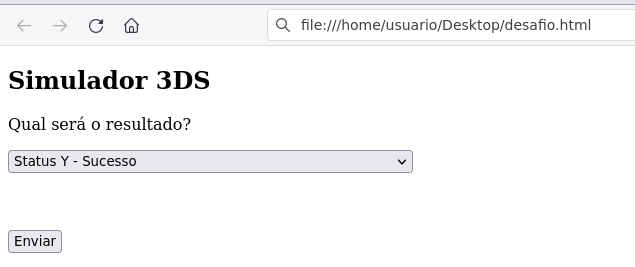
Script response to simulate the challenge as represented in the image above.:
Attention
This script is returned to the response of the CReq submission.
<!DOCTYPE html PUBLIC "-//W3C//DTD HTML 4.0 Transitional//EN"
</html>
Query the transaction status after the challenge.
Request Type: GET
In the URL above, the ID of the 3DS Server transaction was filled with the value fb26dfb6-2486-442a-8887-d1241c940a61, which was obtained during the transaction creation.
Headers:
- Content-Type:
application/json - merchant_id: {Please request your store code from the support team.}
- merchant_key: {Please request your merchant key from the support team.}
Request:
curl --location --request GET 'https://mpi-homolog.softwareexpress.com.br/3ds-server/v2/transaction/fb26dfb6-2486-442a-8887-d1241c940a61' \
--header 'merchant_id: XXXXXXXXX' \
--header 'merchant_key: XXXXXXXX'
Response:
{
    "three_ds_server": {
        "trans_id": "fb26dfb6-2486-442a-8887-d1241c940a61",
        "status": "AUY"
    },
    "brand_id": "2",
    "eci": "02",
    "device_channel": "02",
    "authentication": {
        "value": "kFOAbf75KviDMXVzmGEoG3NIjJTF"
    }
}
E para saber mais sobre essas nomenclaturas (Bin, Software Express, Carat, e-Sitef) Saiba mais
3D Secure Glossary
Brand IDs
| ID | Nome |
|---|---|
1 | Visa |
2 | Mastercard |
41 | Elo |
3DS Server transaction status
| Code | Name | Description |
|---|---|---|
NEW | New | Transaction created recently. |
INV | Invalid | Merchant sent an invalid parameter. |
ERR | Communication error | DS communication failure. |
EXP | Expired | New transaction has exceeded its validity period. |
ERM | Error message | 3DS Server received an error message from DS. |
AUY | 3DS Status Y | Authentication Verification Successful. |
AUN | 3DS Status N | Not Authenticated/Account Not Verified; Transaction denied. |
AUU | 3DS Status U | Authentication/Account Verification Could Not Be Performed; Technical or other problem. |
AUA | 3DS Status A | Attempts Processing Performed; Not Authenticated/Verified, but a proof of attempted authentication/verification is provided. |
AUC | 3DS Status C | Challenge Required; following the "challenge" flow. |
AUR | 3DS Status R | Authentication/ Account Verification Rejected; Issuer is rejecting authentication/verification. |
AUD | 3DS Status D | Challenge Required; Decoupled Authentication confirmed. |
Error codes
| Code | Description |
|---|---|
1 | Invalid credentials (merchant_id & merchant_key) |
2 | Transaction not found |
3 | Invalid transaction status |
101 | Unknown message type |
201 | Empty parameter (see error.detail for further details) |
202 | message.extension not recognized |
203 | Invalid parameter (see error.detail for further details) |
301 | Transaction ID received is not valid for the receiving component. |
305 | Card not supported by the issuer for 3DS 2.0 authentications. |
402 | Timeout when communicating with DS |
404 | Unexpected error |
405 | DS communication error |
device_channel field
device_channel field| Code | Description |
|---|---|
01 | App-based |
02 | Browser |
03 | 3DS Requestor Initiated (3RI) |
04-79 | Reserved for future use by EMVCo |
80-99 | Reserved for future use by DS |
Glossary
- 3DS Requestor: Store or gateway (such as Carat)
- 3D-Secure: Also known as Visa Secure, Mastercard Identity Check,
American Express SafeKey, Discover ProtectCode or Elo SecureCode,
is a security protocol used by card brands to authenticate online transactions and reduce fraud. - ACS (Access Control Server): The server responsible for
provide the authentication interface on behalf of the issuer during the
3D-Secure transaction process. It interacts with the issuer and cardholder to verify the authenticity of the transaction. - DS (Directory Server): Represents the flag
- AReq: Authentication Request, according to the 3DS 2.0 protocol
- ARes: Authentication Response, according to the 3DS 2.0 protocol
- CReq: Challenge Request, according to the 3DS 2.0 protocol
- CRes: Challenge Response, according to the 3DS 2.0 protocol
- RReq: Results Request, according to the 3DS 2.0 protocol
- RRes: Results Response, according to the 3DS 2.0 protocol
- Challenge/Step-up Flow: Also known as "challenge flow".
It is a form of 3D-Secure authentication in which the cardholder is directed to
a page or application to provide additional information or enter a security code to confirm the transaction. - Frictionless Flow: Also known as "frictionless flow".
It is a form of 3D-Secure authentication in which the transaction is automatically authenticated
based on available data, without the need for intervention by the cardholder.
This usually occurs when the issuer has sufficient information
(such as data about the holder or the device used) to confirm the identity of the holder. - 3DS Server Id: ID that identifies the transaction on the 3DS Server (
three_ds_server.trans_idfield of the transaction creation or authentication response) - DS Id: ID that identifies the transaction on the Bandeira server (
ds.trans_idfield of the transaction authentication response) - ACS ID: ID that identifies the transaction at the Issuer (
acs.trans_idfield of the transaction authentication response) - 3DS Method URL: Issuer URL to send a post to collect information from the buyer's device in web transactions
- reference_id: Field to be used in the Carat payment rest API (the
ds.trans_idvalue of the transaction authentication response must be passed) - ECI (or “e-commerce indicator”): Code returned to the MPI by the brands, which indicates the result of the bearer’s 3DS authentication with the issuer
- CAVV or IAV: Cryptogram code used in transaction authentication and sent by the establishment's MPI (
authentication.valuefield in the transaction authentication response or in the transaction query). - Authentication: The process of verifying the identity of the
cardholder during an online transaction. 3D-Secure requires authentication
additional information, usually through a security code, PIN or biometrics by the requesting business. - Issuer: The financial institution (bank or credit card company)
who issues the credit card, debit card to the holder. - Commerce/Merchant: A company or website that accepts online payments via credit or debit cards.
- Enrollment: The process of registering a card for use in 3D-Secure. The cardholder normally carries out
the enrollment process when using the card for the first time on a 3D-Secure compatible website. - Liability Shift: The transfer of responsibility from the merchant to the issuer occurs in the case of a fraudulent transaction, provided that the transaction has been authenticated by 3D-Secure, and the merchant is enabled on 3DS, allowing them to win the "Reversal of Responsibility.".
- RBA (Risk-Based Analysis): It is an approach within 3D-Secure in which the card issuer assesses the risk of a transaction to determine if additional verification is necessary. Based on factors such as transaction value, device identification, and the cardholder's history, low-risk transactions may be approved without additional validation, while medium or high-risk transactions may require extra steps to ensure security. This enhances the customer experience by reducing friction in low-risk transactions while simultaneously safeguarding against fraudulent transactions.
- MPI (Merchant Plug-In): The software or service used by a merchant to connect to the 3D-Secure authentication system. It facilitates communication between the merchant, the issuer and the card brand.
Carat provides support for 3D-Secure 2.0 transactions through its 3DS Server
And to learn more about these nomenclatures (Bin, Software Express, Carat, e-Sitef) Learn more
Challenge
To initiate a challenge, only redirecting the cardholder to the URL obtained in the acs.url field is not enough; it's necessary to POST the CReq. At the end of the challenges, the 3DS Requestor will receive information (on the URL indicated in the notification_url field) regarding the 3DS transaction in the CRes object.
Sending the CReq
The CReq POSt must be performed with the Content-Type header = application/x-www-form-urlencoded when device_channel = 02 or application/jose when device_channel = 01. In this form, the creq parameter must be sent, which has the Base64 URL-safe encoded CReq as its value.
Examples
CReq JSON:
{
    "threeDSServerTransID":"12341234-1234-1234-1234-123412341234",
    "acsTransID":"43214321-4321-4321-4321-432143214321",
    "challengeWindowSize":"05",
    "messageType":"CReq",
    "messageVersion":"2.2.0"
}
CReq Base64:
ewogICAgInRocmVlRFNTZXJ2ZXJUcmFuc0lEIjoiMTIzNDEyMzQtMTIzNC0xMjM0LTEyMzQtMTIzNDEyMzQxMjM0IiwKICAgICJhY3NUcmFuc0lEIjoiNDMyMTQzMjEtNDMyMS00MzIxLTQzMjEtNDMyMTQzMjE0MzIxIiwKICAgICJjaGFsbGVuZ2VXaW5kb3dTaXplIjoiMDUiLAogICAgIm1lc3NhZ2VUeXBlIjoiQ1JlcSIsCiAgICAibWVzc2FnZVZlcnNpb24iOiIyLjIuMCIKfQ
Challenge redirecting HTML:
<!DOCTYPE html
</html>
CReq parameters
| Parameter | Description | Format | Mandatory |
|---|---|---|---|
threeDSRequestorAppURL | Merchant app declaring their URL within the CReq message so that the Authentication app can call the Merchant app after OOB authentication has occurred. | < 256 AN | NO |
threeDSServerTransID | 3DS Server transaction ID | = 36 AN | YES |
acsTransID | ACS transaction ID | = 36 AN | YES |
challengeCancel | Indicator informing the ACS and the DS that the authentication has been canceled.
| = 2 N | NO |
challengeDataEntry | Contains the data that the Cardholder entered into the Native UI text field. | < 45 AN | NO |
challengeHTMLDataEntry | Data that the Cardholder entered into the HTML UI. | < 256 AN | NO |
challengeNoEntry | Indicator informing that the Cardholder submits an empty response (no data entered in the UI).
| = 1 AN | NO |
challengeWindowSize | Dimensions of the challenge window that has been displayed to the Cardholder.
| = 2 N | YES |
messageType | Fixed value CReq. | = 4 AN | YES |
messageVersion | 3DS message version: 2.1.0 or 2.2.0. | < 8 AN | YES |
oobContinue | Boolean value notifying the ACS that Cardholder has completed the authentication as requested by selecting the Continue button in an Out-of-Band (OOB) authentication method. | < 5 AN | NO |
resendChallenge | Indicator to the ACS to resend the challenge information code to the Cardholder.
| = 1 AN | NO |
sdkTransID | 3DS SDK transaction ID. Mandatory when device_channel = 01. | = 36 AN | COND. |
sdkCounterStoA | Counter used as a security measure in the 3DS SDK to ACS secure channel. | < 3 AN | NO |
whitelistingDataEntry | Indicator provided by the SDK to the ACS to confirm whether whitelisting was opted by the cardholder.
| = 1 AN | NO |
| messageExtension[] Data necessary to support requirements not otherwise defined in the 3-D Secure message are carried in a Message Extension. | |||
criticalityIndicator | A Boolean value indicating whether the recipient must understand the contents of the extension to interpret the entire message. | < 5 AN | NO |
data | The data carried in the extension. | Object | NO |
id | A unique identifier for the extension. | < 64 AN | NO |
name | The name of the extension data set as defined by the extension owner. | < 64 AN | NO |
Receiving the CRes
The CRes will be sent in JSON format, Base64 encoded, on the URL informed on the authentication service (notification_url field).
CRes parameters
| Parameter | Description | Format |
|---|---|---|
threeDSServerTransID | 3DS Server transaction ID | = 36 AN |
acsCounterAtoS | Counter used as a security measure in the ACS to 3DS SDK secure channel. | < 3 AN |
acsTransID | ACS transaction ID | = 36 AN |
challengeCompletionInd | Indicator of the state of the ACS challenge cycle and whether the challenge has completed or will require additional messages. Shall be populated in all CRes messages to convey the current state of the transaction.
| = 1 AN |
messageType | Fixed value CRes. | = 4 AN |
messageVersion | 3DS message version: 2.1.0 or 2.2.0. | < 8 AN |
sdkTransID | 3DS SDK transaction ID | = 36 AN |
transStatus | Indicates whether a transaction qualifies as an authenticated transaction or account verification.
| = 1 AN |
| messageExtension[] Data necessary to support requirements not otherwise defined in the 3-D Secure message are carried in a Message Extension. | ||
criticalityIndicator | A Boolean value indicating whether the recipient must understand the contents of the extension to interpret the entire message. | < 5 AN |
data | The data carried in the extension. | Object |
id | A unique identifier for the extension. | < 64 AN |
name | The name of the extension data set as defined by the extension owner. | < 64 AN |
3DS 2.0 Checkout Transparent JavaScript
Quick Start
This guide shows the JavaScript payment process with 3DS 2.0 authentication using an integrated test web merchant
in the approval environment.
Attention: All procedures demonstrated on this page were carried out in the approval environment only to illustrate the flow of a JavaScript Payment with 3DS 2.0 authentication. None of the following screens will be used in the production environment.
What you will need
- Active registration in the Carat approval environment (obtained from our support team)
- Store registered and configured to use JavaScript payment with 3DS 2.0 authentication (obtained from our
support)
Table with different cards used for testing:
| ID | BRAND | NUMBER |
|---|---|---|
1 | Visa | 4551820000009478 |
2 | Mastercard | 5555555555555555 |
41 | Elo | 6091490000009011 |
3 | Amex | 3766001349171000 |
2 | Mastercard | 5251743209931344 Testing a card not supported by the issuer for authentications |
Table with values in cents that can be used to simulate different statuses on 3DS:
| VALUE | STATUS | DESCRIPTION |
|---|---|---|
10000 | AUY | Authentication succeeded |
10004 | AUC | Challenge Required; following the "challenge" flow. |
10001 | AUN | Not Authenticated/Account Not Verified; Transaction denied. |
Creating transaction
In our online store, found on the left side of the menu, a submenu titled Pagamento 3DS MPI. It's in this
submenu where we will generate the transaction, inserting the relevant information in the payload, such as the Merchant ID (your store code) and the
Merchant Key (key to your store). The other data cannot be changed, if you do not want to simulate different statuses of the
3DS 2.0 authentication. After filling in the data,
simply click the Fechar Pedido button to create the transaction.
subtitles
- 1 - 3DS MPI Payment Submenu
- 2 - Merchant ID
- 3 - Merchant Key
- 4 - Request Json
- 5 - Close Order
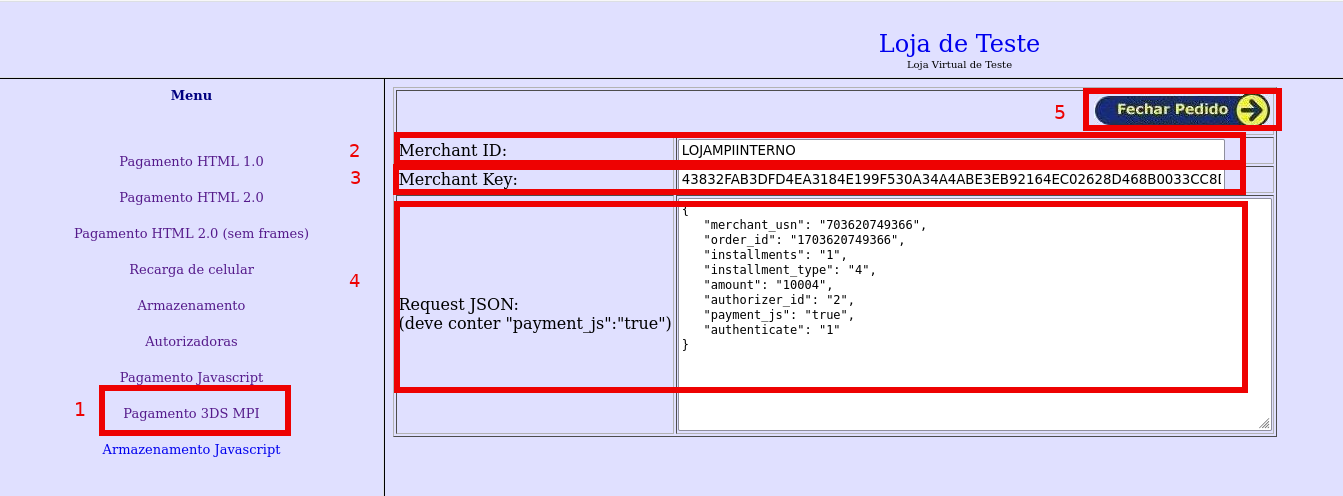
Payment page
On this page, the card data will be inserted, with calls to the startThreeDs and esitefDoPayment functions
are executed. After filling out the card, the startThreeDs function is triggered to validate the card on 3DS 2.0 and
check whether the 3DS Method will be used. This entire process takes place internally, without intervention from the buyer. When
all other fields on the screen are filled in and the CONFIRMAR PAGAMENTO button is clicked, the esitefDoPayment function
is activated. This function, in turn, performs payment authentication and authorization.
subtitles
- 1 - After filling out the card, the event is triggered to call the
startThreeDsfunction - 2 - When clicking the button
CONFIRMAR PAGAMENTOthe event is triggered to call theesitefDoPaymentfunction
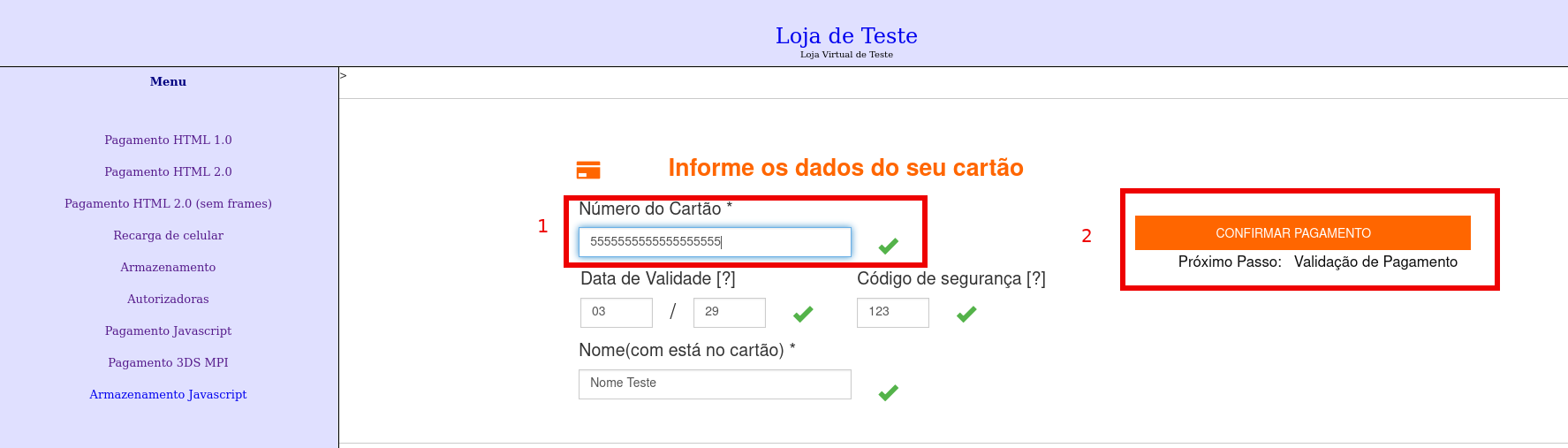
Challenge Flow
In certain situations, authentication with 3DS 2.0 may require a challenge to validate the cardholder's information.
card. When the buttonCONFIRMAR PAGAMENTO is pressed, the function esitefDoPayment will open a modal for carrying out
of this challenge. In our approval environment, a simulator will be displayed, offering options for the desired status of the
challenge - we will choose Status Y, indicating successful authentication - and then click on the button Enviar.
subtitle
- 1 - Combobox with challenge status options
- 2 -
Enviarbutton to complete the challenge.
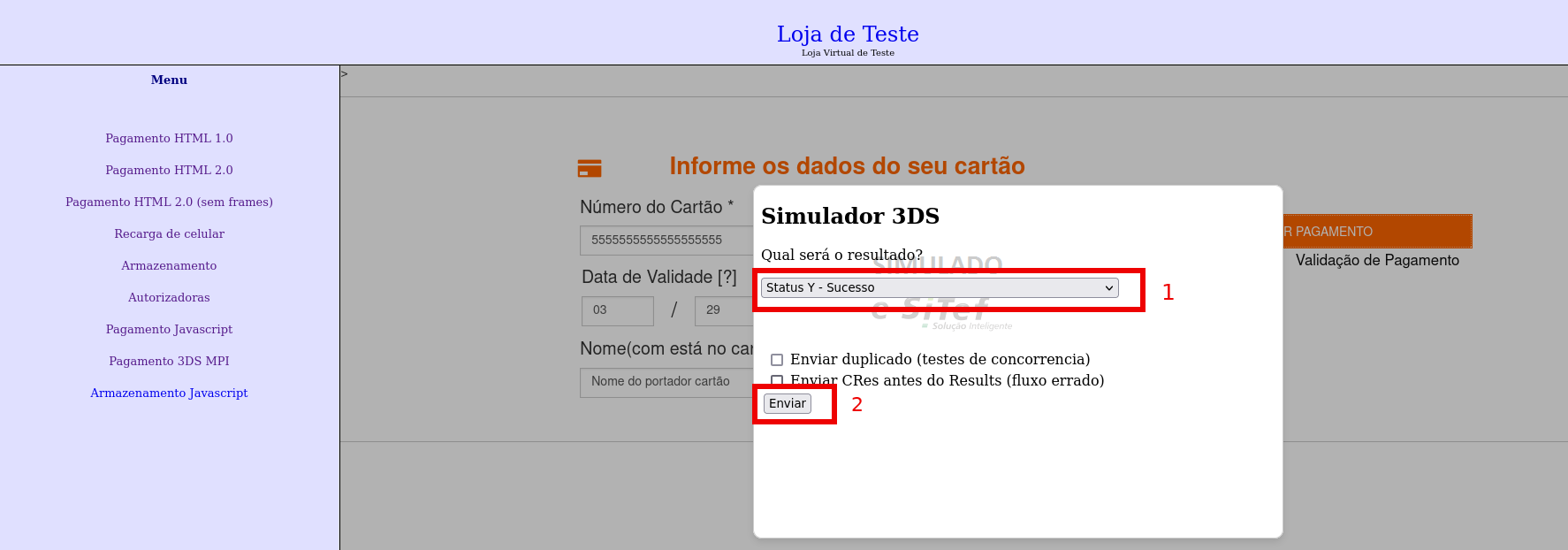
Helper pages
After completing the challenge or if you have not gone through the challenge flow, you will be redirected to a processing screen. This redirection is performed
by the onProcessing callback function, which was passed as a parameter in the esitefDoPayment function.
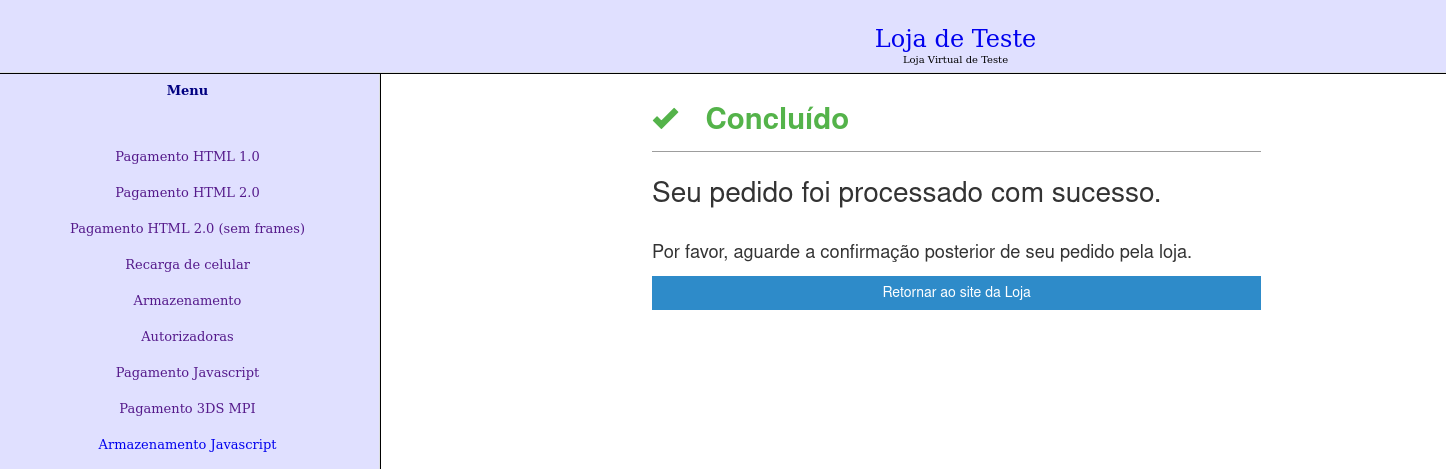
On the processing screen, there is an internal routine that performs a query to check if there has been any change in the transaction status.
If there are changes, redirection to the success screen is triggered, using the onSuccess callback function passed as a parameter
in the esitefDoPayment function.
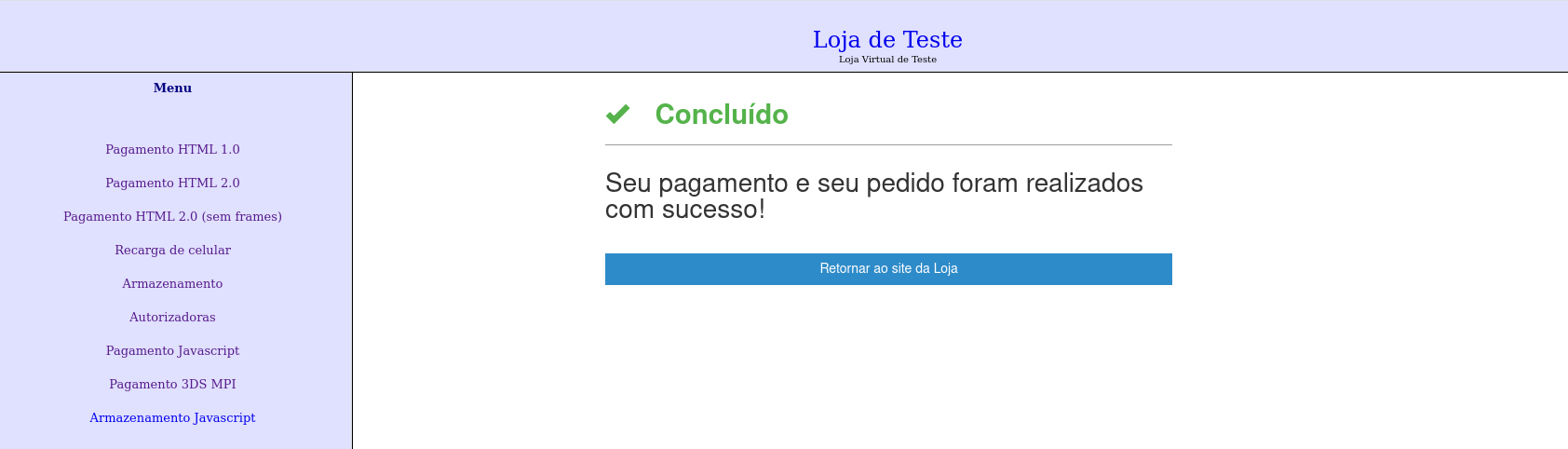
Transaction Query Service
This service should be called after receiving the callbacks of success or failure to ensure the transaction status and obtain more information regarding the payment. This operation should also be used to inquire about the transaction status while waiting for a response from the payment page.
For more details about this call, refer to the REST Payment Transaction Inquiry Service.
Online Merchant Payment Page with 3DS Authentication
After completing the transaction creation step, the merchant's page should be displayed to the user. On this page, integrated with JavaScript payment and 3DS 2.0 authentication, it is crucial to include two files on the checkout page: a JS script and a CSS style sheet. These two files are essential to ensure that the 3DS 2.0 authentication payment functions correctly. In addition to these files, it is necessary to add an HTML tag to the payment page (this HTML tag will be used in the event of a 3DS method flow).
Below are the URLs for download:
Script JS
Below are the homologation and production URLs for download:
URL for Production environment:
https:///js/esitefauthenticatepayment-1.0.min.js
URL for Homologation environment:
https:///js/esitefauthenticatepayment-1.0.min.js
CSS style sheet
Below are the homologation and production URLs for download:
URL for Production environment:
https:///css/v2/threeds.css
URL para ambiente de Homologação:
https:///css/v2/threeds.css
Tag div
Below is the mandatory div tag for the operation of the 3DS method.
<div id="divThreeDsMethodData"></div>
The card fields must contain the specified classes below:
| Parameter | Description | Format | Required |
|---|---|---|---|
esitef-cardnumber | Buyer's card number (PAN). | < 19 N | YES |
esitef-cardexpirydate | Card expiration date in MMYY format. | = 4 N | YES |
esitef-cardexpirymonth & esitef-cardexpiryyear | Card expiration month and year, in MM and YY formats respectively. These fields can be sent instead of esitef-cardexpirydate. If all are sent simultaneously, the separated date (esitef-cardexpirymonth and esitef-cardexpiryyear) will take precedence. | = 2 N | YES |
esitef-cardsecuritycode | Card security code. | < 5 N | YES |
esitef-cardholder | Cardholder name. Mandatory only for e-Rede, GetNet WS, and VR AN (SmartNet) payments. | < 30 AN | COND. |
Two functions must be called during the checkout:
startThreeDsCall details : This function should be called through an event after the final card input; it initiates 3DS and, depending on the BIN, may trigger the 3DS method call if necessary.
esitefDoPaymentCall details : This function should be called through an event after filling in all the necessary data for the checkout completion. This call will initiate the 3DS authentication; the issuer may request a challenge to be performed by the buyer. In this case, a modal will open with the respective challenge. In this scenario, the merchant should redirect the end of the request to a processing screen and await the response from the status notification.
Below is an example of a page integrated with Carat's JavaScript payment:
<!DOCTYPE html>
<html lang="en">
<head>
    <meta charset="UTF-8">
    <meta name="viewport" content="width=device-width, initial-scale=1.0">
    <title>Coleta de dados de cartão via JS</title
</form>
Key points of the implementation example above:
- Import of the JS for 3DS authentication:
<script type="text/javascript" src="https://esitef-homologacao.softwareexpress.com.br/js/esitefauthenticatepayment-1.0.min.js"></script>
- Import of the css for 3DS authentication:
<link rel="stylesheet" href="https://esitef-homologacao.softwareexpress.com.br/css/v2/threeds.css" />
- Call to the
startThreeDsfunction. Learn more. (The call is inside the threedMethod function) when filling the card-number field with a length of 16:
    $("#card-number").on('blur', function() {
        result = isFieldSizeValid($(this).val(), 16, null);
        updateIconSignAndInput("#card-number", ".payment-checked-number", ".payment-error-number", (result));

        if(result){
            threedMethod();
        }

        enableConfirmButton(result);
    });
- Implementation of the request creation and
startThreeDsfunction call:
function threedMethod() {
   var request = {
      onSuccess: function(response) {
         var responseValue = JSON.stringify(response);
      },
      onFailure: function(response) {
          var responseValue = JSON.stringify(response);
          console.log("Error 3ds method: "+ responseValue);
      },
      onInvalid: function(response) {
         var message = response[0].field + ' ' + response[0].cause;
         for (var i = 1; i < response.length; i++) {
             message += ', ' + response[i].field + ' ' + response[i].cause;
         }
         document.getElementById('resultInvalid').innerHTML = message;
      },
      nit: findGetParameter('nit'),
      payToken: findGetParameter('payToken'),
      merchantId: findGetParameter('merchantId'),
      authorizerId: findGetParameter('authorizerId')
   };
  startThreeDs(request);
- Implementation of the request creation and
esitefDoPaymentfunction call:
function myPay() {
   var request = {
      onSuccess: function(response) {
         var responseValue = JSON.stringify(response);
         localStorage.setItem('resultSuccess', responseValue);
  esitefDoPayment(request);
- Implementation of the div with
id="divThreeDsMethodData"for the execution of the 3DS method:
<div id ="divThreeDsMethodData"></div>
Start ThreeDS
Function startThreeDs in Carat's JavaScript
This call is essential to activate 3DS 2.0 authentication, check if the cardholder's card number is within the
supported card range for authentication, and, when necessary, initiate the 3DS Methods flow to capture
additional browser information, aiming to facilitate risk-based decision-making (RBA - Risk-Based
Analysis), increasing the chances of obtaining a challenge-free authentication.
To use the startThreeDs function, simply add the JavaScript payment file with 3DS 2.0 authentication and the div tag
to the checkout page. Both the file and the div tag are essential to
ensure that the startThreeDs function works correctly.
Script JS
URL for Production environment:
https:///js/esitefauthenticatepayment-1.0.min.js
URL for Homologation environment:
https:///js/esitefauthenticatepayment-1.0.min.js
Below is the mandatory div tag for the operation of the 3DS method.
<div id="divThreeDsMethodData"></div>
Card number field
In addition to the items mentioned earlier, it is crucial that the card number field has the specified class below:
| Parameter | Description | Format | Mandatory |
|---|---|---|---|
esitef-cardnumber | Buyer's card number (PAN). | < 19 N | YES |
Example
<input type="number" id="card-number" maxlength="16" class="esitef-cardnumber">
Calling the startThreeDS function in Carat JavaScript
When the buyer enters the card number on the screen, it is possible to create a JavaScript event or a button that triggers the startThreeDS function. The implementation of the event or button does not follow a specific rule, as long as it is triggered after filling in the card number. When calling the startThreeDS function, it is essential to provide a request with the following fields as arguments:
| Parameter | Description | Format | Mandatory |
|---|---|---|---|
nit | Transaction identifier in Carat. Field nit received in the transaction creation step. | = 64 AN | YES |
payToken | Field pay_token received in the transaction creation step. | = 66 AN | YES |
merchantId | Store code in Carat. Production and certification codes will be different. | < 15 N | YES |
locale | Language of messages returned in validation errors (callback "onInvalid"). It can take the following values:pt - Portuguese en - Englishes - SpanishIf the locale is not sent, pt will be used. | = 2 A | NO |
authorizerId | Code of the authorizer in Carat. Learn more. | < 3 N | NO |
onSuccess | Callback function that will be called after a successful call to the startThreeDS function in Carat. This function receives as an argument the response of the startThreeDS function described in - Response of success and failure callbacks. | F | YES |
onFailure | Callback function that will be called after an unsuccessful call to the startThreeDS function in Carat. This function receives as an argument the response of the startThreeDS function described in - Response of success and failure callbacks. | F | YES |
onInvalid | Callback function that will be called after a JavaScript validation error. This function receives as an argument the list of errors described in - Response of validation error callback. | F | YES |
Response of Success and Failure Callbacks
The onSuccess and onFailure callback functions receive an object as an argument containing information regarding the response of the startThreeDs function. Below are the descriptions of these fields:
| Parameter | Description | Format |
|---|---|---|
code | Carat response code. Any code other than 0 (zero) indicates failure. For more information, refer to the Response Codes. | < 4 N |
message | Carat response message. | < 500 AN |
authorizer_id | Authorization code in Carat. Learn more. (só em caso de sucesso). | < 3 N |
Validation error callback response.
The onInvalid callback function receives, as an argument, a list of validation error objects containing the following fields:
| Parameter | Description | Format |
|---|---|---|
field | Name of the field with an error. | < 30 AN |
cause | Error message. | <100 AN |
Example
Below is an example of a page integrated with Carat's JavaScript payment:
To use this example, don't forget to set the {{url}} variable with the value.
<!DOCTYPE html>
<html>
  <head>
    <meta charset="utf-8" />
    <script type="text/javascript" src="https://{{url}}/js/esitefauthenticatepayment-1.0.min.js"></script>
    <script>
        document.addEventListener('DOMContentLoaded', function() {
            document.getElementById('card-number').addEventListener('input', function() {
                var valor = this.value;
Authorize the Payment with Authentication
Function esitefDoPayment
After the customer fills in all the fields on the store's screen, they should click a button to complete the payment. In the onclick event, a JavaScript function should be called, filling the request with nit, payToken, merchantId, authenticate, onSuccess callback function, onProcessing, onFailure, onInvalid, and subsequently invoking the esitefDoPayment function, passing the request as a parameter.
The esitefDoPayment function performs 3DS authentication, which may display a challenge involving security code checks, token validation, approvals on the buyer's mobile device, or other verifications. Following authentication, payment authorization takes place with the acquirer.
It is important to clarify that, according to the parameterization provided during the transaction creation (authenticate field), the transaction authorization behavior may change:
- If the transaction is submitted with authenticate =
1, then the transaction will only be authorized if the authentication is approved. - If the transaction is submitted with authenticate =
2, then the transaction will only be authorized if the authentication is approved, but for card networks not supported by 3DS, the authentication step will be skipped. - If the transaction is submitted with authenticate =
3, then the transaction will go through the authentication flow, but if there is a negative result, the flow proceeds to authorization.
Calling the Carat script
When the buyer fills in the card details and clicks 'pay,' the merchant's page should call the JavaScript function esitefDoPayment, passing as an argument a request with the following fields:
| Parameter | Description | Format | Mandatory |
|---|---|---|---|
nit | Transaction identifier in Carat. Field nit received during the transaction creation step. | = 64 AN | YES |
payToken | Field pay_token received during the transaction creation step. This token can only be used once. | = 66 AN | YES |
merchantId | Merchant code in Carat. Production and certification codes will be different. | < 15 N | YES |
onSuccess | Callback function that will be called after a successful payment in Carat. This function takes the payment response as an argument, as described in - Response from success and failure callbacks. | F | YES |
onProcessing | Callback function that will be called after a challenge requested by the issuer in the 3DS authentication flow or late confirmation. | F | YES |
onFailure | Callback function that will be called after an unsuccessful payment in Carat. This function takes the payment response as an argument, as described in - Response from success and failure callbacks. | F | YES |
onInvalid | Callback function that will be called after a JavaScript validation error. This function takes the list of errors as an argument, as described in - Response from validation error callback. | F | YES |
authenticate | Boolean field to indicate that the JavaScript payment includes 3DS authentication, pass 'true' if the payment is with 3DS. | = 4 AN | YES |
challengeWindowSize | Field that represents the size for the presentation of the challenge: 01 - 250 x 400, 02 - 390 x 400, 03 - 500 x 600. If not passed, JavaScript will determine a value to be used. | = 2 AN | NO |
Response from success and failure callbacks.
The callback functions onSuccess and onFailure receive an object as an argument containing information related to the payment. Below are the descriptions of these fields:
| Parameter | Description | Format |
|---|---|---|
code | Carat response code. Any code other than 0 (zero) indicates failure. For more information, refer to the Response Codes. | < 4 N |
message | Carat response message. | < 500 AN |
| payment | ||
authorizer_code | Authorization response code. | < 10 AN |
authorizer_message | Authorization response message. | < 500 AN |
status | Payment transaction status in Carat. | = 3 AN |
nit | Identification number of the payment transaction in Carat. | = 64 AN |
order_id | Order code sent by the store during the creation of the transaction. | < 40 AN |
customer_receipt | Coupon (via customer). | < 4000 AN |
authorizer_id | Code of the acquirer used in the transaction. | < 4 N |
Validation error callback response.
The onInvalid callback function receives, as an argument, a list of objects representing validation errors, containing the following fields:
| Parameter | Description | Format |
|---|---|---|
field | Name of the field with an error. | < 30 AN |
cause | Error message. | <100 AN |
Example
Below is an example of a JavaScript function calling esitefDoPayment:
function myPay() {
    var request = {
          onSuccess: function(response) {
             var responseValue = JSON.stringify(response);
             localStorage.setItem('resultSuccess', responseValue);

             if (response.payment.status == 'PPC') {
                window.location = 'loja-pag-pendente-3ds-mpi.html?nit='+ findGetParameter('nit');
             } else {
                 window.location = 'loja-sucesso-3ds-mpi.html';
             }
          },
          onProcessing: function() {
             window.location = 'loja-pag-pendente-3ds-mpi.html?nit='+ findGetParameter('nit');
          },
          onFailure: function(response) {
              var responseValue = JSON.stringify(response);
              localStorage.setItem('resultFailure', responseValue);

              window.location = 'loja-fracasso-js.html';
          },
          onInvalid: function(response) {
             var message = response[0].field + ' ' + response[0].cause;
             for (var i = 1; i < response.length; i++) {
                 message += ', ' + response[i].field + ' ' + response[i].cause;
             }
             document.getElementById('resultInvalid').innerHTML = message;
          },
          nit: findGetParameter('nit'),
          payToken: findGetParameter('payToken'),
          merchantId: findGetParameter('merchantId'),
          authenticate: 'true'
    };

    esitefDoPayment(request);
}
Transaction Creation Service
The consumption of this service is mandatory in the JavaScript payment flow. In addition to the
REST payment request parameters, the following parameters must also be sent:
| Parameter | Description | Format | Mandatory |
|---|---|---|---|
payment_js | Must be sent with the value true to enable the JavaScript payment flow. | < 5 A | YES |
authenticate | Identifies the type of 3DS 2.0 authentication.
| = 1 N | YES |
additional_data | General transaction data. | ||
exponent | Number of decimal places for the currency as defined in ISO 4217. The default value will be 2. | = 1 N | NO |
extra_info | Additional information about the account provided optionally by the 3DS Requestor. | < 64 AN | NO |
additional_data.payer | Cardholder information. | ||
email | Cardholder's email address. It is recommended to send this field, as it aids in risk assessment, contributing to a frictionless authentication. | < 256 AN | NO |
name | Cardholder's name. | < 45 AN | NO |
additional_data.payer.phones[] | Cardholder's phone information. | ||
ddi | DDI of the phone. It is recommended to send this field, as it aids in risk assessment, contributing to a frictionless authentication. | < 3 N | NO |
ddd | DDD of the phone. It is recommended to send this field, as it aids in risk assessment, contributing to a frictionless authentication. | < 3 N | NO |
number | Phone number. It is recommended to send this field, as it aids in risk assessment, contributing to a frictionless authentication. | < 12 N | NO |
type | Phone type:
06 It is recommended to send this field, as it aids in risk assessment, contributing to a frictionless authentication. | < 12 N | NO |
additional_data.billing_data.address | Billing address. | ||
city | City. | < 50 AN | NO |
country | ISO 3166-1 three-digit numeric country code. | = 3 N | NO |
street_name | Street name. | < 50 AN | NO |
street_number | Street number. | < 50 AN | NO |
complement | Address complement. | < 50 AN | NO |
zip_code | Zip code. | < 16 AN | NO |
state | State acronym. | < 3 AN | NO |
additional_data.shipment.address | Delivery address. | ||
city | City. | < 50 AN | NO |
country | ISO 3166-1 three-digit numeric country code. | = 3 N | NO |
street_name | Street name. | < 50 AN | NO |
street_number | Street number. | < 50 AN | NO |
complement | Address complement. | < 50 AN | NO |
zip_code | Zip code. | < 16 AN | NO |
state | State acronym. | < 3 AN | NO |
In response, the following parameter will be additionally returned:
| Parameter | Description | Format |
|---|---|---|
| payment | ||
pay_token | Token associated with the JavaScript payment. | = 66 AN |
For more details about this call, refer to REST Payment.
Example
Request:
To use this example, don't forget to set the variable. {{url}} with the value
curl
--request POST "https://{{url}}/e-sitef/api/v1/transactions"
--header "Content-Type: application/json"
--header "merchant_id: xxxxxxxx"
--header "merchant_key: xxxxxxxx"
--data-binary
{
    "authenticate": "1",
    "merchant_usn":"12042142155",
    "order_id":"12042142155",
    "installments":"1",
    "installment_type":"4",
    "authorizer_id":"2",
    "amount":"10004",
    "payment_js":"true"
}
--verbose
Response:
{
    "code":"0",
    "message":"OK. Transaction successful.",
    "payment":{
        "status":"NOV",
        "nit":"1234567890123456789012345678901234567890123456789012345678901234",
        "order_id":"12042142155",
        "merchant_usn":"12042142155",
        "amount":"1000",
        "pay_token":"123456789012345678901234567890123456789012345678901234567890123456"
    }
}
Customization of the threeds.css File
The modal displayed in the 3DS 2.0 authentication challenge is customizable. To customize it, you can replace
the threeds.css file with another, as long as the new file follows the code structure provided below. Ensure to
preserve the same class names and style logic to ensure the proper functioning of the modal.
Presentation of the Modal
In 3DS 2.0 authentication, the dimensions of the challenge are standardized through an integer provided in the
challengeWindowSize field. It is through this parameter that the size of the content in the challenge is replicated.
This field is a parameter in the esitefDoPayment function call in the Carat JavaScript. If no value is provided,
a default value will be automatically configured based on the buyer's screen size. The following are the possible values for use:
| value | dimensions |
|---|---|
1 | 250 x 400 |
2 | 390 x 400 |
3 | 500 x 600 |
4 | 600 x 400 |
File threeds.css
Default Modal
.modal-challenge {
  display: block;
  position: fixed;
  top: 50%;
  left: 50%;
  transform: translate(-50%, -50%) translateY(-100%);
  background-color: #fff;
  border: 1px solid #ccc;
  box-shadow: 0 4px 8px rgba(0, 0, 0, 0.1);
  z-index: 1000;
  border-radius: 10px;
  opacity: 0;
  transition: transform 0.3s ease-out, opacity 0.6s ease;
}
| Property | Value | Description |
|---|---|---|
display | block | Sets the modal to be displayed as a block. |
position | fixed | Defines the fixed position of the modal on the screen. |
top | 50% | Centers the modal on the screen. |
left | 50% | Positions the modal in the center of the screen. |
transform | translate(-50%, -50%) translateY(-100%) | Moves the modal upwards (off the screen) using transformations. |
background-color | #fff | Sets the background color of the modal to white. |
border | 1px solid #ccc | Adds a 1-pixel solid border with a light gray color. |
box-shadow | 0 4px 8px rgba(0, 0, 0, 0.1) | Adds a shadow around the modal to give a sense of elevation. |
z-index | 1000 | Defines the stacking order of the modal (how far above it is in relation to other elements). |
border-radius | 10px | Adds rounded corners to the modal. |
opacity | 0 | Initially, the modal is transparent. |
transition | transform 0.3s ease-out, opacity 0.6s ease | Adds a smooth transition for transformations and opacity. |
Modal opening
.modal-challenge.open {
  transform: translate(-50%, -50%) translateY(0);
  opacity: 1;
}
| Property | Value | Description |
|---|---|---|
transform | translate(-50%, -50%) translateY(0) | Moves the modal to the center position of the screen. |
opacity | 1 | Makes the modal completely opaque when opened. |
Overlay (initially transparent)
.overlay-challenge {
  display: block;
  position: fixed;
  top: 0;
  left: 0;
  width: 100%;
  height: 100%;
  background-color: rgba(0, 0, 0, 0);
  z-index: 999;
}
| Property | Value | Description |
|---|---|---|
display | block | Makes the overlay visible. |
position | fixed | Defines the fixed position of the overlay. |
top | 0 | Overlay on top of the screen. |
left | 0 | Overlay on the left side of the screen. |
width | 100% | Sets the width of the overlay to cover the entire screen. |
height | 100% | Sets the height of the overlay to cover the entire screen. |
background-color | rgba(0, 0, 0, 0) | Initially, the overlay is transparent. |
z-index | 999 | Defines the stacking order of the overlay. |
Adding to the overlay when the modal is open
.overlay-challenge.open {
  background-color: rgba(0, 0, 0, 0.3);
}
| Property | Value | Description |
|---|---|---|
background-color | rgba(0, 0, 0, 0.3) | Makes the overlay semi-transparent when the modal is open. |
## 3DS 2.0 Checkout Fiserv ### Begin Transaction
Transaction begin process
The transaction creation process must follow the following steps:
- The transaction is created according to the parameters sent in the
requestkey and represented by a JSON object via POST in the request; - The store receives a success or error message, formatted as XML or JSON, according to the "return type" parameter in the URL sent when starting a transaction.
URL to start a transaction via POST HTTPS:
| Approval Environment: |
|---|
| https:///e-sitef-hml/init/[return_type].se |
| Production Environment |
| https:///e-sitef/init/[return_type].se |
Attention: The IP should never be used instead of the domain esitef-ec.softwareexpress.com.br (or {{url}} for the approval environment). The IP can change at any time and without prior notice, so it is important to always use the domain to access Carat.
- Header parameters:
| Parameter | Description | Format | Mandatory |
|---|---|---|---|
merchant_key | Store authentication key in Carat. The production and certification keys will be different. | 80 AN | YES |
For more information see HTML transaction creation service
Integration specific parameters
The HTML transaction creation service has the following fields specific to the 3DS 2.0 integration:
| Parameter | Description | Format | Mandatory |
|---|---|---|---|
authenticate | Identifies the 3DS 2.0 authentication type.
| = 1 N | YES |
additional_data | General transaction data. | ||
exponent | Minor units of currency as specified in the ISO 4217 currency exponent. The default value will be 2. | = 1 N | NO |
extra_info | Additional information about the account optionally provided by the 3DS Requestor. | < 64 AN | NO |
additional_data.authentication | General authentication data. | ||
transaction_type | Identifies the type of transaction being authenticated.
01 in 3ds transactions. | = 2 N | NO |
indicator | Indicates the type of Authentication request.
01. The recurrence scenario will not be addressed for the time being. | = 2 N | NO |
challenge_indicator | Indicates whether a challenge is requested for this transaction.
| = 2 N | NO |
address_match | Indicates whether the delivery address and billing address of the bearer are the same.
| = 1 AN | NO |
additional_data.authentication.info | Information about how 3DS Requestor authenticated the cardholder before or during the transaction. | ||
method | Mechanism used by the Cardholder to authenticate to the 3DS Requestor.
| = 2 N | NO |
timestamp | Date and time in UTC of the cardholder authentication in YYYYMMDDHHMM format. | = 12 N | NO |
additional_data.authentication.prior_info | Information about how 3DS Requestor authenticated the cardholder as part of a previous 3DS transaction. | ||
method | Mechanism used by the Cardholder to previously authenticate to the 3DS Requestor.
| = 2 N | NO |
timestamp | Date and time in UTC of the prior cardholder authentication in YYYYMMDDHHMM format. | = 12 N | NO |
reference | This data element provides additional information to the ACS to determine the best approach for handing a request. | < 36 AN | NO |
additional_data.authentication.account | Buyer's account information on 3DS Requestor. | ||
age_indicator | Length of time that the cardholder has had the account with the 3DS Requestor.
| = 2 N | NO |
change_date | Date that the cardholder’s account with the 3DS Requestor was last changed, including Billing or Shipping address, new payment account, or new user(s) added, in YYYYMMDD format. | = 8 N | NO |
change_indicator | Length of time since the cardholder’s account information with the 3DS Requestor was last changed, including Billing or Shipping address, new payment account, or new user(s) added.
| = 2 N | NO |
date | Date that the cardholder opened the account with the 3DS Requestor in YYYYMMDD format. | = 8 N | NO |
password_change | Date that cardholder’s account with the 3DS Requestor had a password change or account reset in YYYYMMDD format. | = 8 N | NO |
password_change_indicator | Indicates the length of time since the cardholder’s account with the 3DS Requestor had a password change or account reset.
| = 2 N | NO |
number_purchases | Number of purchases with this cardholder account during the previous six months. | < 4 N | NO |
provision_attempts_day | Number of card addition attempts in the last 24 hours. | < 3 N | NO |
txn_activity_day | Number of transactions (successful and abandoned) for this cardholder account with the 3DS Requestor across all payment accounts in the previous 24 hours. | < 3 N | NO |
txn_activity_year | Number of transactions (successful and abandoned) for this cardholder account with the 3DS Requestor across all payment accounts in the previous year. | < 3 N | NO |
payment_account_age | Date that the payment account was enrolled in the cardholder’s account with the 3DS Requestor in YYYYMMDD format. | = 8 N | NO |
payment_account_indicator | Indicates the length of time that the payment account was enrolled in the cardholder’s account with the 3DS Requestor.
| = 2 N | NO |
ship_address_usage | Date when the shipping address used for this transaction was first used with the 3DS Requestor in YYYYMMDD format. | = 8 N | NO |
ship_address_usage_indicator | Indicates when the shipping address used for this transaction was first used with the 3DS Requestor.
| = 2 N | NO |
ship_name_indicator | Indicates if the Cardholder Name on the account is identical to the shipping Name used for this transaction.
| = 2 N | NO |
suspicious_activity | Indicates whether the 3DS Requestor has experienced suspicious activity (including previous fraud) on the cardholder account.
| = 2 N | NO |
additional_data.authentication.merchant_risk | Store assessment of the level of fraud risk for carrier-specific authentication and the authentication being conducted. | ||
delivery_email_address | For Electronic delivery, the email address to which the merchandise was delivered. | < 254 AN | NO |
delivery_timeframe | Indicates the merchandise delivery timeframe.
| = 2 N | NO |
gift_card_amount | For prepaid or gift card purchase, the purchase amount total of prepaid or gift card(s) in major units (for example, USD 123.45 is 123). | < 15 N | NO |
gift_card_count | For prepaid or gift card purchase, total count of individual prepaid or gift cards/codes purchased. | < 2 N | NO |
gift_card_currency | For prepaid or gift card purchase, ISO 4217 three-digit currency code of the gift card. | = 3 N | NO |
pre_order_date | For a pre-ordered purchase, the expected date that the merchandise will be available in YYYYMMDD format. | = 8 N | NO |
pre_order_purchase_indicator | Indicates whether Cardholder is placing an order for merchandise with a future availability or release date.
| = 2 N | NO |
reorder_items_indicator | Indicates whether the cardholder is reordering previously purchased merchandise.
| = 2 N | NO |
shipping_indicator | Indicates shipping method chosen for the transaction.
| = 2 N | NO |
additional_data.authentication.message | Details about 3DS messaging. | ||
category | Identifies the message category for a specific use case.
01. | = 2 N | NO |
additional_data.authentication.recurring | Recurrence data. | ||
expiry | Date on which no more authorizations will be made in the format YYYYMMDD. Mandatory when authentication.indicator = 02 or 03. | = 8 N | COND. |
frequency | Indicates the minimum number of days between authorizations. Mandatory when authentication.indicator = 02 or 03. | < 4 N | COND. |
additional_data.purchase_information_data | Purchase data. | ||
date | UTC date and time of purchase in the format YYYYMMDDHHMMSS. | = 12 N | NO |
additional_data.payer | Cardholder information. | ||
email | The email address associated with the account that is either entered by the Cardholder, or is on file with the 3DS Requestor. If it is not sent, the completed form will be requested on the payment screen. | < 256 AN | NO |
name | Name of the Cardholder. If it is not sent, the completed form will be requested on the payment screen. | < 45 AN | NO |
additional_data.payer.phones[] | Cardholder phone information. | ||
ddi | DDI of the phone. If it is not sent, the completed form will be requested on the payment screen. | < 3 N | NO |
ddd | DDD of the phone. If it is not sent, the completed form will be requested on the payment screen. | < 3 N | NO |
number | Phone number. If it is not sent, the completed form will be requested on the payment screen. | < 12 N | NO |
type | Phone type:
06 | < 12 N | NO |
additional_data.billing_data.address | Billing address. | ||
city | City. If it is not sent, the completed form will be requested on the payment screen. | < 50 AN | NO |
country | ISO 3166-1 three-digit numeric country code. If it is not sent, the completed form will be requested on the payment screen. | = 3 N | NO |
street_name | Street name. If it is not sent, the completed form will be requested on the payment screen. | < 50 AN | NO |
street_number | Street number. If it is not sent, the completed form will be requested on the payment screen. | < 50 AN | NO |
complement | Address complement. If it is not sent, the completed form will be requested on the payment screen. | < 50 AN | NO |
zip_code | Zip code. If it is not sent, the completed form will be requested on the payment screen. | < 16 AN | NO |
state | State acronym. If it is not sent, the completed form will be requested on the payment screen. | < 3 AN | NO |
additional_data.shipment.address | Delivery address. | ||
city | City. If it is not sent, the completed form will be requested on the payment screen. | < 50 AN | NO |
country | ISO 3166-1 three-digit numeric country code. If it is not sent, the completed form will be requested on the payment screen. | = 3 N | NO |
street_name | Street name. If it is not sent, the completed form will be requested on the payment screen. | < 50 AN | NO |
street_number | Street number. If it is not sent, the completed form will be requested on the payment screen. | < 50 AN | NO |
complement | Address complement. If it is not sent, the completed form will be requested on the payment screen. | < 50 AN | NO |
zip_code | Zip code. If it is not sent, the completed form will be requested on the payment screen. | < 16 AN | NO |
state | State acronym. If it is not sent, the completed form will be requested on the payment screen. | < 3 AN | NO |
ATTENTION: Parameters that exist in
payer,billingandshipmentwhen not passed to the transaction creation service viaadditional_data, will be requested in the payment screen. However, if the parameters are passed in the transaction creation service, you will not be asked to fill in the fields on the payment screen.
JSON example:
{
  "merchant_id": "XXXXX",
  "authorizer_id": "2",
  "amount": "10004",
  "authenticate": "1",
  "additional_data": {
    "purchase_information_data": {
      "date": "20201023113749"
    },
    "exponent": "2",
    "authentication": {
      "transaction_type": "01",
      "indicator": "01"
    }
  }
}
Mastercard 3DS Identity Check Insights (Dataonly)
Identity Check Insights is a 3DS mode exclusive to Mastercard that has the following characteristics:
- It provides a frictionless experience, with reduced latency and no possibility of a cardholder challenge.
- The merchant will be responsible for paying for the fraud (without liability shift).
- Higher approval rate.
- Exclusive for Mastercard branded cards.
More details in the official Mastercard documentation.
In Carat Portal it is possible to make a payment transaction using Identity Check Insights in two ways:
- Via parameter when starting a payment transaction
- Via merchant configuration
Via parameter when starting transaction
The merchant can indicate that he wants to use Identity Check Insights by informing the value 80 in the parameter additional_data.authentication.message.category.
Example:
{
  "merchant_id": "LOJAYYZ",
  "authorizer_id": "2",
  "amount": "10004",
  "authenticate": "1",
  "additional_data": {
    "purchase_information_data": {
      "date": "20201023113749"
    },
    "exponent": "2",
    "authentication": {
      "transaction_type": "01",
      "indicator": "01",
      "message": {
        "category": "80"
      }
    }
  }
}
Via merchant configuration
The merchant can ask the e-SiTef Support Team to enable the option Utiliza Mastercard 3DS Identity Check Insights.
With this setting enabled, all payment transactions using Mastercard and Maestro branded cards will use Mastercard 3DS Identity Check Insights by default.
Example:
{
  "merchant_id": "DATAONLYON",
  "authorizer_id": "2",
  "amount": "10004",
  "authenticate": "1",
  "additional_data": {
    "purchase_information_data": {
      "date": "20201023113749"
    },
    "exponent": "2",
    "authentication": {
      "transaction_type": "01",
      "indicator": "01"
    }
  }
}
It is possible to override this behavior by sending the value 01 in the parameter additional_data.authentication.message.category, ignoring the merchant configuration.
Example:
{
  "merchant_id": "DATAONLYON",
  "authorizer_id": "2",
  "amount": "10004",
  "authenticate": "1",
  "additional_data": {
    "purchase_information_data": {
      "date": "20201023113749"
    },
    "exponent": "2",
    "authentication": {
      "transaction_type": "01",
      "indicator": "01",
      "message": {
        "category": "01"
      }
    }
  }
}
Customizations
Customizations
Interval limits for 3DS automatic activation
For cases where the interval limits for automatic activation of 3DS are configured in the merchant and a value of authenticate is passed in the creation of the transaction, the Carat Portal will only accept the value of authenticate passed if the transaction is between the activation limits. And if the 3DS automatic activation interval limits are configured in the merchant and an authenticate value is not passed in the transaction, the value 1 will be assumed as the default for the authentication type. Important: intervals that allow the use of 3DS and anti-fraud together must not be used. More information at Integration specific parameters.
Antifraud over 3DS
It is possible to configure in the merchant a parameter for activating anti-fraud if the chosen brand does not support 3DS. If the transaction using a merchant with this configuration is marked with 3DS (with authenticate = 1) and the card used is not supported on the 3DS Server (brand was not certified or card out of range in the 3DS base for authentication), then Payment Online will not deny the transaction and will follow the payment flow using anti-fraud ("enabled_after_auth"). Please contact our support team to find out how to enable this setting.
Mastercard 3DS Identity Check Insights (Dataonly)
Mastercard 3DS Identity Check Insights (Dataonly)
Identity Check Insights is a 3DS mode exclusive to Mastercard that has the following characteristics:
- It provides a frictionless experience, with reduced latency and no possibility of a cardholder challenge.
- The merchant will be responsible for paying for the fraud (without liability shift).
- Higher approval rate.
- Exclusive for Mastercard branded cards.
More details in the official Mastercard documentation.
In Carat Portal it is possible to make a payment transaction using Identity Check Insights in two ways:
- Via parameter when starting a payment transaction
- Via merchant configuration
Via parameter when starting transaction
The merchant can indicate that he wants to use Identity Check Insights by informing the value 80 in the parameter additional_data.authentication.message.category.
Example:
{
  "merchant_id": "LOJAYYZ",
  "authorizer_id": "2",
  "amount": "10004",
  "authenticate": "1",
  "additional_data": {
    "purchase_information_data": {
      "date": "20201023113749"
    },
    "exponent": "2",
    "authentication": {
      "transaction_type": "01",
      "indicator": "01",
      "message": {
        "category": "80"
      }
    }
  }
}
Via merchant configuration
The merchant can ask the e-SiTef Support Team to enable the option Utiliza Mastercard 3DS Identity Check Insights.
With this setting enabled, all payment transactions using Mastercard and Maestro branded cards will use Mastercard 3DS Identity Check Insights by default.
Example:
{
  "merchant_id": "DATAONLYON",
  "authorizer_id": "2",
  "amount": "10004",
  "authenticate": "1",
  "additional_data": {
    "purchase_information_data": {
      "date": "20201023113749"
    },
    "exponent": "2",
    "authentication": {
      "transaction_type": "01",
      "indicator": "01"
    }
  }
}
It is possible to override this behavior by sending the value 01 in the parameter additional_data.authentication.message.category, ignoring the merchant configuration.
Example:
{
  "merchant_id": "DATAONLYON",
  "authorizer_id": "2",
  "amount": "10004",
  "authenticate": "1",
  "additional_data": {
    "purchase_information_data": {
      "date": "20201023113749"
    },
    "exponent": "2",
    "authentication": {
      "transaction_type": "01",
      "indicator": "01",
      "message": {
        "category": "01"
      }
    }
  }
}
Updated 2 months ago