
Pre-Authorization
Pre-Authorization Documentation
Table of Contents
Pre-Authorization
Source: https://docs.apis-fiserv.com/latam/docs/pre-authorization
Overview
Pre-authorization (pre-auth) is a transaction whose funds will be put on hold from the card limit, but will not be debited immediately and can be captured later for an amount equal or less than the authorized. The duration of the hold, as well as the possibility of capturing smaller amounts will depend on the negotiation with the network acquirer/routing, the virtual store will consult the network acquirer/routing.
Pre-authorization is used whenever is necessary to capture the transaction after a long period of time. Thus, you can only authorize a payment transaction and confirm/capture it on a later day. The difference between a later confirmed payment and a pre-authorization with capture is the deadline in which the transaction can be completed.
The time allowed to confirm/capture a pre-authorization is longer than a payment with subsequent confirmation. For better understanding, we can cite the following application examples:
A car rental company issues a payment request to a customer. The company will capture/confirm the transaction only when the customer returns the car, which may take a few days. In this scenario, it would be recommended to use a Pre-Authorization transaction .
A store issues a payment request, but before confirming/capturing the transaction, it checks the stock to check the availability of a payment method, which could take a few minutes or hours, and then effect the payment. In this scenario, it would be recommended to use a common payment transaction with later confirmation.
And to learn more about these nomenclatures (Bin, Software Express, Carat, e-Sitef) Learn more
Communication
To make a Web Service transaction, the whole communication must be done via HTTPS/TLS. It’s important that the merchant’ server supports encryption of a minimum of 128 bits e minimum protocol TLS 1.2. The merchant’ server must make calls on specific addresses to do REST transactions.
Each service must be called using the base URL concatenated with the desired resource (see the chapter related to the service to be consumed). The HTTP method (GET, POST or PUT) indicates the expected action on the selected resource. Listed below are the base URLs of Carat Portal:
Production base URL:
https:///e-sitef/api/
Homologation base URL:
https:///e-sitef/api/
Attention:
Never use the IP instead of the esitef-ec.softwareexpress.com.br domain. The IP can change at any time without previous warning, so it’s important to use the domain when accessing Carat Portal.
Important:
Besides the response parameters of the services described in this specification, Carat Portal can return other parameters without previous warning.
It’s important that the application is prepared to receive the unknown parameters besides the fields already specified and simply ignore them.
Flow
The pre-authorization flow will be started by the virtual store when the application submits the beginTransaction operation, in the request response the application will receive nit and other parameters.
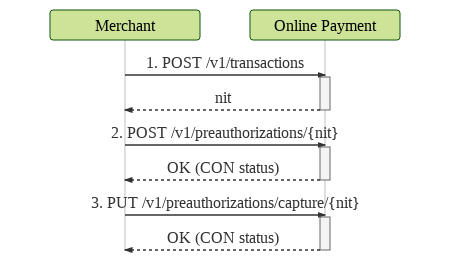
Flow description:
- When starting the beginTransaction operation through the virtual store, a
nit(transaction id) and other parameters are returned; - The virtual store then proceeds to consume the doPreAuthorization, pre-auth effectuation operation, passing the
nitand the other parameters received. If successful, the pre-authorization transaction will change its status toCON(confirmed transaction). - Subsequently (according to the business rule) the same
nitsent in the pre-authorization should be sent in the capture operation along with other parameters and should handle the parameters received in the webservice response.
V1 Double Request
Quick Start
Source: https://docs.apis-fiserv.com/latam/docs/pre-autorizacao-rest-quickstart
This guide shows the process of executing a pre-authorization, using Carat Portal's REST web service interface.
Requirements
- Active account on Carat Portal's homologation environment (obtained with our support team)
- A tool capable of performing HTTP calls, such as Postman, REST Client or cURL
Creating the Pre-Authorization
HTTP method: POST
URL: https:///e-sitef/api/v1/transactions
Headers:
- Content-Type: application/json
- merchant_id: {your merchant id}
- merchant_key: {your merchant key}
Request:
To use this example, remember to set the variable {{url}} to the value
To use this example, don't forget to define the variable {{url}} to the value
{
  "order_id": "orderID",
  "merchant_usn": "20190101",
  "amount": "100",
  "transaction_type": "preauthorization"
}
curl
--request POST "https://{{url}}/api/v1/transactions"
--header "Content-Type: application/json"
--header "merchant_id: xxxxxxxxxxxxxxx"
--header "merchant_key: xxxxxxxxxxx"
--data-binary
{
    "order_id":"orderID",
    "merchant_usn":"20190101",
    "amount":"100",
    "transaction_type":"preauthorization"
}
--verbose
Response:
{
  "code": "0",
  "message": "OK. Transaction successful.",
  "pre_authorization": {
    "status": "NOV",
    "nit": "1234567890abcdefghijklmnopqrstuvwxyz1234567890abcdefghijklmnopqr",
    "order_id": "orderID",
    "merchant_usn": "20190101",
    "amount": "100"
  }
}
Learn more about this service.
Pre-Authorization
HTTP Method: POST
URL: https:///e-sitef/api/v1/preauthorizations/
Headers:
- Content-Type: application/json
- merchant_id: {your merchant id}
- merchant_key: {your merchant key}
Request:
To use this example, remember to set the variable {{url}} to the value
{
  "authorizer_id": "2",
  "installments": "2",
  "installment_type": "4",
  "card": {
    "number": "xxxxxxxxxxxxxxxx",
    "expiry_date": "1222",
    "security_code": "123"
  }
}
curl
--request POST "https://{{url}}/e-sitef/api/v1/preauthorizations/1234567890abcdefghijklmnopqrstuvwxyz1234567890abcdefghijklmnopqr"
--header "Content-Type: application/json"
--header "merchant_id: xxxxxxxx"
--header "merchant_key: xxxxxxxxxxx"
--data-binary
{
    "authorizer_id":"2",
    "installments":"2",
    "installment_type":"4",
    "card":{
        "number":"xxxxxxxxxxxxxxxx",
        "expiry_date":"1222",
        "security_code":"123"
    }
}
--verbose
Response:
{
  "code": "0",
  "message": "OK. Transaction successful.",
  "pre_authorization": {
    "authorizer_code": "000",
    "authorizer_message": "Transacao OK.",
    "status": "CON",
    "nit": "1234567890abcdefghijklmnopqrstuvwxyz1234567890abcdefghijklmnopqr",
    "customer_receipt": "=== CUSTOMER RECEIPT ===",
    "merchant_receipt": "=== MERCHANT RECEIPT ===",
    "authorizer_id": "2",
    "authorizer_date": "09/11/2018T19:40",
    "acquirer_id": "229",
    "acquirer_name": "Bin",
    "authorization_number": "013245",
    "merchant_usn": "20190101",
    "esitef_usn": "181109017689784",
    "order_id": "orderID",
    "sitef_usn": "212194",
    "host_usn": "999212194",
    "amount": "100",
    "issuer": "2",
    "payment_type": "C",
    "authorizer_merchant_id": "000000000000000"
  }
}
Learn more about this service.
Capturing the pre-authorization
HTTP Method: POST
URL: https:///e-sitef/api/v1/preauthorizations/capture/
Headers:
- Content-Type: application/json
- merchant_id: {your merchant id}
- merchant_key: {your merchant key}
Request:
To use this example, remember to set the variable {{url}} to the value
{
  "amount": "100",
  "installments": "1",
  "installment_type": "4",
  "card": {
    "number": "xxxxxxxxxxxxxxxx",
    "expiry_date": "1222",
    "security_code": "123"
  },
  "acquirer": {
    "submerchant_split": [
      {
        "submerchant_code": "empresa01",
        "submerchant_amount": "10"
      },
      {
        "submerchant_code": "empresa02",
        "submerchant_amount": "20"
      },
      {
        "submerchant_code": "empresa03",
        "submerchant_amount": "20"
      },
      {
        "submerchant_code": "empresa04",
        "submerchant_amount": "30"
      },
      {
        "submerchant_code": "empresa05",
        "submerchant_amount": "30"
      }
    ]
  }
}
curl
--request POST "https://{{url}}/e-sitef/api/v1/preauthorizations/capture/1234567890abcdefghijklmnopqrstuvwxyz1234567890abcdefghijklmnopqr"
--header "Content-Type: application/json"
--header "merchant_id: xxxxxxxx"
--header "merchant_key: xxxxxxxxxxx"
--data-binary
{
    "amount":"100",
    "installments":"1",
    "installment_type":"4",
    "card":{
    "number":"xxxxxxxxxxxxxxxx",
    "expiry_date":"1222",
    "security_code":"123"
    },
    "acquirer":{
        "submerchant_split":[
            {
                "submerchant_code":"empresa01",
                "submerchant_amount":"10"
            },
            {
                "submerchant_code":"empresa02",
                "submerchant_amount":"20"
            },
            {
                "submerchant_code":"empresa03",
                "submerchant_amount":"20"
            },
            {
                "submerchant_code":"empresa04",
                "submerchant_amount":"30"
            },
            {
                "submerchant_code":"empresa05",
                "submerchant_amount":"30"
            }
        ]
    }
}
--verbose
Response:
{
  "code": "0",
  "message": "OK. Transaction successful.",
  "capture": {
    "status": "CON",
    "nit": "1234567890abcdefghijklmnopqrstuvwxyz1234567890abcdefghijklmnopqr",
    "order_id": "orderID",
    "customer_receipt": "=== CUSTOMER RECEIPT ===",
    "merchant_receipt": "=== MERCHANT RECEIPT ===",
    "authorizer_id": "2",
    "acquirer_id": "229",
    "acquirer_name": "Bin",
    "authorizer_code": "000",
    "authorizer_message": "Transacao OK.",
    "authorizer_date": "11/08/2019T14:17",
    "authorizer_merchant_id": "000000000000000",
    "authorization_number": "212195",
    "esitef_usn": "180921015287704",
    "merchant_usn": "20190101",
    "sitef_usn": "212195",
    "host_usn": "999212195",
    "amount": "100",
    "payment_type": "C",
    "issuer": "2"
  }
}
Learn more about this service.
Card Query
HTTP method: POST
URL: https:///e-sitef/api/v1/preauthorizations/
Headers:
- Content-Type: application/json
- merchant_id: {your merchant id}
- merchant_key: {your merchant key}
Request:
To use this example, remember to set the variable {{url}} to the value
{
  "card": {
    "number": "5555555555555555"
  },
  "authorizer_id": "1"
}
curl
--request POST "https://{{url}}/e-sitef/api/v1/preauthorizations/1234567890abcdefghijklmnopqrstuvwxyz1234567890abcdefghijklmnopqr/cards"
--header "Content-Type: application/json"
--header "merchant_id: xxxxxxxxxxx"
--header "merchant_key: xxxxxxxxxxx"
--data-binary
{
    "card":{
        "number":"5555555555555555"
    },
    "authorizer_id":"1"
}
--verbose
Response:
{
  "code": "0",
  "message": "OK. Transaction successful.",
  "preauthorization": {
    "status": "NOV"
  },
  "card": {
    "acquirer_name": "Bin",
    "authorizer_id": "1",
    "authorizer_response_code": "000",
    "is_customer_id_required": "false",
    "is_expiry_date_required": "true",
    "is_installment_funding_enabled": "true",
    "is_security_code_required": "true",
    "is_spot_sale_enabled": "true",
    "is_with_interest_sale_enabled": "true",
    "is_without_interest_sale_enabled": "true",
    "max_installments_with_interest": "12",
    "min_installments_with_interest": "01",
    "prefixes": {
      "TRAT": "2",
      "PERIFERICO": "1",
      "CSEG": "2"
    }
  }
}
Learn more about this service.
Transaction Query
HTTP method: GET
URL: https:///e-sitef/api/v1/transaction/
Headers:
- Content-Type: application/json
- merchant_id: {your merchant id}
- merchant_key: {your merchant key}
Request:
To use this example, remember to set the variable {{url}} to the value
curl
--request GET "https://{{url}}/e-sitef/api/v1/transactions/1234567890abcdefghijklmnopqrstuvwxyz1234567890abcdefghijklmnopqr"
--header "Content-Type: application/json"
--header "merchant_id: xxxxxxxx"
--header "merchant_key: xxxxxxxxxxx"
--verbose
Response:
{
  "code": "0",
  "message": "OK. Transaction successful.",
  "pre_authorization": {
    "acquirer_id": "1181",
    "acquirer_name": "GetNet Lac",
    "amount": "1470",
    "authorization_number": "301367",
    "authorizer_code": "000",
    "authorizer_date": "30/10/2018T11:58",
    "authorizer_id": "1",
    "authorizer_merchant_id": "000000000000000",
    "authorizer_message": "Transacao OK",
    "customer_receipt": "=== CUSTOMER RECEIPT ===",
    "merchant_receipt": "=== MERCHANT RECEIPT ===",
    "esitef_usn": "181030016873984",
    "host_usn": "010301367   ",
    "issuer": "1",
    "merchant_usn": "20180809",
    "nit": "1234567890abcdefghijklmnopqrstuvwxyz1234567890abcdefghijklmnopqr",
    "order_id": "201808020001",
    "payment_type": "C",
    "sitef_usn": "301367",
    "status": "CON"
  },
  "capture": {
    "acquirer_id": "1181",
    "acquirer_name": "GetNet Lac",
    "amount": "1380",
    "authorization_number": "000000",
    "authorizer_date": "30/10/2018T12:00",
    "authorizer_id": "1",
    "customer_receipt": "=== CUSTOMER RECEIPT ===",
    "merchant_receipt": "=== MERCHANT RECEIPT ===",
    "esitef_usn": "181030016874034",
    "host_usn": "010301368   ",
    "issuer": "1",
    "authorizer_code": "000",
    "authorizer_message": "Transacao OK SDO DISPONIVEL          244,00",
    "merchant_usn": "20180809",
    "nit": "abcdefghijklmnopqrstuvwxyz1234567890abcdefghijklmnopqr1234567890",
    "order_id": "201808020001",
    "authorizer_merchant_id": "000000000000000",
    "payment_type": "C",
    "sitef_usn": "301368",
    "status": "CON"
  }
}
Learn more about this service.
Pre-Authorization Creation
Source: https://docs.apis-fiserv.com/latam/docs/pre-autorizacao-rest-begin
import ResponseCodes from './codigos-de-resposta.md';
import ApiDoc from '../../../../../src/components/api-doc/ApiDoc';
The Pre-Authorization transaction flow is started by consuming the beginTransaction operation, which will generate an Carat Portal record of a transaction with status = NOV, and return the nit parameter to the application, which will identify this transaction.
A nit has a usage time set in Carat Portal. If this timeout exceeds the transaction, it will go beyond status NOV to the status EXP. In this case it will no longer be allowed to use the same nit, being necessary to consume the beginTransaction operation again to generate another valid nit.
Risk Analysis
For transactions with risk analysis built-in, the same fields available on payment transactions should apply.
Call details
- Resource:
/v1/transactions - HTTP Method:
POST - Request format:
JSON - Response format:
JSON - Header parameters:
| Parameter | Description | Format | Mandatory |
|---|---|---|---|
Content-Type | Fixed value "application/json" | = 15 A | Yes |
merchant_id | Carat Portal store's ID. Production and certification IDs are different. | ≤ 15 A | Yes |
merchant_key | Store authentication key in Carat Portal. Production and certification keys are different. | < 80 A | Yes |
Examples
Below there are some examples of calling the pre-authorization creation service using the cURL tool.
Pre-Authorization
Request:
To use this example, don't forget to define the variable {{url}} to the value
curl
--request POST "https://{{url}}/e-sitef/api/v1/transactions"
--header "Content-Type: application/json"
--header "merchant_id: xxxxxxxxxxxxxxx"
--header "merchant_key: xxxxxxxxxxx"
--data-binary
{
   "order_id":"orderID",
    "merchant_usn":"20190101",
    "amount":"100",
    "transaction_type":"preauthorization"
}
--verbose
Response:
{
  "code": "0",
  "message": "OK. Transaction successful.",
  "pre_authorization": {
    "status": "NOV",
    "nit": "1234567890abcdefghijklmnopqrstuvwxyz1234567890abcdefghijklmnopqr",
    "order_id": "orderID",
    "merchant_usn": "20190101",
    "amount": "100"
  }
}
Request Parameter
| Parameter | Description | Format | Mandatory |
|---|---|---|---|
amount | Total purchase amount (in cents). Example: 1.00 = 100 or 1,100.00 = 110000 – send amount without dots or commas | < 12N | Yes |
encrypted_card | This field must be sent with a value of "true" if the card number to be sent in the next step of the flow uses SiTef encryption. The option to send the encrypted card will only be available through routing via SiTef and prior SiTef setup is required. Options: 1. "true" 2. "false" (default) | < 5 AN | No |
merchant_usn | Unique sequential id for each order created by the store. NSU will be used in all communication with the store to identify the order. As this is a store-side access key, although it is optional for Carat Portal, it is strongly recommended that the field be formatted and sent by the store application. | < 12 N | No |
order_id | Order code to be displayed to the buyer, defined by the merchant. It should be different at each request to facilitate traceability. If the store's integration with the acquirer/routing networks (Cielo, Redecard, etc) is via SiTef (TEF), the field orderId, which has a maximum length of 40 characters, will be shortened to 12 characters due to a SiTef restriction. This reduction will be performed by keeping the characters from left to right (eg if an order code entered is 12345678901234567890 in Carat Portal, in SiTef it will only be 123456789012). | < 4020 AN | No |
transaction_type | Fixed value "preauthorization" | = 15 A | Yes |
soft_descriptor | Additional text that will be presented alongside the name of the establishment in the credit card invoice. Learn more | < 22 AN | NO |
ecomm_pos_ref | This field will send and identification that will appear in the PDV field of the SiTef Web report for e-commerce transactions. | < 8 AF | NO |
installment_type | Installment financing type: Value 3 = installments with interest. Value 4 = installments without interest (use this value also on spot sales). Value 6 = installments with interest (IATA). Value 7 = installments without interest (IATA). The IATA financing types are only used by companies that work with air transportation. | < 2 N | YES |
installments | Number of installments. Send 1 for spot sales. | < 2 N | YES |
| iata | This element contains specific fields for IATA transactions. | ||
departure_tax | Departure tax in cents. | < 12 N | YES only for installment_type = 6 or 7 |
first_installment | Amount of the first installment on IATA transactions in cents. This functionality is available only for Getnet acquirer. | < 12 N | NO |
| Parameter | Description | Format | Mandatory |
|---|---|---|---|
amount | Total purchase amount (in cents). Example: 1.00 = 100 or 1,100.00 = 110000 – send amount without dots or commas | < 12N | Yes |
encrypted_card | This field must be sent with a value of "true" if the card number to be sent in the next step of the flow uses SiTef encryption. The option to send the encrypted card will only be available through routing via SiTef and prior SiTef setup is required. Options: 1. "true" 2. "false" (default) | < 5 AN | No |
merchant_usn | Unique sequential id for each order created by the store. NSU will be used in all communication with the store to identify the order. As this is a store-side access key, although it is optional for Carat Portal, it is strongly recommended that the field be formatted and sent by the store application. | < 12 N | No |
order_id | Order code to be displayed to the buyer, defined by the merchant. It should be different at each request to facilitate traceability. If the store's integration with the acquirer/routing networks (Cielo, Redecard, etc) is via SiTef (TEF), the field orderId, which has a maximum length of 40 characters, will be shortened to 12 characters due to a SiTef restriction. This reduction will be performed by keeping the characters from left to right (eg if an order code entered is 12345678901234567890 in Carat Portal, in SiTef it will only be 123456789012). | < 4020 AN | No |
transaction_type | Fixed value "preauthorization" | = 15 A | Yes |
soft_descriptor | Additional text that will be presented alongside the name of the establishment in the credit card invoice. Learn more | < 22 AN | NO |
ecomm_pos_ref | This field will send and identification that will appear in the PDV field of the SiTef Web report for e-commerce transactions. | < 8 AF | NO |
installment_type | Installment financing type: Value 3 = installments with interest. Value 4 = installments without interest (use this value also on spot sales). Value 6 = installments with interest (IATA). Value 7 = installments without interest (IATA). The IATA financing types are only used by companies that work with air transportation. | < 2 N | YES |
installments | Number of installments. Send 1 for spot sales. | < 2 N | YES |
| iata | This element contains specific fields for IATA transactions. | ||
departure_tax | Departure tax in cents. | < 12 N | YES only for installment_type = 6 or 7 |
Format field caption:
A = alphanumeric
N = numeric
N A = not applied
Response Parameters
| Parameter | Description | Format |
|---|---|---|
code | Carat Portal response code. Any code other than ‘0’ means failure. For more information, see Responde Codes. | < 4 N |
message | Carat Portal's response message. | < 500 A |
amount | Transaction's amount defined by the store (in cents) at transaction creation. | < 12 N |
merchant_usn | Unique sequential number sent by store transaction creation. | < 12 N |
nit | Pre-authorization transaction ID in Carat Portal. | = 64 A |
order_id | Order code sent by store at transaction creation. | < 4020 AN |
status | Pre-authorization transaction status in Carat Portal. | = 3 A |
Pre-Authorization Effectuation
Source: https://docs.apis-fiserv.com/latam/docs/pre-autorizacao-rest-dopreauthorization
import ResponseCodes from './codigos-de-resposta.md';
import ApiDoc from '../../../../../src/components/api-doc/ApiDoc';
Call details
The nit obtained from the return of the pre-authorization creation service should be sent on the pre-authorization effectuation operation along with the parameters described in the table below (as necessary by each application):
- Resource:
/v1/preauthorizations/{nit} - HTTP Method:
POST - Request format:
JSON - Response format:
JSON - Header parameters:
| Parameter | Description | Format | Mandatory |
|---|---|---|---|
Content-Type | Fixed value application/json | = 15 AN | YES |
merchant_id | Merchant code on Carat Portal. The production and certification codes will be different. | < 15 AN | YES |
merchant_key | Merchant authentication key on Carat Portal. The production and certification keys will be different. | < 80 AN | YES |
Examples:
Request:
To use this example, don't forget to define the variable {{url}} to the value
curl
--request POST "https://{{url}}/e-sitef/api/v1/preauthorizations/1234567890abcdefghijklmnopqrstuvwxyz1234567890abcdefghijklmnopqr"
--header "Content-Type: application/json"
--header "merchant_id: xxxxxxxx"
--header "merchant_key: xxxxxxxxxxx"
--data-binary
{
    "authorizer_id":"2",
    "installments":"2",
    "installment_type":"4",
    "card":{
        "number":"xxxxxxxxxxxxxxxx",
        "expiry_date":"1222",
        "security_code":"123"
    }
}
--verbose
Pre-Authorization
Request:
To use this example, don't forget to define the variable {{url}} to the value
curl
--request POST "https://{{url}}/e-sitef/api/v1/preauthorizations/1234567890abcdefghijklmnopqrstuvwxyz1234567890abcdefghijklmnopqr"
--header "Content-Type: application/json"
--header "merchant_id: xxxxxxxx"
--header "merchant_key: xxxxxxxxxxx"
--data-binary
{
    "authorizer_id":"2",
    "installments":"2",
    "installment_type":"4",
    "card":{
        "number":"xxxxxxxxxxxxxxxx",
        "expiry_date":"1222",
        "security_code":"123"
    }
}
--verbose
Response:
{
    "code":"0",
    "message":"OK. Transaction successful.",
    "pre_authorization":{
        "authorizer_code":"000",
        "authorizer_message":"Transacao OK.",
        "status":"CON",
        "nit":"1234567890abcdefghijklmnopqrstuvwxyz1234567890abcdefghijklmnopqr",
        "customer_receipt":"=== CUSTOMER RECEIPT ===",
        "merchant_receipt":"=== MERCHANT RECEIPT ===",
        "authorizer_id":"2",
        "authorizer_date":"09/11/2018T19:40",
        "acquirer_id":"229",
        "acquirer_name":"Bin",
        "authorization_number":"013245",
        "merchant_usn":"20190101",
        "esitef_usn":"181109017689784",
        "order_id":"orderID",
        "sitef_usn":"212194",
        "host_usn":"999212194",
        "amount":"100",
        "issuer":"2",
        "payment_type":"C",
        "authorizer_merchant_id":"000000000000000"
    }
}
Pre-Authorization - Network Token
Some card brands have a tokenization solution that offers the storage of cards in safes at the brand itself, in an encrypted form. This brand tokenization is intended to improve the security and quality of the transmitted card information, which leads to possible increases in the conversion of approval by issuing banks.
Request:
To use this example, don't forget to define the variable {{url}} to the value
curl
--request POST "https://{{url}}/e-sitef/api/v1/preauthorizations/8621c93b58e507d3fe0bda407f5cb0b1fe3971df591fd2652cc9f737134502d3"
--header "Content-Type: application/json"
--header "merchant_id: xxxxxxxx"
--header "merchant_key: xxxxxxxxxxx"
--data-binary
{
    "card": {
        "expiry_date": "1023",
        "number": "xxxxxxxxxxxxxxxx",
        "security_code": "123",
        "cryptogram":"ALRzlt6NKQtPAAZAkOuIAAADFA=="
    }
}'
Response:
{
    "code": "0",
    "message": "OK. Transaction successful.",
    "pre_authorization": {
        "authorizer_code": "000",
        "authorizer_message": "Transacao Aprov.",
        "status": "CON",
        "nit": "8621c93b58e507d3fe0bda407f5cb0b1fe3971df591fd2652cc9f737134502d3",
        "order_id": "1670945065929",
        "customer_receipt":"=== CUSTOMER RECEIPT ===",
        "merchant_receipt":"=== MERCHANT RECEIPT ===",
        "authorizer_id": "2",
        "acquirer_id": "229",
        "acquirer_name": "Bin",
        "authorizer_date": "13/12/2022T12:24",
        "authorization_number": "136231",
        "merchant_usn": "16114726760",
        "esitef_usn": "221213115168264",
        "sitef_usn": "136231",
        "host_usn": "999136231   ",
        "amount": "25255",
        "payment_type": "C",
        "issuer": "1",
        "authorizer_merchant_id": "000000000000005",
        "terminal_id": "ES000038"
    }
}
Request Parameters
| Parameter | Description | Format | Mandatory |
|---|---|---|---|
authorizer_id | Carat Portal authorizers ID. Learn more. | < 3 N | YES |
customer_id | Buyers' ID. Only alphanumerics are allowed (no dots, dashes or other special characters). | < 20 AN | NO |
discount | Discount amount in cents. In case of pre-authorizations with promotional values when using Visa Checkout, VISA suggests that this field should be submitted additionally. | < 12 N | NO |
installments | Number of installments. Send 1 for spot sales. | < 2 N | YES |
installment_type | Installment financing type: Value 3 = installments with interest. Value 4 = installments without interest (use this value also on spot sales). Value 6 = installments with interest (IATA). Value 7 = installments without interest (IATA). The IATA financing types are only used by companies that work with air transportation. | < 2 N | YES |
mcc | Merchant Category Code - Indicates the merchant category's ID. | < 4 N | Required only when using sub-acquirer Stone WS and it It is optional to send it to acquirers with sub-merchant funding via SiTef. |
merchant_email | Store e-mail. When this parameter is sent, it overwrites the store registered e-mail. | < 40 AN | NO |
nit | Transaction ID in Carat Portal (encrypted). Obtained from beginTransaction's return. | = 64 AN | YES |
promo_code | Visa Checkout promotion code used in pre-authorization. In case of pre-authorizations with promotional values when using Visa Checkout, VISA suggests that this field should be submitted additionally. | AN | NO |
soft_descriptor | Additional text that will be presented alongside the name of the establishment in the credit card invoice. Learn more | < 22 AN | NO |
subtotal | Subtotal amount, in cents. In case of pre-authorizations with promotional amounts by using Visa Checkout, VISA suggests that this field be submitted additionally. | < 12 N | NO |
subacquirer_merchant_id | It is the merchant identification for the subacquirer. | < 22 N | NO |
| card | Sending card data is mandatory. Only one of these fields must be used: number, token or wallet_transaction_id | ||
holder | Cardholder's name. Required only for e-Rede, GetNet WS e VR (SmartNet) routings. | < 30 AN | COND. NO |
number | Customer's card number (PAN). Brand generated token (DPAN) for network token payment. Learn more | < 19 N | |
cryptogram | Cryptogram generated by the card brand | = 28 AN | NO |
token | Used for recurring pre-authorizations, when the card is already stored at Carat Portal database. | = 88 AN | COND. |
wallet_transaction_id | Wallet Visa Checkout transaction ID. | < 25 AN | COND. |
initial_wallet_transaction_id | Informs if the Wallet ID (wallet_transaction_id) is being used for the first time. If it's the first time, send true, otherwise, send false. Required only for Visa Checkout.Default value: true | < 5 AN | COND. |
expiry_date | Card expiry date in MMYY format. | = 4 N | COND. |
security_code | Card security code. | < 5 N | COND. |
wallet_type | Field that specifies whether the transaction is processed with PAN or DPAN. If “type” is empty, the default value is PAN (non-tokenized card number). If there is a tokenized transaction, you must send the value “network_token”. | AN | NO |
external_authentication This element receives MPI authentication fields. | |||
version | 3DS version used in the authentication process (only version 2 is currently being accepted). | < 1 AN | NO |
eci | Eletronic Commerce Indicator – Card holder authentication security level indicator. | < 3 N | NO |
xid | External card holder authentication transaction id. | < 40 N | NO |
cavv | Cardholder Authentication Verification Value - Codes that refers to card holder authentication result data. | < 40 N | NO |
acquirer | Data required only to specific acquirers / routings. | ||
terminal | Sitef terminal code. In absence Carat Portal will generate a random terminal code. | = 14 N | NO |
company_code | Sitef company code. In absence Carat Portal will use company code from merchant configuration. | = 8 N | NO |
(*) Installments funding routed by GetNetLac via SiTef : In this case, the merchant will be responsible for the installment control, so the installment rules set up for the Carat Portal HTML payment interface won't take effect, only the authorizing installment rules will be verified and applied. For these mentioned networks, if pre-authorization is made at spot, the capture cannot be split. Also, pre-authorizations routed by GetNetLac via SiTef, when splitted, are only accepted without interest, that is, with the parameter installment_type = 4. Interest-free installments are not accepted on this routing.
WARNING: The
terminalecompany_codeparameters must be used only for SiTef routings and must be sent simultaneously.
It is also necessary send a request to the Carat Portal Support Team for the permission Allows the sending of Company and SiTef Terminal through REST.
Response Parameters
The table below contains the response parameters of the pre-authorization effectuation service. The app should store the parameters that finds necessary. We suggest storing the parameters:order_id, authorization_number, merchant_usn, esitef_usn, sitef_usn, host_usn, status, code, amount, message (the message parameter can be displayed to the customer).
| Parameter | Description | Format |
|---|---|---|
code | Carat Portal response code. Anything besides 0 means failure. Learn more. | < 4 N |
message | Carat Portal response message. | < 500 AN |
pre_authorization | ||
acquirer_id | Acquirer/routing ID used in transaction. | < 4 N |
acquirer_name | Acquirer/routing name used in transaction. | < 100 AN |
amount | Purchase amount specified by store (in cents) on transaction creation. | < 12 AN |
authorization_number | Authorization number | < 6 AN |
authorizer_code | Authorizer responde code. | < 10 AN |
authorizer_date | Authorizer pre-auth effectuation date, returned by the authorizer on the format DD/MM/AAAA’T’HH:mm. Example: 13/07/2017T16:03 | = 16 AN |
authorizer_id | Authorizer ID use in transaction. | < 4 N |
authorizer_merchant_id | Merchant ID from authorizer. | < 100 AN |
authorizer_message | Reponse message from authorizer. | < 500 AN |
customer_receipt | Customer receipt. | < 4000 AN |
eci | Eletronic Commerce Indicator. | < 3 AN |
esitef_usn | Carat Portal pre-authorization's unique sequential number. | = 15 N |
host_usn | Authorizer NSU. | < 15 AN |
issuer | Issuer code returned by the authorizer. | < 5 AN |
merchant_receipt | Merchant receipt. | < 4000 AN |
merchant_usn | Unique sequential number sent by store at the transaction creation. | < 12 AN |
nit | Carat Portal pre-authorization transaction ID. | = 64 AN |
order_id | Order ID sent by the store at transaction creation. | < 40 AN |
payment_type | Payment type from the selected authorizer: B = boleto, C = credit, D = debit, P = Private Label credit card, T = bank transfer, G = gift card, O = other payment methods, W = Boleto NR via Web Service | = 1 AN |
sitef_usn | SiTef pre-authorization's unique sequential number. | = 6 N |
status | Carat Portal pre-authorization transaction status. | = 3 AN |
tid | Acquirer/routing transaction ID. This field is only returned in transactions with external acquirer's. | < 40 AN |
xid | XID field returned on 3DS authentications or certain acquirers/routings. | < 40 AN |
retryable_code | Reversibility indicator of a transaction whose authorization was denied by the authorizer. This field will be returned in the response to the card payment request and must be taken into account in the online store's transaction retry mechanism. Valid codes:01 – Reversible Denied Transaction, Retain Later.02 – Irreversible Denied Transaction, Non-Retentive. | = 2 N |
Pre-Authorization Editing
Source: https://docs.apis-fiserv.com/latam/docs/pre-autorizacao-rest-editpreauthorization
For GetnetLac route you can change the value of a non-captured preauthorization. Consult our support to avail which other routes have this functionality too. To use this functionality, simply call the doPreAuthorization operation with data from a pre-authorization transaction with status CON (confirmed) in addition to the amount field. Below are the details for this call.
Request Parameters
| Parameter | Description | Format | Mandatory |
|---|---|---|---|
nit | Transaction ID in Carat Portal (encrypted). Obtained from beginTransaction's return. | = 64 A | Yes |
authorizer_id | Carat Portal authorizers ID. See Authorizers. | ≤ 3 N | Yes |
amount | Purchase amount specified by store (in cents). | < 12 AN | Yes |
number | Buyer card number (PAN). | ≤ 19 N | Yes |
token | Used for recurring pre-authorizations, when the card is already stored at Carat Portal database. | = 88 A | Conditional |
expiry_date | Card expiration date in format MMAA. | = 4 N | Yes |
security_code | Security code. | ≤ 5 N | Yes |
ecomm_pos_ref | This field will send and identification that will appear in the PDV field of the SiTef Web report for e-commerce transactions. | ≤ 8 AF | No |
Response Parameters
| Parameter | Description | Format |
|---|---|---|
code | Carat Portal response code. Anything besides "0" means failure. See more information at the Response Code document | < 4 N |
message | Carat Portal response message. | < 500 AN |
acquirer_id | Acquirer/routing ID used in transaction. | < 4 N |
acquirer_name | Acquirer/routing name used in transaction. | < 100 AN |
amount | Purchase amount specified by store (in cents). | < 12 AN |
authorization_number | Authorization number | < 6 AN |
authorizer_code | Authorizer responde code. | < 10 AN |
authorizer_date | Authorizer pre-auth effectuation date, returned by the authorizer on the format DD/MM/AAAA’T’HH:mm. Example: 13/07/2017T16:03 | = 16 D |
authorizer_id | Authorizer ID used in transaction. | < 4 N |
authorizer_merchant_id | Merchant ID from authorizer. | < 100 AN |
authorizer_message | Reponse message from authorizer. | < 500 AN |
customer_receipt | Customer receipt. | < 4000 AN |
eci | Eletronic Commerce Indicator (pre-authorization security level indicator on transactions via Cielo e-Commerce). | < 3 AN |
esitef_usn | Carat Portal pre-authorization's unique sequential number. | = 15 N |
host_usn | Authorizer NSU. | < 15 AN |
issuer | Issuer code returned by the authorizer. | < 5 AN |
merchant_receipt | Merchant receipt. | < 4000 AN |
merchant_usn | Unique sequential number sent by store at the transaction creation. | < 12 AN |
nit | Carat Portal pre-authorization transaction ID. | = 64 AN |
order_id | Order ID sent by the store at transaction creation. | < 40 AN |
payment_type | Payment type from the selected authorizer: B = boleto, C = credit, D = debit, P = Private Label credit card, T = bank transfer, G = gift card, O = other ways of payments, W = Boleto NR via Web Service | = 1 A |
sitef_usn | SiTef pre-authorization's unique sequential number. | = 6 N |
status | Carat Portal pre-authorization transaction status. | = 3 AN |
tid | Acquirer/routing transaction ID. This field is only returned in transactions with external acquirer's. | < 40 AN |
xid | XID field returned on 3DS authentications or certain acquirers/routings. | < 40 AN |
In case of success, the responseCode returned will be '0'. Transaction status will not be changed under any circumstances (success or failure). On the other hand, the fields sitef_usn, host_usn, authorization_number, sitef_date, customer_receipt e merchant_receipt will change in case the edition is confirmed.
Pre-Authorization Editing for External Origin
Source: https://docs.apis-fiserv.com/latam/docs/pre-autorizacao-rest-editpreauthorization-origem-externa
import ResponseCodes from './codigos-de-resposta.md';
import ApiDoc from '../../../../../src/components/api-doc/ApiDoc';
For GetnetLac route you can change the value of a non-captured preauthorization, even if it isn't present in Carat Portal's databases. Consult our support to avail which other routes have this functionality too. To use this functionality, simply call the doPreAuthorization operation with data from a pre-authorization transaction with status CON (confirmed) in addition to the amount field. Below are the details for this call.
Currently, this functionality only alows editing of pre-authorizations originated via SiTef.
This operation has one more step, in relation to a normal pre-authorization editing. The pre-authorization editing external origin transaction flow is started by consuming the beginTransaction operation, which will generate an Carat Portal record of a transaction with status = NOV, and return the nit parameter to the application, which will identify this transaction.
Pre-authorization editing external origin creation
Call details
- Resource:
/v1/transactions - HTTP Method:
POST - Request format:
JSON - Response format:
JSON - Header parameters:
| Parameter | Description | Format | Mandatory |
|---|---|---|---|
Content-Type | Fixed value "application/json" | = 15 A | Yes |
merchant_id | Carat Portal store's ID. Production and certification IDs are different. | ≤ 15 A | Yes |
merchant_key | Store authentication key in Carat Portal. Production and certification keys are different. | < 80 A | Yes |
Examples
Below there are some examples of calling the pre-authorization creation service using the cURL tool.
Request:
To use this example, don't forget to define the variable {{url}} to the value
curl
--request POST "https://{{url}}/e-sitef/api/v1/transactions"
--header "Content-Type: application/json"
--header "merchant_id: xxxxxxxxxxxxxxx"
--header "merchant_key: xxxxxxxxxxx"
--data-binary
{
    "order_id":"orderID",
    "merchant_usn":"20190101",
    "amount":"100",
    "transaction_type":"preauthorization",
    "is_transaction_origin_external": "true"
}
--verbose
Response:
{
  "code": "0",
  "message": "OK. Transaction successful.",
  "pre_authorization": {
    "status": "NOV",
    "nit": "1234567890abcdefghijklmnopqrstuvwxyz1234567890abcdefghijklmnopqr",
    "order_id": "orderID",
    "merchant_usn": "20190101",
    "amount": "100"
  }
}
Request Parameter
| Parameter | Description | Format | Mandatory |
|---|---|---|---|
amount | Total purchase amount (in cents). Example: 1.00 = 100 or 1,100.00 = 110000 – send amount without dots or commas | < 12N | Yes |
encrypted_card | This field must be sent with a value of "true" if the card number to be sent in the next step of the flow uses SiTef encryption. The option to send the encrypted card will only be available through routing via SiTef and prior SiTef setup is required. Options: 1. "true" 2. "false" (default) | < 5 AN | No |
merchant_usn | Unique sequential id for each order created by the store. NSU will be used in all communication with the store to identify the order. As this is a store-side access key, although it is optional for Carat Portal, it is strongly recommended that the field be formatted and sent by the store application. | < 12 N | No |
order_id | Order code to be displayed to the buyer, defined by the merchant. It should be different at each request to facilitate traceability. If the store's integration with the acquirer/routing networks (Cielo, Redecard, etc) is via SiTef (TEF), the field orderId, which has a maximum length of 40 characters, will be shortened to 12 characters due to a SiTef restriction. This reduction will be performed by keeping the characters from left to right (eg if an order code entered is 12345678901234567890 in Carat Portal, in SiTef it will only be 123456789012). | < 40 AN | No |
transaction_type | Fixed value "preauthorization" | = 15 A | Yes |
soft_descriptor | Additional text that will be presented alongside the name of the establishment in the credit card invoice. Learn more | < 22 AN | NO |
is_transaction_origin_external | Fixed value "true" | = 5 AN | Yes |
Format field caption:
AN = alphanumeric
N = numeric
N A = not applied
Response Parameters
| Parameter | Description | Format |
|---|---|---|
code | Carat Portal response code. Any code other than ‘0’ means failure. For more information, see Responde Codes. | < 4 N |
message | Carat Portal's response message. | < 500 A |
amount | Transaction's amount defined by the store (in cents) at transaction creation. | < 12 N |
merchant_usn | Unique sequential number sent by store transaction creation. | < 12 N |
nit | Pre-authorization transaction ID in Carat Portal. | = 64 A |
order_id | Order code sent by store at transaction creation. | < 40 AN |
status | Pre-authorization transaction status in Carat Portal. | = 3 A |
Pre-Authorization Editing External Origin Service
The execution follows the same flow as a pre-authorization editing transaction originated in Carat Portal, but it is necessary to send some additional parameters in the request.
Request Parameter
| Parameter | Description | Format | Mandatory |
|---|---|---|---|
| acquirer | This element’s fields must be sent in cases of external origin transactions. | ||
routing_id | Routing information used by the payment done outside of Carat Portal. It is used to identify the routing inside of SiTef. This information only make sense in external origin transaction. | < 5 N | No |
authorizer_id | Code of the authorizer on Carat Portal. It must be the same value sent on the pre autorization. | < 3 N | Yes |
host_usn | Host/authorizer USN of the transaction to be captured. | = 9 N | Yes |
authorization_number | Authorization number of the transaction to be captured. | < 6 N | Yes |
authorizer_date | Pre-authorization date returned by the authorizer in DD/MM/YYYY format. | = 10 D | Yes |
order_id | Order code used in the pre-authorization initiated outside Carat Portal. | < 40 AN | No |
identification_number | CPF or CNPJ used in the pre-authorization initiated outside Carat Portal. | < 20 AN | Yes |
terminal | SiTef terminal code. In absence Carat Portal will generate a random terminal code. | = 8 AN | No |
company_code | SiTef company code. In absence Carat Portal will use company code from merchant configuration. | = 8 N | No |
Note:
1 - When the terminal and company_code information are sent, the behavior of cardquery changes slightly. At this point, when running cardquery, Carat Portal will identify the network returned by SiTef. Once identified, it will be used instead of the one registered in the store.
2 - In operations of external origin, we are unable to validate the network that was used in the external part of the operation, which was carried out outside Carat Portal. In these cases, we are going to use the network configured on SiTef. Because of that, configuration changes, if done during operation, can cause invalid or denied requests. For example, if a pre-authorization was made on the physical medium on the 181 network and, before the capture is completed, the SiTef configuration is changed to the 125 network, the operations that are done via Carat Portal will take over the 125 network.
WARNING: The
terminalecompany_codeparameters must be sent simultaneously.
It is also necessary send a request to the Carat Portal Support Team for the permission Allows the sending of Company and SiTef Terminal through REST.
Example
Request:
To use this example, don't forget to define the variable {{url}} to the value
curl
--request POST "https://{{url}}/e-sitef/api/v1/preauthorizations/1234567890abcdefghijklmnopqrstuvwxyz1234567890abcdefghijklmnopqr"
--header "Content-Type: application/json"
--header "merchant_id: xxxxxxxx"
--header "merchant_key: xxxxxxxxxxx"
--data-binary
{
    "amount": "3000",
    "installments": "1",
    "installment_type": "4",
    "card": {
        "number": "5555555555555555",
        "expiry_date": "1222",
        "security_code": "123"
    },
    "acquirer": {
        "authorizer_id": "1",
        "authorization_number": 212820,
        "identification_number": "11111111555",
        "order_id": 1611256811271,
        "authorizer_date": "21/01/2021",
        "host_usn": 999212820
    }
}
--verbose
Response:
{
  "code": "0",
  "message": "OK. Transaction successful.",
  "pre_authorization": {
    "authorizer_code": "000",
    "authorizer_message": "Transacao OK SDO DISPONIVEL 244,00",
    "status": "CON",
    "nit": "1234567890abcdefghijklmnopqrstuvwxyz1234567890abcdefghijklmnopqr",
    "order_id": "orderID",
    "customer_receipt": "=== CUSTOMER RECEIPT ===",
    "merchant_receipt": "=== MERCHANT RECEIPT ===",
    "authorizer_id": "1",
    "acquirer_id": "1181",
    "acquirer_name": "GetNet Lac",
    "authorizer_date": "30/03/2021T10:03",
    "authorization_number": "300016",
    "merchant_usn": "30120944339",
    "esitef_usn": "210330069186034",
    "sitef_usn": "300016",
    "host_usn": "003300016 ",
    "amount": "3000",
    "payment_type": "C",
    "authorizer_merchant_id": "000000000000000"
  }
}
Pre-Authorization Increment
Source: https://docs.apis-fiserv.com/latam/docs/pre-autorizacao-rest-incrementpreauthorization
For certains routings you can increment the value of a non-captured preauthorization. Consult our support to avail which routes have this functionality.
To use this functionality, simply call the doPreAuthorization operation with data from a pre-authorization transaction with status CON (confirmed) in addition to the additional_amount field. Below are the details for this call.
Request Parameters
| Parameter | Description | Format | Mandatory |
|---|---|---|---|
nit | Transaction ID in Carat Portal (encrypted). Obtained from beginTransaction's return. | = 64 A | Yes |
authorizer_id | Carat Portal authorizers ID. See Authorizers. | ≤ 3 N | Yes |
additional_amount | Additional amount specified by store (in cents). | < 12 AN | |
number(*) | Buyer card number (PAN). | ≤ 19 N | Sim |
token(*) | Used for recurring pre-authorizations, when the card is already stored at Carat Portal database. | = 88 A | Conditional |
wallet_transaction_id(*) | Visa Checkout wallet transaction ID. | < 25 A | Conditional |
expiry_date | Card expiration date in format MMYY. | = 4 N | Yes |
security_code | Security code. | ≤ 5 N | Yes |
(*) Mandatory using only one of the fields: number, token or wallet_transaction_id
Response Parameters
| Parameter | Description | Format |
|---|---|---|
code | Carat Portal response code. Anything besides "0" means failure. See more information at the Response Code document | < 4 N |
message | Carat Portal response message. | < 500 AN |
acquirer_id | Acquirer/routing ID used in transaction. | < 4 N |
acquirer_name | Acquirer/routing name used in transaction. | < 100 AN |
amount | Total purchase amount (in cents), i.e, initially pre-authorized amount plus incremented amount(s) | < 12 AN |
authorization_number | Increment's authorization number | < 6 AN |
authorizer_code | Increment's authorizer responde code. | < 10 AN |
authorizer_date | Increment's authorizer pre-auth effectuation date, returned by the authorizer on the format DD/MM/YYYY’T’HH:mm. Example: 13/07/2017T16:03 | = 16 D |
authorizer_id | Authorizer ID used in increment. | < 4 N |
authorizer_merchant_id | Merchant ID from authorizer. | < 100 AN |
authorizer_message | Increment's reponse message from authorizer. | < 500 AN |
customer_receipt | Increment's customer receipt. | < 4000 AN |
eci | Eletronic Commerce Indicator (pre-authorization security level indicator on transactions via Cielo e-Commerce). | < 3 AN |
esitef_usn | Carat Portal pre-authorization's unique sequential number. | = 15 N |
host_usn | Increment's authorizer NSU. | < 15 AN |
issuer | Increment's issuer code returned by the authorizer. | < 5 AN |
merchant_receipt | Increment's merchant receipt. | < 4000 AN |
merchant_usn | Unique sequential number sent by merchant at the transaction creation. | < 12 AN |
nit | Carat Portal pre-authorization transaction ID. | = 64 AN |
order_id | Order ID sent by the merchant at transaction creation. | < 40 AN |
payment_type | Payment type from the selected authorizer: B = boleto, C = credit, D = debit, P = Private Label credit card, T = bank transfer, G = gift card, O = other ways of payments | = 1 A |
sitef_usn | SiTef pre-authorization increment's unique sequential number. | = 6 N |
status | Carat Portal pre-authorization increment status. | = 3 AN |
tid | Acquirer/routing increment transaction ID. This field is only returned in transactions with external acquirer's. | < 40 AN |
xid | XID field returned on 3DS authentications or certain acquirers/routings. | < 40 AN |
In case of success, the responseCode returned will be '0'. Transaction status in Carat Portal database will not be changed under any circumstances (success or failure).
The fields sitef_usn, host_usn, authorization_number, sitef_date, customer_receipt e merchant_receipt refers to increment, but the respective transaction data is not updated in database. Only total amount is updated in transaction.
Exemplo:
- R$20,00 pre-authorization creation and effectuation:
- R$20,00 pre-authorization creation and effectuation:
a. creation - request
{
  "order_id": "orderID",
  "merchant_usn": "20190101",
  "amount": "2000",
  "transaction_type": "preauthorization"
}
it's assumed here that creation was successful...
b. effectuation - request
{
  "authorizer_id": "2",
  "installments": "2",
  "installment_type": "4",
  "card": {
    "number": "xxxxxxxxxxxxxxxx",
    "expiry_date": "1222",
    "security_code": "yyy"
  }
}
c. response
{
  "code": "0",
  "message": "OK. Transaction successful.",
  "pre_authorization": {
    "authorizer_code": "000",
    "authorizer_message": "Transacao OK.",
    "status": "CON",
    "nit": "1234567890abcdefghijklmnopqrstuvwxyz1234567890abcdefghijklmnopqr",
    "customer_receipt": "=== CUSTOMER RECEIPT ===",
    "merchant_receipt": "=== MERCHANT RECEIPT ===",
    "authorizer_id": "2",
    "authorizer_date": "09/11/2018T19:40",
    "acquirer_id": "1296",
    "acquirer_name": "Safra",
    "authorization_number": "013245",
    "merchant_usn": "20190101",
    "esitef_usn": "181109017689784",
    "order_id": "orderID",
    "sitef_usn": "212194",
    "host_usn": "999212194",
    "amount": "2000",
    "issuer": "2",
    "payment_type": "C",
    "authorizer_merchant_id": "000000000000000"
  }
}
- R$2,00 pre-authorization increment
- R$2,00 pre-authorization increment
a. increment - request
{
  "authorizer_id": "2",
  "installments": "2",
  "installment_type": "4",
  "additional_amount": "200",
  "card": {
    "number": "xxxxxxxxxxxxxxxx",
    "expiry_date": "1222",
    "security_code": "yyy"
  }
}
b. increment - response
{
  "code": "0",
  "message": "OK. Transaction successful.",
  "pre_authorization": {
    "authorizer_code": "000",
    "authorizer_message": "Transacao OK.",
    "status": "CON",
    "nit": "1234567890abcdefghijklmnopqrstuvwxyz1234567890abcdefghijklmnopqr",
    "customer_receipt": "=== CUSTOMER RECEIPT INCREMENT ===",
    "merchant_receipt": "=== MERCHANT RECEIPT INCREMENT ===",
    "authorizer_id": "2",
    "authorizer_date": "09/11/2018T19:42",
    "acquirer_id": "1296",
    "acquirer_name": "Safra",
    "authorization_number": "013246",
    "merchant_usn": "20190101",
    "esitef_usn": "181109017689785",
    "order_id": "orderID",
    "sitef_usn": "212195",
    "host_usn": "999212195",
    "amount": "2200",
    "issuer": "2",
    "payment_type": "C",
    "authorizer_merchant_id": "000000000000000"
  }
}
Note that amount field contains the pre-authorized total value.
- Resulting pre-authorization transaction status inquiry
- Resulting pre-authorization transaction status inquiry
a. transaction status inquiry - response
{
  "code": "0",
  "message": "OK. Transaction successful.",
  "pre_authorization": {
    "authorizer_code": "000",
    "authorizer_message": "Transacao OK.",
    "status": "CON",
    "nit": "1234567890abcdefghijklmnopqrstuvwxyz1234567890abcdefghijklmnopqr",
    "customer_receipt": "=== CUSTOMER RECEIPT ===",
    "merchant_receipt": "=== MERCHANT RECEIPT ===",
    "authorizer_id": "2",
    "authorizer_date": "09/11/2018T19:40",
    "acquirer_id": "1296",
    "acquirer_name": "Safra",
    "authorization_number": "013245",
    "merchant_usn": "20190101",
    "esitef_usn": "181109017689784",
    "order_id": "orderID",
    "sitef_usn": "212194",
    "host_usn": "999212194",
    "amount": "2200",
    "issuer": "2",
    "payment_type": "C",
    "authorizer_merchant_id": "000000000000000"
  }
}
Pre-Authorization Capture
Source: https://docs.apis-fiserv.com/latam/docs/pre-autorizacao-rest-capture
import ResponseCodes from './codigos-de-resposta.md';
import ApiDoc from '../../../../../src/components/api-doc/ApiDoc';
The capture of the Pre-Authorization is intended to effect the Pre-Authorization, which may be in the total amount or lower than the total value of the Pre-Authorization. This will depend on the business rule of the Virtual Store application.
The flow should be: do the pre-authorization operation and if the result is approved, the capture service should be called to complete the flow. The capture will be accomplished in the moment defined by the application business rule.
In the capture operation, the parameter amount may have a value equal to or less than the pre-authorization parameter amount.
For GetNetLac via SiTef routing, the installment can also be done at the pre-authorization and in this case, the capture should expect a installmente number equal or more than the sent previously. If the pre-auth is a sale spot, the capture can not be installed.
Call details
- Resources:
/v1/preauthorizations/capture/{nit} - HTTP Method:
POST - Request format:
JSON - Response format:
JSON - Header parameters:
| Parameter | Description | Format | Mandatory |
|---|---|---|---|
Content-Type | Fixed value application/json | = 15 AN | YES |
merchant_id | Merchant code on Carat Portal. The production and certification codes will be different. | < 15 AN | YES |
merchant_key | Merchant authentication key on Carat Portal. The production and certification keys will be different. | < 80 AN | YES |
Example
Request:
To use this example, don't forget to define the variable {{url}} to the value
curl
--request POST "https://{{url}}/e-
sitef/api/v1/preauthorizations/capture/1234567890abcdefghijklmnopqrstuvwx
yz1234567890abcdefghijklmnopqr"
--header "Content-Type: application/json"
--header "merchant_id: xxxxxxxx"
--header "merchant_key: xxxxxxxxxxx"
--data-binary
{
   "amount":"100",
   "installments":"1",
   "installment_type":"4",
   "card":{
      "number":"xxxxxxxxxxxxxxxx",
      "expiry_date":"1225",
      "security_code":"123"
   }
}
--verbose
Response:
{
  "code": "0",
  "message": "OK. Transaction successful.",
  "capture": {
    "status": "CON",
    "nit": "1234567890abcdefghijklmnopqrstuvwxyz1234567890abcdefghijklmnopqr",
    "order_id": "orderID",
    "customer_receipt": "=== CUSTOMER RECEIPT ===",
    "merchant_receipt": "=== MERCHANT RECEIPT ===",
    "authorizer_id": "2",
    "acquirer_id": "229",
    "acquirer_name": "Bin",
    "authorizer_code": "000",
    "authorizer_message": "Transacao OK.",
    "authorizer_date": "09/11/2018T19:40",
    "authorizer_merchant_id": "000000000000000",
    "authorization_number": "212195",
    "esitef_usn": "180921015287704",
    "merchant_usn": "20190101",
    "sitef_usn": "212195",
    "host_usn": "999212195",
    "amount": "100",
    "payment_type": "C",
    "issuer": "2"
  },
  "card":{
    "suffix":"5555",
    "bin": "544444"
  }
}
Request parameters
| Parameter | Description | Format | Mandatory | |||
|---|---|---|---|---|---|---|
amount | Purchase amount specified by store (in cents) on transaction creation. | < 12 N | YES | |||
discount | Discount amount in cents. In case of pre-authorizations with promotional values when using Visa Checkout, VISA suggests that this field should be submitted additionally. | < 12 N | NO | |||
installments (*) | Installments number, 1 for sale spot | < 2 N | YES | |||
installment_type | Along with the installments field, indicates installment. Possible values for installment_type are:
| = 1 N | YES | |||
promo_code | Visa Checkout promotion code used in pre-authorization. In case of pre-authorizations with promotional values when using Visa Checkout, VISA suggests that this field should be submitted additionally. | AN | NO | |||
subtotal | Subtotal amount, in cents. In case of pre-authorizations with promotional amounts by using Visa Checkout, VISA suggests that this field be submitted additionally. | < 12 N | NO | |||
card | Sending card data is mandatory on SiTef routed transactions with the exception of the Cetelem acquirer. Only one of these fields must be used: number, token or wallet_transaction_id | |||||
number | Customer's card number (PAN). | < 19 N | COND. | |||
token | Used for recurring pre-authorizations, when the card is already stored at Carat Portal database. | = 88 AN | COND. | |||
wallet_transaction_id | Wallet Visa Checkout transaction ID. | < 25 AN | COND. | |||
initial_wallet_transaction_id | Informs if the Wallet ID (wallet_transaction_id) is being used for the first time. If it's the first time, send true, otherwise, send false. Required only for Visa Checkout.Default value: true | < 5 AN | COND. | |||
expiry_date | Card expiry date in MMYY format. | = 4 N | COND. | |||
security_code | Card security code. | < 5 N | COND. | |||
mcc | The MCC (Merchant Category Code) is a code that classifies the business by the type of goods or services it provides. | < 4 N | NO | |||
subacquirer_merchant_id | It is the merchant identification for the subacquirer. | < 22 AN | NO | |||
ecomm_pos_ref | This field will send and identification that will appear in the PDV field of the SiTef Web report for e-commerce transactions. | < 8 AF | NO | |||
Response parameters
| Parameter | Description | Format |
|---|---|---|
code | Carat Portal response code. Anything besides 0 means failure. See more information at the Response Code document | < 4 N |
message | Carat Portal response message. | < 500 AN |
capture | ||
acquirer_id | Acquirer/routing ID used in transaction. | < 4 N |
acquirer_name | Acquirer/routing name used in transaction. | < 100 AN |
amount | Purchase amount specified by store (in cents) on transaction creation. | < 12 AN |
authorization_number | Authorization number | < 6 AN |
authorizer_code | Authorizer responde code. | < 10 AN |
authorizer_date | Authorizer pre-auth effectuation date, returned by the authorizer on the format DD/MM/AAAA’T’HH:mm. Example: 13/07/2017T16:03 | = 16 AN |
authorizer_id | Authorizer ID use in transaction. | < 4 N |
authorizer_merchant_id | Merchant ID from authorizer. | < 100 AN |
authorizer_message | Reponse message from authorizer. | < 500 AN |
customer_receipt | Customer receipt. | < 4000 AN |
eci | Eletronic Commerce Indicator (pre-authorization security level indicator on transactions). | < 3 AN |
esitef_usn | Carat Portal pre-authorization's unique sequential number. | = 15 N |
host_usn | Authorizer NSU. | < 15 AN |
issuer | Issuer code returned by the authorizer. | < 5 AN |
merchant_receipt | Merchant receipt. | < 4000 AN |
merchant_usn | Unique sequential number sent by store at the transaction creation. | < 12 AN |
nit | Carat Portal pre-authorization transaction ID. | = 64 AN |
order_id | Order ID sent by the store at transaction creation. | < 40 AN |
payment_type | Payment type from the selected authorizer: B = boleto, C = credit, D = debit, P = Private Label credit card, T = bank transfer, G = gift card, O = other payment methods, W = Boleto NR via Web Service | = 1 AN |
sitef_usn | SiTef pre-authorization's unique sequential number. | = 6 N |
status | Carat Portal pre-authorization transaction status. | = 3 AN |
tid | Acquirer/routing transaction ID. This field is only returned in transactions with external acquirer's. | < 40 AN |
xid | XID field returned on 3DS authentications or certain acquirers/routings. | < 40 AN |
| card | ||
suffix | Last 4 digits of the customer’s card number. | = 4 AN |
bin | First 6 digits of the customer’s card. | = 6 AN |
Pre-Authorization Capture for External Origin
Source: https://docs.apis-fiserv.com/latam/docs/pre-autorizacao-rest-capture-origem-externa
This functionality consists in capture a transaction even if it isn't present in Carat Portal's databases.
Currently, this functionality only alows capture of pre-authorizations originated via SiTef.
This operation has one more step, in relation to a normal capture. The capture external origin transaction flow is started by consuming the beginTransaction operation, which will generate an Carat Portal record of a transaction with status = NOV, and return the nit parameter to the application, which will identify this transaction.
A nit has a usage time set in Carat Portal. If this timeout exceeds the transaction, it will go beyond status NOV to the status EXP. In this case it will no longer be allowed to use the same nit, being necessary to consume the beginTransaction operation again to generate another valid nit.
Capture external origin creation
Call details
- Resource:
/v1/transactions - HTTP Method:
POST - Request format:
JSON - Response format:
JSON - Header parameters:
| Parameter | Description | Format | Mandatory |
|---|---|---|---|
Content-Type | Fixed value "application/json" | = 15 A | Yes |
merchant_id | Carat Portal store's ID. Production and certification IDs are different. | ≤ 15 A | Yes |
merchant_key | Store authentication key in Carat Portal. Production and certification keys are different. | < 80 A | Yes |
Examples
Below there are some examples of calling the pre-authorization creation service using the cURL tool.
Request:
To use this example, don't forget to define the variable {{url}} to the value
curl
--request POST "https://{{url}}/e-sitef/api/v1/transactions"
--header "Content-Type: application/json"
--header "merchant_id: xxxxxxxxxxxxxxx"
--header "merchant_key: xxxxxxxxxxx"
--data-binary
{
    "order_id":"orderID",
    "merchant_usn":"20190101",
    "amount":"100",
    "transaction_type":"capture",
    "is_transaction_origin_external": "true"
}
--verbose
Response:
{
  "code": "0",
  "message": "OK. Transaction successful.",
  "capture": {
    "status": "NOV",
    "nit": "1234567890abcdefghijklmnopqrstuvwxyz1234567890abcdefghijklmnopqr",
    "order_id": "orderID",
    "merchant_usn": "20190101",
    "amount": "100"
  }
}
Request Parameter
| Parameter | Description | Format | Mandatory |
|---|---|---|---|
amount | Total purchase amount (in cents). Example: 1.00 = 100 or 1,100.00 = 110000 – send amount without dots or commas | < 12N | Yes |
encrypted_card | This field must be sent with a value of "true" if the card number to be sent in the next step of the flow uses SiTef encryption. The option to send the encrypted card will only be available through routing via SiTef and prior SiTef setup is required. Options: 1. "true" 2. "false" (default) | < 5 AN | No |
merchant_usn | Unique sequential id for each order created by the store. NSU will be used in all communication with the store to identify the order. As this is a store-side access key, although it is optional for Carat Portal, it is strongly recommended that the field be formatted and sent by the store application. | < 12 N | No |
order_id | Order code to be displayed to the buyer, defined by the merchant. It should be different at each request to facilitate traceability. If the store's integration with the acquirer/routing networks (Cielo, Redecard, etc) is via SiTef (TEF), the field orderId, which has a maximum length of 40 characters, will be shortened to 12 characters due to a SiTef restriction. This reduction will be performed by keeping the characters from left to right (eg if an order code entered is 12345678901234567890 in Carat Portal, in SiTef it will only be 123456789012). | < 40 AN | No |
transaction_type | Fixed value "preauthorization" | = 15 A | Yes |
is_transaction_origin_external | Fixed value "true" | = 5 A | Yes |
soft_descriptor | Additional text that will be presented alongside the name of the establishment in the credit card invoice. Learn more | < 22 AN | NO |
Format field caption:
A = alphanumeric
N = numeric
N A = not applied
Response Parameters
| Parameter | Description | Format |
|---|---|---|
code | Carat Portal response code. Any code other than ‘0’ means failure. For more information, see Responde Codes. | < 4 N |
message | Carat Portal's response message. | < 500 A |
amount | Transaction's amount defined by the store (in cents) at transaction creation. | < 12 N |
merchant_usn | Unique sequential number sent by store transaction creation. | < 12 N |
nit | Pre-authorization transaction ID in Carat Portal. | = 64 A |
order_id | Order code sent by store at transaction creation. | < 40 AN |
status | Pre-authorization transaction status in Carat Portal. | = 3 A |
Pre-Authorization Capture External Origin Service
The execution follows the same flow as a transaction capture originated in Carat Portal, but it is necessary to send some additional parameters in the request.
Request Parameter
| Parameter | Description | Format | Mandatory |
|---|---|---|---|
| acquirer | This element’s fields must be sent in cases of capture external origin. | ||
routing_id | Routing information used by the payment done outside of Carat Portal. It is used to identify the routing inside of SiTef. This information only make sense in external origin transaction. | < 5 N | No |
authorizer_id | Code of the authorizer on Carat Portal. It must be the same value sent on the pre autorization. | < 3 N | Yes |
host_usn | Host/authorizer USN of the transaction to be captured. | = 9 N | Yes |
authorization_number | Authorization number of the transaction to be captured. | < 6 N | Yes |
authorizer_date | Pre-authorization date returned by the authorizer in DD/MM/YYYY format. | = 10 D | Yes |
order_id | Order code used in the pre-authorization initiated outside Carat Portal. | < 40 AN | No |
identification_number | CPF or CNPJ used in the pre-authorization initiated outside Carat Portal. | < 20 AN | Yes |
terminal | Sitef terminal code. In absence Carat Portal will generate a random terminal code. | = 8 AN | No |
company_code | Sitef company code. In absence Carat Portal will use company code from merchant configuration. | = 8 N | No |
"Format" field type legent:
A - Alphanumeric
N - Numeric
N A - Not used
Note:
1 - When the terminal and company_code information are sent, the behavior of cardquery changes slightly. At this point, when running cardquery, Carat Portal will identify the network returned by SiTef. Once identified, it will be used instead of the one registered in the store.
2 - In operations of external origin, we are unable to validate the network that was used in the external part of the operation, which was carried out outside Carat Portal. In these cases, we are going to use the network configured on SiTef. Because of that, configuration changes, if done during operation, can cause invalid or denied requests. For example, if a pre-authorization was made on the physical medium on the 181 network and, before the capture is completed, the SiTef configuration is changed to the 125 network, the operations that are done via Carat Portal will take over the 125 network.
WARNING: The
terminalecompany_codeparameters must be sent simultaneously.
It is also necessary send a request to the Carat Portal Support Team for the permission Allows the sending of Company and SiTef Terminal through REST.
Example
Request:
To use this example, don't forget to define the variable {{url}} to the value
curl
--request POST "https://{{url}}/e-sitef/api/v1/preauthorizations/capture/1234567890abcdefghijklmnopqrstuvwxyz1234567890abcdefghijklmnopqr"
--header "Content-Type: application/json"
--header "merchant_id: xxxxxxxx"
--header "merchant_key: xxxxxxxxxxx"
--data-binary
{
    "amount": "300",
    "installments": "1",
    "installment_type": "4",
    "card": {
        "number": "5555555555555555",
        "expiry_date": "1222",
        "security_code": "123"
    },
    "acquirer": {
        "authorizer_id": "2",
        "authorization_number": 212820,
        "identification_number": "11111111555",
        "order_id": 1611256811271,
        "authorizer_date": "21/01/2021",
        "host_usn": 999212820
    }
}
--verbose
Response:
{
  "code": "0",
  "message": "OK. Transaction successful.",
  "capture": {
    "status": "CON",
    "nit": "1234567890abcdefghijklmnopqrstuvwxyz1234567890abcdefghijklmnopqr",
    "order_id": "orderID",
    "customer_receipt": "=== CUSTOMER RECEIPT ===",
    "merchant_receipt": "=== MERCHANT RECEIPT ===",
    "authorizer_id": "2",
    "acquirer_id": "229",
    "acquirer_name": "Bin",
    "authorizer_code": "000",
    "authorizer_message": "Transacao OK.",
    "authorizer_date": "21/01/2021T19:40",
    "authorizer_merchant_id": "000000000000000",
    "authorization_number": "212195",
    "esitef_usn": "180921015287704",
    "merchant_usn": "20190101",
    "sitef_usn": "212195",
    "host_usn": "999212195",
    "amount": "100",
    "payment_type": "C",
    "issuer": "2"
  }
}
V2 Single Request
Create Pre-Authorization
Source: https://docs.apis-fiserv.com/latam/docs/pre-autorizacao
import ApiDoc from '../../../../../src/components/api-doc/ApiDoc';
import ResponseCodes from './codigos-de-resposta.md';
WARNING: This page is a document under construction, subject to change without notice, and still uncoupled from our full documentation. If you wish to access all our documentation, check here.
Pre-authorization interface that allows the merchant to perform pre-authorization requests in a single call. Click here for more information on pre-authorization capture.
Request details
- Resource:
/v2/preauthorizations/ - HTTP Method:
POST - Request format:
JSON - Response format:
JSON - Header parameters:
| Parameter | Description | Format | Mandatory |
|---|---|---|---|
Content-Type | Fixed value application/json | = 15 AN | YES |
merchant_id | Merchant code on Carat Portal. The production and certification codes will be different. | < 15 AN | YES |
merchant_key | Merchant authentication key on Carat Portal. The production and certification keys will be different. | < 80 AN | YES |
Examples:
Request:
To use this example, don't forget to define the variable {{url}} to the value
curl
--request POST "https://{{url}}/e-sitef/api/v2/preauthorizations/"
--header "Content-Type: application/json"
--header "merchant_id: xxxxxxxx"
--header "merchant_key: xxxxxxxxxxx"
--data-binary
{
    "order_id":"123255",
    "merchant_usn":"20190101",
    "amount":"100",
    "authorizer_id":"2",
    "installments":"2",
    "installment_type":"4",
    "card":{
        "number":"xxxxxxxxxxxxxxxx",
        "expiry_date":"1225",
        "security_code":"123"
    }
}
--verbose
Response:
{
    "code":"0",
    "message":"OK. Transaction successful.",
    "pre_authorization":{
        "authorizer_code":"000",
        "authorizer_message":"Transacao OK.",
        "status":"CON",
        "nit":"1234567890abcdefghijklmnopqrstuvwxyz1234567890abcdefghijklmnopqr",
        "customer_receipt":"=== CUSTOMER RECEIPT ===",
        "merchant_receipt":"=== MERCHANT RECEIPT ===",
        "authorizer_id":"2",
        "authorizer_date":"09/11/2018T19:40",
        "acquirer_id":"229",
        "acquirer_name":"Bin",
        "authorization_number":"013245",
        "merchant_usn":"20190101",
        "esitef_usn":"181109017689784",
        "order_id":"123255",
        "sitef_usn":"212194",
        "host_usn":"999212194",
        "amount":"100",
        "issuer":"2",
        "payment_type":"C",
        "authorizer_merchant_id":"000000000000000",
        "standin_details": "000001",
        "cvv_result_code": "M"
    }
}
Pre-Authorization with CARD PAR Token
An object {{card}} was created that receives the field {{par}}: The Payment Account Reference, it is a value linked to the PAN: Primary Account Number of a Mastercard card.
Request:
It is worth emphasizing that it will only work if the variable {{cryptogram}} is defined in the request.
curl
--request POST "https://{{url}}/e-sitef/api/v2/preauthorizations/"
--header "Content-Type: application/json"
--header "merchant_id: xxxxxxxx"
--header "merchant_key: xxxxxxxxxxx"
--data-binary
{
   "merchant_usn":"1709151775",
   "order_id":"0001709151774770",
   "installments":"1",
   "installment_type":"4",
   "authorizer_id":"2",
   "amount":"100",
   "soft_descriptor": "Empresa Aluguel de carros XYZ",
    "card":{
      "number":"555555555555555",
      "expiry_date":"1227",
      "security_code":"157",
      "cryptogram": "ALRzlt6NKQtPAAZAkOuIAAADFA==",
      "wallet_type": "network_token"
   }
}'
Response:
{
    "code": "0",
    "message": "OK. Transaction successful.",
    "card": {
        "par": "A80pcFJxz0FgEK6qDggFpM5KUl2Jf"
    },
    "pre_authorization": {
        "authorizer_code": "000",
        "authorizer_message": "TRANSACAO APROVADA",
        "status": "CON",
        "nit": "74e3fa7509d683c73240e4868ec7b75b14170547567b809f6f2698f234ab8f4f",
        "order_id": "0001709151682784",
        "customer_receipt": "====CUPOM COMPRADOR====",
        "merchant_receipt": "====CUPOM ESTABELECIMENTO====",
        "authorizer_id": "2",
        "acquirer_id": "2651",
        "acquirer_name": "Bin (Via Servicos TEF)",
        "authorizer_date": "28/02/2024T17:21",
        "authorization_number": "242440",
        "merchant_usn": "1709151683",
        "esitef_usn": "240228062687254",
        "sitef_usn": "304331",
        "host_usn": "43734572891",
        "amount": "100",
        "payment_type": "C",
        "terminal_id": "ES000001",
        "card_par": "A80pcFJxz0FgEK6qDggFpM5KUl2Jf",
        "recurrency_tid": "969452034274685",
        "standin_details": "000001",
        "cvv_result_code": "M"
    }
}
Pre-Authorization - Network Token
Some card brands have a tokenization solution that offers card storage encrypted in safes at the brand itself. This brand tokenization is intended to improve the security and quality of the transmitted card information, which may increase checkout conversion rates.
Request:
To use this example, don't forget to define the variable {{url}} to the value
curl
--request POST "https://{{url}}/e-sitef/api/v2/preauthorizations/"
--header "Content-Type: application/json"
--header "merchant_id: xxxxxxxx"
--header "merchant_key: xxxxxxxxxxx"
--data-binary
{
    "order_id":"1670945065929",
    "merchant_usn":"16114726760",
    "amount":"25255",
    "authorizer_id":"2",
    "installments":"2",
    "installment_type":"4",
    "card": {
        "expiry_date": "1023",
        "number": "xxxxxxxxxxxxxxxx",
        "security_code": "123",
        "cryptogram":"ALRzlt6NKQtPAAZAkOuIAAADFA=="
    }
}'
Response:
{
    "code": "0",
    "message": "OK. Transaction successful.",
    "pre_authorization": {
        "authorizer_code": "000",
        "authorizer_message": "Transacao Aprov.",
        "status": "CON",
        "nit": "8621c93b58e507d3fe0bda407f5cb0b1fe3971df591fd2652cc9f737134502d3",
        "order_id": "1670945065929",
        "customer_receipt":"=== CUSTOMER RECEIPT ===",
        "merchant_receipt":"=== MERCHANT RECEIPT ===",
        "authorizer_id": "2",
        "acquirer_id": "229",
        "acquirer_name": "Bin",
        "authorizer_date": "13/12/2022T12:24",
        "authorization_number": "136231",
        "merchant_usn": "16114726760",
        "esitef_usn": "221213115168264",
        "sitef_usn": "136231",
        "host_usn": "999136231   ",
        "amount": "25255",
        "payment_type": "C",
        "issuer": "1",
        "authorizer_merchant_id": "000000000000005",
        "terminal_id": "ES000038",
        "standin_details": "000001",
        "cvv_result_code": "M"
    }
}
Request Parameters
| Parameter | Description | Format | Mandatory |
|---|---|---|---|
amount | Total purchase amount (in cents). Example: 1.00 = 100 or 1,100.00 = 110000 – send amount without dots or commas | < 12N | Yes |
encrypted_card | This field must be sent with a value of "true" if the card number to be sent in the next step of the flow uses SiTef encryption. The option to send the encrypted card will only be available through routing via SiTef and prior SiTef setup is required. Options: 1. "true" 2. "false" (default) | < 5 AN | No |
merchant_usn | Unique sequential id for each order created by the merchant. NSU will be used in all communication with the merchant to identify the order. As this is a merchant-side access key, although it is optional for Carat Portal, it is strongly recommended that the field be formatted and sent by the merchant application. | < 12 N | No |
order_id | Order code defined by the merchant. It's advised that it is different for each order so that it becomes easier to track it. For transactions routed through the acquirer Bin, there's a 20 characters limit. | < 40 AN | Yes |
authorizer_id | Carat Portal authorizers ID. Learn more. | < 3 N | YES |
customer_id | Buyers' ID. Only alphanumerics are allowed (no dots, dashes or other special characters). | < 20 AN | NO |
discount | Discount amount in cents. In case of pre-authorizations with promotional values when using Visa Checkout, VISA recommends that this field should be submitted additionally. | < 12 N | NO |
installments | Number of installments. Send 1 for spot sales. | < 2 N | YES |
installment_type | Installment financing type: Value 3 = installments with interest. Value 4 = installments without interest (use this value also on spot sales). Value 6 = installments with interest (IATA). Value 7 = installments without interest (IATA). The IATA financing types are only used by companies that work with air transportation. | < 2 N | YES |
mcc | Merchant Category Code - Indicates the merchant category's ID. | < 4 N | Required only when using sub-acquirer Stone WS and it It is optional to send it to acquirers with sub-merchant funding via SiTef. |
merchant_email | Merchant e-mail. When this parameter is sent, it overwrites the merchant registered e-mail. | < 40 AN | NO |
promo_code | Visa Checkout promotion code used in pre-authorization. In case of pre-authorizations with promotional values when using Visa Checkout, VISA recommends that this field should be submitted additionally. | AN | NO |
soft_descriptor | Additional text that will be presented alongside the name of the establishment in the credit card invoice. Learn more | < 22 AN | NO |
subtotal | Subtotal amount, in cents. In case of pre-authorizations with promotional amounts by using Visa Checkout, VISA recommends that this field be submitted additionally. | < 12 N | NO |
subacquirer_merchant_id | Merchant identification for the subacquirer. | < 22 N | NO |
| card | Sending card data is mandatory. Only one of these fields must be used: number, token or wallet_transaction_id | ||
holder | Cardholder's name. Required only for e-Rede, GetNet WS e VR (SmartNet) routings. | < 30 AN | COND. |
number | Customer's card number (PAN). Brand generated token (DPAN) for network token payment. | < 19 N | |
cryptogram | Cryptogram generated by the card brand | = 28 AN | NO |
token | Used for recurring pre-authorizations, when the card is already stored at Carat Portal database. | = 88 AN | COND. |
wallet_transaction_id | Wallet Visa Checkout transaction ID. | < 25 AN | COND. |
initial_wallet_transaction_id | Informs if the Wallet ID (wallet_transaction_id) is being used for the first time. If it's the first time, send true, otherwise, send false. Required only for Visa Checkout.Default value: true | < 5 AN | COND. |
expiry_date | Card expiry date in MMYY format. | = 4 N | COND. |
security_code | Card security code. | < 5 N | COND. |
wallet_type | Field that specifies whether the transaction is processed with PAN or DPAN. If “type” is empty, the default value is PAN (non-tokenized card number). If there is a tokenized transaction, you must send the value “network_token”. | AN | NO |
external_authentication | This element receives MPI authentication fields. | ||
version | 3DS version used in the authentication process (only version 2 is currently being accepted). | < 1 AN | NO |
eci | Eletronic Commerce Indicator – Card holder authentication security level indicator. | < 3 N | NO |
xid | External card holder authentication transaction id. | < 40 N | NO |
cavv | Cardholder Authentication Verification Value - Codes that refers to card holder authentication result data. | < 40 N | NO |
acquirer | Data required only to specific acquirers / routings. | ||
terminal | Sitef terminal code. In absence Carat Portal will generate a random terminal code. | = 14 N | NO |
mid | Sitef terminal code. In absence Carat Portal will generate a random terminal code. | < 15 AN | COND. |
company_code | Sitef company code. In absence Carat Portal will use company code from merchant configuration. | = 8 N | NO |
additional_data | Element for sending additional data. | ||
ecomm_pos_ref | This field will send and identification that will appear in the PDV field of the SiTef Web report for e-commerce transactions. | < 8 AF | NO |
| iata | This element contains specific fields for IATA transactions. | ||
departure_tax | Departure tax in cents. | < 12 N | YES only for installment_type = 6 or 7 |
first_installment | Amount of the first installment on IATA transactions in cents. This functionality is available only for GetNet acquirer. | < 12 N | NO |
(*) Installments funding routed by GetNetLac via SiTef : In this case, the merchant will be responsible for the installment control, so the installment rules set up for the Carat Portal HTML payment interface won't take effect, only the authorizing installment rules will be verified and applied. For these mentioned networks, if pre-authorization is made at spot, the capture cannot be split. Also, pre-authorizations routed by GetNetLac via SiTef, when splitted, are only accepted without interest, that is, with the parameter installment_type = 4. Interest-free installments are not accepted on this routing.
| Parameter | Description | Format | Mandatory |
|---|---|---|---|
amount | Total purchase amount (in cents). Example: 1.00 = 100 or 1,100.00 = 110000 – send amount without dots or commas | < 12N | Yes |
encrypted_card | This field must be sent with a value of "true" if the card number to be sent in the next step of the flow uses SiTef encryption. The option to send the encrypted card will only be available through routing via SiTef and prior SiTef setup is required. Options: 1. "true" 2. "false" (default) | < 5 AN | No |
merchant_usn | Unique sequential id for each order created by the merchant. NSU will be used in all communication with the merchant to identify the order. As this is a merchant-side access key, although it is optional for Carat Portal, it is strongly recommended that the field be formatted and sent by the merchant application. | < 12 N | No |
order_id | Order code defined by the merchant. It's advised that it is different for each order so that it becomes easier to track it. For transactions routed through the acquirer Bin, there's a 20 characters limit. | < 40 AN | Yes |
authorizer_id | Carat Portal authorizers ID. Learn more. | < 3 N | YES |
customer_id | Buyers' ID. Only alphanumerics are allowed (no dots, dashes or other special characters). | < 20 AN | NO |
discount | Discount amount in cents. In case of pre-authorizations with promotional values when using Visa Checkout, VISA recommends that this field should be submitted additionally. | < 12 N | NO |
installments | Number of installments. Send 1 for spot sales. | < 2 N | YES |
installment_type | Installment financing type: Value 3 = installments with interest. Value 4 = installments without interest (use this value also on spot sales). Value 6 = installments with interest (IATA). Value 7 = installments without interest (IATA). The IATA financing types are only used by companies that work with air transportation. | < 2 N | YES |
mcc | Merchant Category Code - Indicates the merchant category's ID. | < 4 N | Required only when using sub-acquirer Stone WS and it It is optional to send it to acquirers with sub-merchant funding via SiTef. |
merchant_email | Merchant e-mail. When this parameter is sent, it overwrites the merchant registered e-mail. | < 40 AN | NO |
promo_code | Visa Checkout promotion code used in pre-authorization. In case of pre-authorizations with promotional values when using Visa Checkout, VISA recommends that this field should be submitted additionally. | AN | NO |
soft_descriptor | Additional text that will be presented alongside the name of the establishment in the credit card invoice. Learn more | < 22 AN | NO |
subtotal | Subtotal amount, in cents. In case of pre-authorizations with promotional amounts by using Visa Checkout, VISA recommends that this field be submitted additionally. | < 12 N | NO |
subacquirer_merchant_id | Merchant identification for the subacquirer. | < 22 N | NO |
| card | Sending card data is mandatory. Only one of these fields must be used: number, token or wallet_transaction_id | ||
holder | Cardholder's name. Required only for e-Rede, GetNet WS e VR (SmartNet) routings. | < 30 AN | COND. |
number | Customer's card number (PAN). Brand generated token (DPAN) for network token payment. | < 19 N | |
cryptogram | Cryptogram generated by the card brand | = 28 AN | NO |
token | Used for recurring pre-authorizations, when the card is already stored at Carat Portal database. | = 88 AN | COND. |
wallet_transaction_id | Wallet Visa Checkout transaction ID. | < 25 AN | COND. |
initial_wallet_transaction_id | Informs if the Wallet ID (wallet_transaction_id) is being used for the first time. If it's the first time, send true, otherwise, send false. Required only for Visa Checkout.Default value: true | < 5 AN | COND. |
expiry_date | Card expiry date in MMYY format. | = 4 N | COND. |
security_code | Card security code. | < 5 N | COND. |
wallet_type | Field that specifies whether the transaction is processed with PAN or DPAN. If “type” is empty, the default value is PAN (non-tokenized card number). If there is a tokenized transaction, you must send the value “network_token”. | AN | NO |
external_authentication | This element receives MPI authentication fields. | ||
version | 3DS version used in the authentication process (only version 2 is currently being accepted). | < 1 AN | NO |
eci | Eletronic Commerce Indicator – Card holder authentication security level indicator. | < 3 N | NO |
xid | External card holder authentication transaction id. | < 40 N | NO |
cavv | Cardholder Authentication Verification Value - Codes that refers to card holder authentication result data. | < 40 N | NO |
acquirer | Data required only to specific acquirers / routings. | ||
terminal | Sitef terminal code. In absence Carat Portal will generate a random terminal code. | = 14 N | NO |
mid | Sitef terminal code. In absence Carat Portal will generate a random terminal code. | < 15 AN | COND. |
company_code | Sitef company code. In absence Carat Portal will use company code from merchant configuration. | = 8 N | NO |
additional_data | Element for sending additional data. | ||
ecomm_pos_ref | This field will send and identification that will appear in the PDV field of the SiTef Web report for e-commerce transactions. | < 8 AF | NO |
| iata | This element contains specific fields for IATA transactions. | ||
departure_tax | Departure tax in cents. | < 12 N | YES only for installment_type = 6 or 7 |
WARNING:
In addition to the return parameters of the services described in this specification, Carat may return other parameters without prior notice.
It is important that the application is prepared to receive unknown parameters in addition to the parameters already specified and simply ignore them.
The
terminalecompany_codeparameters must be used only for SiTef routings and must be sent simultaneously.
It is also necessary send a request to the Carat Portal Support Team for the permission Allows the sending of Company and SiTef Terminal through REST.
Response Parameters
The table below contains the response parameters of the pre-authorization effectuation service. The app should merchant the parameters that finds necessary. We suggest storing the parameters:order_id, authorization_number, merchant_usn, esitef_usn, sitef_usn, host_usn, status, code, amount, message (the message parameter can be displayed to the customer).
| Parameter | Description | Format |
|---|---|---|
code | Carat Portal response code. Anything besides 0 means failure. Learn more. | < 4 N |
message | Carat Portal response message. | < 500 AN |
pre_authorization | ||
acquirer_id | Acquirer/routing ID used in transaction. | < 4 N |
acquirer_name | Acquirer/routing name used in transaction. | < 100 AN |
amount | Purchase amount specified by merchant (in cents) on transaction creation. | < 12 AN |
authorization_number | Authorization number | < 6 AN |
authorizer_code | Authorizer responde code. | < 10 AN |
authorizer_date | Authorizer pre-auth effectuation date, returned by the authorizer on the format DD/MM/AAAA’T’HH:mm. Example: 13/07/2017T16:03 | = 16 AN |
authorizer_id | Authorizer ID use in transaction. | < 4 N |
authorizer_merchant_id | Merchant ID from authorizer. | < 100 AN |
authorizer_message | Reponse message from authorizer. | < 500 AN |
customer_receipt | Customer receipt. | < 4000 AN |
eci | Eletronic Commerce Indicator (pre-authorization security level indicator). | < 3 AN |
esitef_usn | Carat Portal pre-authorization's unique sequential number. | = 15 N |
host_usn | Authorizer NSU. | < 15 AN |
issuer | Issuer code returned by the authorizer. | < 5 AN |
merchant_receipt | Merchant receipt. | < 4000 AN |
merchant_usn | Unique sequential number sent by merchant at the transaction creation. | < 12 AN |
nit | Carat Portal pre-authorization transaction ID. | = 64 AN |
order_id | Order ID sent by the merchant at transaction creation. | < 4020 AN |
payment_type | Payment type from the selected authorizer: B = boleto, C = credit, D = debit, P = Private Label credit card, T = bank transfer, G = gift card, O = other payment methods, W = Boleto NR via Web Service | = 1 AN |
sitef_usn | SiTef pre-authorization's unique sequential number. | = 6 N |
status | Carat Portal pre-authorization transaction status. | = 3 AN |
tid | Acquirer/routing transaction ID. This field is only returned in transactions with external acquirer's. | < 40 AN |
xid | XID field returned on 3DS authentications or certain acquirers/routings. | < 40 AN |
retryable_code | Reversibility indicator of a transaction whose authorization was denied by the authorizer. This field will be returned in the response to the card payment request and must be taken into account in the online merchant's transaction retry mechanism. Valid codes:01 – Reversible Denied Transaction, Retain Later.02 – Irreversible Denied Transaction, Non-Retentive. | = 2 N |
| Parameter | Description | Format |
|---|---|---|
code | Carat Portal response code. Anything besides 0 means failure. Learn more. | < 4 N |
message | Carat Portal response message. | < 500 AN |
pre_authorization | ||
acquirer_id | Acquirer/routing ID used in transaction. | < 4 N |
acquirer_name | Acquirer/routing name used in transaction. | < 100 AN |
amount | Purchase amount specified by merchant (in cents) on transaction creation. | < 12 AN |
authorization_number | Authorization number | < 6 AN |
authorizer_code | Authorizer responde code. | < 10 AN |
authorizer_date | Authorizer pre-auth effectuation date, returned by the authorizer on the format DD/MM/AAAA’T’HH:mm. Example: 13/07/2017T16:03 | = 16 AN |
authorizer_id | Authorizer ID use in transaction. | < 4 N |
authorizer_merchant_id | Merchant ID from authorizer. | < 100 AN |
authorizer_message | Reponse message from authorizer. | < 500 AN |
customer_receipt | Customer receipt. | < 4000 AN |
esitef_usn | Carat Portal pre-authorization's unique sequential number. | = 15 N |
host_usn | Authorizer NSU. | < 15 AN |
issuer | Issuer code returned by the authorizer. | < 5 AN |
merchant_receipt | Merchant receipt. | < 4000 AN |
merchant_usn | Unique sequential number sent by merchant at the transaction creation. | < 12 AN |
nit | Carat Portal pre-authorization transaction ID. | = 64 AN |
order_id | Order ID sent by the merchant at transaction creation. | < 4020 AN |
payment_type | Payment type from the selected authorizer: B = boleto, C = credit, D = debit, P = Private Label credit card, T = bank transfer, G = gift card, O = other payment methods, W = Boleto NR via Web Service | = 1 AN |
sitef_usn | SiTef pre-authorization's unique sequential number. | = 6 N |
status | Carat Portal pre-authorization transaction status. | = 3 AN |
tid | Acquirer/routing transaction ID. This field is only returned in transactions with external acquirer's. | < 40 AN |
xid | XID field returned on 3DS authentications or certain acquirers/routings. | < 40 AN |
retryable_code | Reversibility indicator of a transaction whose authorization was denied by the authorizer. This field will be returned in the response to the card payment request and must be taken into account in the online merchant's transaction retry mechanism. Valid codes:01 – Reversible Denied Transaction, Retain Later.02 – Irreversible Denied Transaction, Non-Retentive. | = 2 N |
standin_details | This field provides additional information to identify whether a transaction was performed by the Stand-in on behalf of the issuer. Learn more. | < 6 AN |
cvv_result_code | CVV result code (present only in Mastercard and Visa transactions). Values: M = Valid (match) N = Invalid (not matching) P = Not processed (issuer temporarily unavailable) U = not verified S = CVV2 must be on card | = 1 N |
Updated 6 days ago