
Automatic Retries
Automatic Retries
Quick Start
When performing a payment transaction, certain "transaction denied" responses of the acquirers indicate that a retry is possible without compromising the merchant score, thus giving a new chance to convert the transaction to successful.
The transaction retry in Carat Portal is an automatic procedure that identifies the acquirer's response suitable for retries and act according to a flow that has been set for your store. If at the end of the retry flow it is not possible to convert to a successful transaction, the transaction will remain with the last acquirer's response.
The retry will be performed regardless of the day or the moment of the day. Therefore, there are scenario where the original transactions was denied on a particular date, but the successful retry transaction was performed at a later date.
Important 1:
The transaction retry feature is only possible in credit card operations with the routings listed below:
- All via SiTef
- Cielo e-Commerce
- e-Rede
- e.Rede REST
- Getnet WS
- GlobalPayment WS
Important 2:
There is no transaction retry on Split Payments via HTML interface.
Attention:
After configure automatic transaction retries, it is recommended to the merchant application avoid make manual transaction retries in a denied one (i.e. a new call re-using the NIT of a denied transaction), because it may cause unexpected behaviour.
Retry Service
The retry also works for recurrent payments. Learn more about recurrent payments scheduling.
Attention: the recurrent payments scheduling mentions the term "reprocess". Don't confuse this term with retry. Those two are distinct processes on Carat Portal and don't have relation/interference with each other.
The scheduled payments are executed as normal payments. So if your store's retry mechanism is enabled and the transaction context fits in the retry scenarios, the scheduled payment will start the retry flow.
In the merchant webpage, it is possible to consult the recurrent schedules. Learn more about the Schedule Report.
During the retry flow, the recurrent schedule status is "Error". If the retry mechanism succeeds in confirming the transaction, the schedule status will become "Active". So it is possible that the recurrent schedule temporarily stays with status "Error" while the retry mechanism doesn't finish the flow.
Flow
The online and offline retries flows differ mainly on when the execution of retries are performed to the acquirers.
In the online retry flow, the retry is performed during the transactional flow of paymnent and up to two retries are performed.
This retry flow allows you to set up retries that use more then one acquirer. If the retry is performed on more than one acquirer, it is necessary that your store has a contract with the desired acquirerers, and it must be registered accordingly in Carat Portal.
There are differences between the REST and HTML interfaces that will be detailed in the following sections.
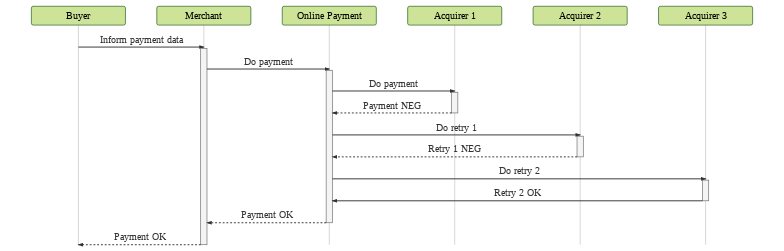
Flux description:
- The need or possibility of a retry will be evaluated after each response.
- At the end of the process, the Merchant will receive the final response and will communicate it to the Buyer.
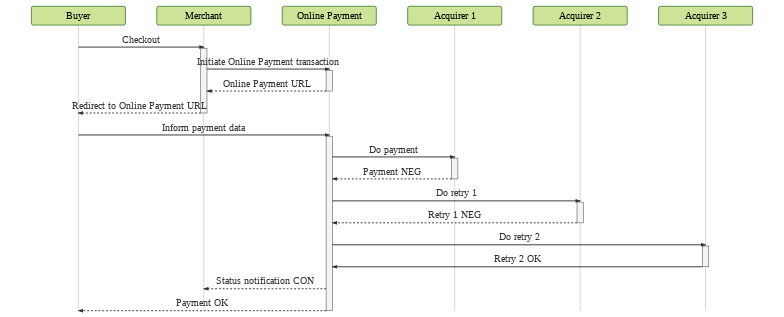
Flux description:
- First, the Buyer will request a checkout to the Merchant.
- The Merchant will initiate a transaction with Carat Portal and will receive an URL to which the Buyer must be redirected.
- The Buyer will interact directly with Carat Portal and will inform the payment data.
- With the payment data, Carat Portal will start its payment tries. Every retry response returned, Carat Portal will evaluate if another retry is needed or possible.
- At the end of this flux, Carat Portal will send a status notification to the Merchant and the Buyer will receive the final response.
In the offline retry flow, the retries are scheduled to run at a later time, and the payment response is "pay in process" with status RET.
If the offline retry is successful, the transaction changes status from RET to CON.
The retries are scheduled according to the configuration defined per routing:
- Maximum number of retries;
- Interval between retries (in days).
By default, 3 (three) retries will be performed with a one-day break between them.
To enable this functionality and change the default configuration, contact the Carat Portal production team.
Unlike the online retry flow, the offline retry flow can't perform the retry with more than one acquirer.
In this retry flow, the Merchant must estabilish agreements with the Acquirer to enable payments without the card security code.
There are differences between the REST and HTML flows that will be detailed in the following sections.
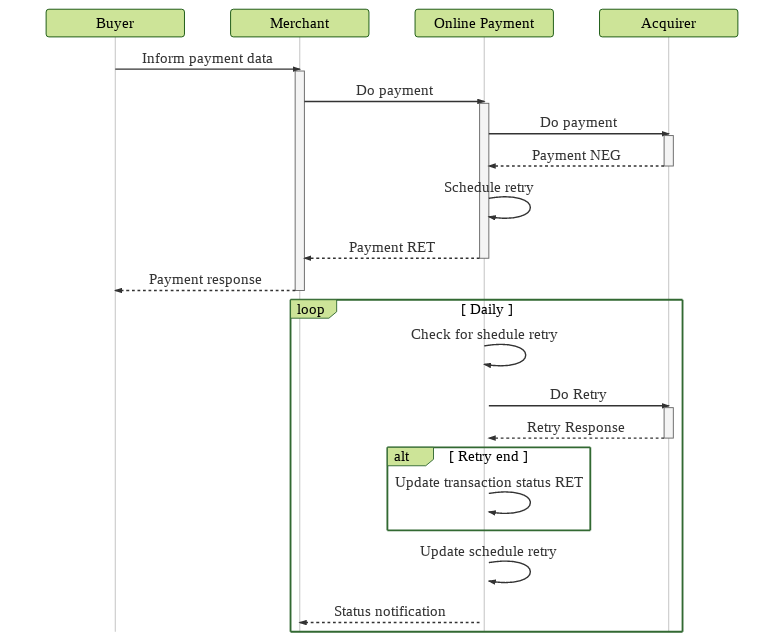
Flux description:
- On the first try, Carat Portal will evaluate if an offline retry can be performed. If it does, Carat Portal will send a response with the transaction status
RETto the Merchant and schedule the retry. - The retry is scheduled according to the configuration defined for the type of payment, on the day it was created. If the offline trial was created in one day and then the interval and / or quantity setting was changed, the old configuration will be kept.
- The retries are attempted daily by Carat Portal.
- At each retry response, Carat Portal will send a status notification to the Merchant and will evaluate if another retry is needed or possible. If the end of retries is detected, the transaction status
RETis changed accordingly the last retry response. - At the end of each retry response, Carat Portal send a status notification to the Merchant.
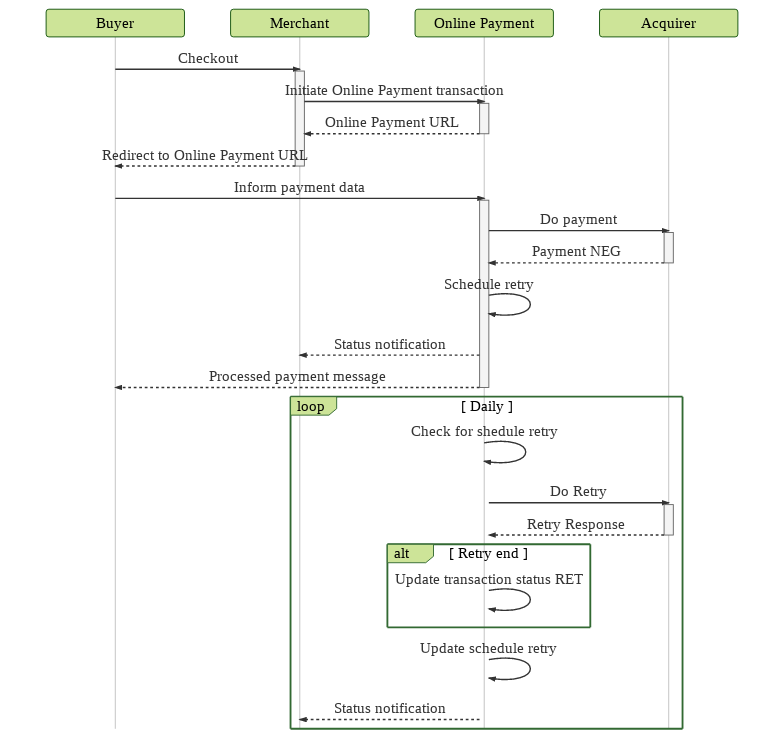
Flux description:
- First, the Buyer will request a checkout to the Merchant.
- After that, the Merchant will initiate a transaction with Carat Portal and will receive an URL to which the Buyer must be redirected.
- The Buyer will interact directly with Carat Portal and will inform all his/her payment data.
- With the payment data, Carat Portal will evaluate if an offline retry need to be scheduled. If it does, Carat Portal will send a processed payment response to the Buyer and will send a status notification
RETto the Merchant. - The retry is scheduled according to the configuration defined for the type of payment, on the day it was created. If the offline trial was created in one day and then the interval and / or quantity setting was changed, the old configuration will be kept.
- The retries are attempted daily by Carat Portal.
- At each retry response, Carat Portal will send a status notification to the Merchant and will evaluate if another retry is needed or possible. If the end of retries is detected, the transaction status
RETis changed accordingly the last retry response. - At the end of each retry response, Carat Portal send a status notification to the Merchant.
Important:
The customer can combine the use of Online and Offline retries. In this scenario, the offline retries flow will start if all the online retries are denied.
Allowed Return Codes
| Autorizadora | Código retorno |
|---|---|
| Cielo | DS |
| Cielo | EK |
| Cielo | R1 |
| Cielo | S0 |
| Cielo | TM |
| Cielo | V7 |
| Cielo | AA |
| Cielo | 005 |
| Cielo | 006 |
| Cielo | 019 |
| Cielo | 025 |
| Cielo | 028 |
| Cielo | 05 |
| Cielo | 057 |
| Cielo | 060 |
| Cielo | 061 |
| Cielo | 065 |
| Cielo | 076 |
| Cielo | 089 |
| Cielo | 091 |
| Cielo | 092 |
| Cielo | 096 |
| Cielo | 098 |
| Cielo | 099 |
| Cielo | 110 |
| Cielo | 19 |
| Cielo | 213 |
| Cielo | 25 |
| Cielo | 28 |
| Cielo | 57 |
| Cielo | 60 |
| Cielo | 61 |
| Cielo | 65 |
| Cielo | 89 |
| Cielo | 91 |
| Cielo | 92 |
| Cielo | 96 |
| Cielo | 98 |
| Cielo | AE |
| Cielo | AV |
| Cielo | BO |
| Cielo | DF |
| Cielo e-Commerce | 05 |
| Cielo e-Commerce | R1 |
| Cielo e-Commerce | 19 |
| Cielo e-Commerce | 25 |
| Cielo e-Commerce | 28 |
| Cielo e-Commerce | 57 |
| Cielo e-Commerce | 60 |
| Cielo e-Commerce | 61 |
| Cielo e-Commerce | 65 |
| Cielo e-Commerce | 89 |
| Cielo e-Commerce | 90 |
| Cielo e-Commerce | 91 |
| Cielo e-Commerce | 92 |
| Cielo e-Commerce | 96 |
| Cielo e-Commerce | 98 |
| Cielo e-Commerce | 99 |
| Cielo e-Commerce | 999 |
| Cielo e-Commerce | AA |
| Cielo e-Commerce | AE |
| Cielo e-Commerce | AF |
| Cielo e-Commerce | AG |
| Cielo e-Commerce | AV |
| Cielo e-Commerce | BD |
| Cielo e-Commerce | BO |
| Cielo e-Commerce | DF |
| Cielo e-Commerce | DS |
| Cielo e-Commerce | EK |
| Cielo e-Commerce | 15 |
| eRede | 15 |
| e.Rede REST | 103 |
| e.Rede REST | 104 |
| e.Rede REST | 106 |
| e.Rede REST | 107 |
| e.Rede REST | 121 |
| e.Rede REST | 150 |
| e.Rede REST | 56 |
| e.Rede REST | 64 |
| e.Rede REST | 74 |
| GetNet Lac | 80 |
| GetNet Lac | V7 |
| GetNet Lac | 96 |
| GetNet Lac | 91 |
| GetNet Lac | 83 |
| GetNet Lac | S0 |
| GetNet Lac | TM |
| GetNetWS | 85 |
| GetNetWS | 86 |
| GetNetWS | 87 |
| GetNetWS | 88 |
| GetNetWS | 94 |
| GetNetWS | 19 |
| GetNetWS | O1 |
| GetNetWS | Q0 |
| GetNetWS | Q1 |
| GetNetWS | Q2 |
| GetNetWS | 68 |
| GetNetWS | O0 |
| Global Payments via WS | 96 |
| Global Payments via WS | 68 |
| Global Payments via WS | 91 |
| Redecard | 19 |
| Redecard | V7 |
| Redecard | TM |
| Redecard | 91 |
| Redecard | 96 |
| Redecard | S0 |
| Safra | 099 |
| Safra | S0 |
| Safra | TM |
| Safra | V7 |
| Stone | TM |
| Stone | S0 |
| Stone | 96 |
| Stone | 06 |
| Stone | V7 |
Important: the codes not present above are irreversible, that is, they cannot be retained.
Updated 6 days ago