
Tokenization
Tokenization
Card Storage
Carat Portal provides to the merchant the option to store, securely, the customer card number for future use on purchase transactions or refunds.
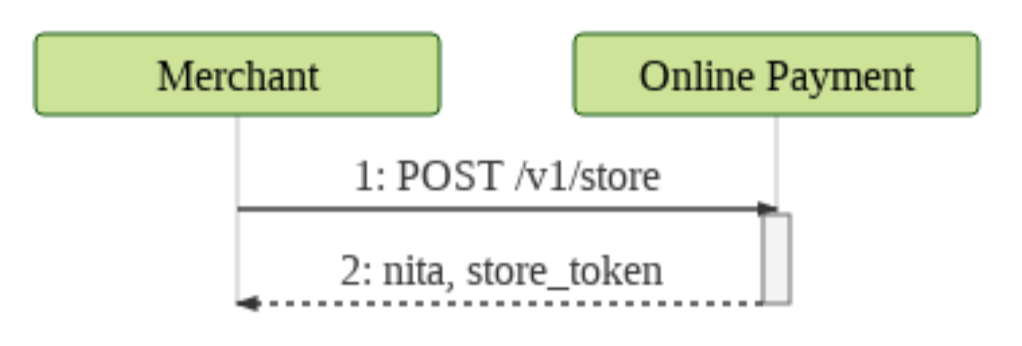
The flow used to perform a payment with card storage is exactly the same used by the payment previously described.
Call details
- Resource:
/v1/cards - HTTP Method:
POST - Request format:
JSON - Response format:
JSON - Header parameters:
| Parameter | Description | Format | Mandatory |
|---|---|---|---|
merchant_id | Merchant code on Carat Portal. The production and certification codes will be different. | < 15 AN | YES |
merchant_key | Merchant authentication key on Carat Portal. The production and certification keys will be different. | < 80 AN | YES |
Content-Type | It must be sent with the value application/json. | = 15 AN | YES |
Flow
Examples
Below are some examples of calling the card storage service using the cURL tool.
Card storage request
Request:
To use this example, don't forget to define the variable {{url}} with the value
curl --location --request POST 'https://{{url}}/e-sitef/api/v1/cards' \
--header 'Content-Type: application/json' \
--header 'merchant_id: xxxxxxxxxxx' \
--header 'merchant_key: xxxxxxxxxxx' \
--data-raw '{
  "customer_id": "11122211122",
  "authorizer_id": "2",
  "card": {
    "number": "5555555555555555",
    "expiry_date": "1222",
    "security_code": "123",
    "holder": "Card Holder"
  }
}'
--verbose
Response:
{
  "code": "0",
  "message": "OK. Transaction successful.",
  "store": {
    "status": "CON",
    "nsua": "18051600000560A",
    "nita": "xxxxxxxxxxxxxxxxxxx",
    "customer_id": "11122211122",
    "authorizer_id": "2"
  },
  "card": {
    "token": "xxxxxxxxxxxxxxxxxxxxxxxxxxxxxxx==",
    "suffix": "5555",
    "bin": "544444",
    "status": "ATV"
  }
}
Request parameters
The table below describes the request parameters for the card storage service:
| Parameter | Description | Format | Mandatory |
|---|---|---|---|
customer_id | Buyer identification for card storage. | < 20 AN | NO |
authorizer_id | Authorizer code used for storage. | < 3 N | NO |
card | Card data. | ||
number | Customer's card number (PAN). | < 19 N | YES |
expiry_date | Card expiry date in MMYY format. | = 4 N | COND. |
security_code | Card security code. This field may not be mandatory depending on the acquirer agreement. | < 5 N | COND. |
holder | Card holder name. | < 30 AN | COND. |
Response parameters
In case of success, the HTTP response code will be 200. Any other code should be interpreted as an error. The table below describes the response parameters for the card storage service:
| Parameter | Description | Format |
|---|---|---|
code | Carat response code. Any code different from 0 (zero) means failure. Learn more. | < 4 N |
message | Carat response message. | < 500 AN |
store | ||
status | Storage transaction status on Carat. | = 3 AN |
nsua | Unique sequential number of the storage transaction on Carat. | = 15 AN |
nita | Stored item identification on Carat. | = 64 AN |
customer_id | Customer identification for card storage. | < 20 AN |
authorizer_id | Authorizer code used for storage. | < 3 N |
card | ||
token | Identification of the stored card. This token is used in place of the customer's card for transactions with Carat. | = 88 AN |
suffix | Last 4 digits of the customer's card. | = 4 AN |
bin | First 6 digits of the customer's card. | = 6 AN |
status | Card status. ATV (Active) and INA (Inactive). | < 3 AN |
Activation and Deactivation of Card Token
Source: https://docs.apis-fiserv.com/latam/docs/armazenamento-rest-ativacao-inativacao
Call Details
- Resource:
/v1/cards/{card.token} - HTTP Method:
PUT - Request Format:
JSON - Response Format:
JSON - Header Parameters:
| Parameter | Description | Format | Required |
|---|---|---|---|
merchant_id | Merchant code on Carat. The production and certification codes will be different. | < 15 AN | YES |
merchant_key | Merchant authentication key on Carat. The production and certification keys will be different. | < 80 AN | YES |
token | Token obtained from the token creation service Learn more.. If Authorization is not sent, this field becomes mandatory. | = 66 AN | COND. |
Authorization | The authentication signature of the merchant must be sent in Bearer {signature} format. Example: Bearer {TOKEN_JWT_EXAMPLE}. If token is not sent, this field becomes mandatory. | < 2000 AN | COND. |
Content-Type | Must be sent with the value application/json. | = 15 AN | YES |
Flow
sequenceDiagram
    STORE->>CARAT: 1. PUT /v1/cards/{card.token}
    CARAT-->>STORE: 2. nita, status
Examples
Below are some examples of calling the card token activation and deactivation service using the cURL tool.
Activation of the card token with token authentication
Request:
To use this example, remember to set the variable {{url}} with the value
curl
	--request PUT "https://{{url}}/e-sitef/api/v1/cards/{card.token}"
	--header "Content-Type: application/json"
	--header "merchant_id: xxxxxxxxxxx"
	--header "merchant_key: xxxxxxxxxxx"
	--header 'token: XXXXX'
	--data-binary
	{
	   "card":{
	      "status":"ATV"
	   }
	}
	--verbose
Activation of the card token with signature authentication
curl
	--request PUT "https://{{url}}/e-sitef/api/v1/cards/{card.token}"
	--header "Content-Type: application/json"
	--header "merchant_id: xxxxxxxxxxx"
	--header "merchant_key: xxxxxxxxxxx"
	--header 'Authorization: Bearer {TOKEN_JWT_EXAMPLE}'
	--data-binary
	{
	   "card":{
	      "status":"ATV"
	   }
	}
	--verbose
Response:
{
   "code":"0",
   "message":"OK. Transaction successful.",
   "card":{
      "token":"xxxxxxxxxxxxxxxxxxxxxxxxxxxxxxx==",
      "suffix":"5555",
      "bin": "544444",
      "status": "ATV"
   },
   "store":{
      "status":"CON",
      "nsua":"18051600000560A",
      "nita":"xxxxxxxxxxxxxxxxxxx",
      "customer_id":"11122211122",
      "authorizer_id":"2"
   }
}
Deactivation of the card token with token authentication
Request:
To use this example, remember to set the variable {{url}} with the value
curl
	--request PUT "https://{{url}}/e-sitef/api/v1/cards/{card.token}"
	--header "Content-Type: application/json"
	--header "merchant_id: xxxxxxxxxxx"
	--header "merchant_key: xxxxxxxxxxx"
	--header 'token: XXXXX'
	--data-binary
	{
	   "card":{
	      "status":"INA"
	   }
	}
	--verbose
Deactivation of the card token with signature authentication
curl
	--request PUT "https://{{url}}/e-sitef/api/v1/cards/{card.token}"
	--header "Content-Type: application/json"
	--header "merchant_id: xxxxxxxxxxx"
	--header "merchant_key: xxxxxxxxxxx"
	--header 'Authorization: Bearer {TOKEN_JWT_EXAMPLE}'
	--data-binary
	{
	   "card":{
	      "status":"INA"
	   }
	}
	--verbose
Response:
{
   "code":"0",
   "message":"OK. Transaction successful.",
   "card":{
      "token":"xxxxxxxxxxxxxxxxxxxxxxxxxxxxxxx==",
      "suffix":"5555",
      "bin": "544444",
      "status": "INA"
   },
   "store":{
      "status":"CON",
      "nsua":"18051600000560A",
      "nita":"xxxxxxxxxxxxxxxxxxx",
      "customer_id":"11122211122",
      "authorizer_id":"2"
   }
}
Request Parameters
The table below describes the request parameters for the card token activation and deactivation service:
| Parameter | Description | Format | Required |
|---|---|---|---|
card.token | Identification of the stored card. This token is used in place of the customer's card for transactions with Carat. | = 88 AN | YES |
card | |||
status | Card status. ATV (Active) and INA (Inactive). | < 3 AN | YES |
Response Parameters
In case of success, the HTTP response code will be 200. Any other code should be interpreted as an error. The table below describes the response parameters for the card token activation and deactivation service:
| Parameter | Description | Format |
|---|---|---|
code | Carat response code. Any code other than 0 (zero) means failure. Learn more. | < 4 N |
message | Carat response message. | < 500 AN |
store | ||
status | Storage transaction status on Carat. Learn more. | = 3 AN |
nsua | Unique sequential number of the storage transaction on Carat. | = 15 AN |
nita | Stored item identification on Carat. | = 64 AN |
customer_id | Customer identification for card storage. | < 20 AN |
authorizer_id | Authorizer code used for storage. | < 3 N |
card | ||
token | Identification of the stored card. This token is used in place of the customer's card for transactions with Carat. | = 88 AN |
suffix | Last 4 digits of the customer's card. | = 4 AN |
bin | First 6 digits of the customer's card. | = 6 AN |
status | Card status. ATV (Active) and INA (Inactive). | < 3 AN |
List of tokenized cards
Source: https://docs.apis-fiserv.com/latam/docs/armazenamento-rest-listagem
Call details
- Resource:
/v1/cards/list - HTTP Method:
GET - Request format:
JSON - Response format:
JSON - Header Parameters:
| Parameter | Description | Format | Mandatory |
|---|---|---|---|
merchant_id | Store code on Carat. Production and certification codes will be different. | < 15 AN | YES |
merchant_key | Store authentication key in Carat. The production and certification keys will be different. | < 80 AN | YES |
token | Token obtained from the token creation service Learn more.. If Authorization is not sent, this field becomes mandatory. | = 66 AN | COND. |
Authorization | The store authentication signature must be sent in the format Bearer {signature}. Example: Bearer {TOKEN_JWT_EXAMPLE}. If token is not sent, this field will be mandatory. | < 2000 AN | COND. |
Content-Type | It must be sent with the value application/json. | = 15 AN | YES |
Flow
sequenceDiagram
    participant MERCHANT
    participant CARAT
    MERCHANT->>+CARAT: 1. GET /v1/cards/list
    CARAT-->>-MERCHANT: 2. List of tokenized cards
Examples
Below are some examples of calling the tokenized card listing service using the cURL tool.
List of tokenized cards using token
Request:
To use this example, don't forget to define the variable {{url}} with the value
curl --location --request GET 'https://{{url}}/e-sitef/api/v1/cards/list?authorizer_id=1&status=ATV&page=0&limit=1' \
--header 'merchant_id: xxxxxxxxxxx' \
--header 'merchant_key: xxxxxxxxxxx' \
--header 'token: ca6ff575d51b013dc01ab4059c63aebb055af2963b8a31043daa33e16b20750e01'
--verbose
Listing of tokenized cards using signature
Request:
To use this example, don't forget to define the variable {{url}} with the value
curl --location --request GET 'https://{{url}}/e-sitef/api/v1/cards/list?authorizer_id=1&status=ATV&page=0&limit=1' \
--header 'merchant_id: LOJATESTE' \
--header 'merchant_key: F19DE00177C301DF24A865F11AA9B2567F604891F0F44DDAEFD69E3399E0B7E1' \
--header 'Authorization: Bearer {TOKEN_JWT_EXAMPLE}'
Response:
{
    "response_code": "0",
    "response_message": "OK. Transaction successful.",
    "cards": [
        {
            "status": "ATV",
            "authorizer_id": 1,
            "token": "S1uloKsLc+CLVhbOtf1SBg0WwTCbYLBsxh29jgKwhm-jNAfkQ1g-u6vcWfiV5gH1CfyAhu8Hl5fXR2ho+Cmrjw==",
            "bin": "455182",
            "suffix": "2345",
            "expiration_date": "1129",
            "customer_id": "1",
            "creation_date": "14/11/2023T00:21",
            "modification_date": "14/11/2023T02:56"
        },
        {
            "status": "ATV",
            "authorizer_id": 1,
            "token": "wAVdAIFCTkCTRZSL+BOH93hJYlBlD7Z4QhRDnyp6pbLQpfYE+rcUh740Tpf9Svvc5nLKZqKFuc4aZpTo41jc8Q==",
            "bin": "401200",
            "suffix": "1112",
            "expiration_date": "1212",
            "customer_id": "kakaroto",
            "creation_date": "07/04/2024T23:22",
            "modification_date": "09/05/2012T15:54"
        }
    ],
    "current_page": "0",
    "total_pages": "1",
    "count": "2"
}
Request parameters
The table below describes the request parameters for the tokenized card listing service:
| Parameter | Description | Format | Mandatory |
|---|---|---|---|
authorizer_id | Authorizer code in Carat. Learn more. | 3 N | NO |
customer_id | Buyer identification for card storage. | < 20 AN | NO |
status | Card status storing in Carat ATV (Active) or INA (Inactive). | = 3 AN | NO |
page | Listing page. The first page has a value of 0. If it is not sent, we will assume the value 0. | 3 N | NO |
limit | Maximum number of records per page. If it is not sent, we will assume the maximum value 100 | 3 N | NO |
Response parameters
If successful, the HTTP response code will be 200. Any other code must be interpreted as an error. In the table below is the description of the response parameters of the tokenized card listing service:
| Parameter | Description | Format |
|---|---|---|
code | Carat response code. Any code other than 0 (zero) means failure. Learn more. | < 4 N |
message | Carat response message. | < 500 AN |
current_page | Current records page. | < 4 AN |
total_pages | Total number of pages. | < 4 AN |
count | Total record count. | < 4 AN |
card | ||
status | Card status. | = 3 AN |
customer_id | Buyer identification for card storage. | = 20 AN |
authorizer_id | Authorizer code used in storage. | < 3 N |
token | Identification of the stored card. This token must be used instead of the buyer's card to carry out transactions with Carat. | = 88 AN |
suffix | Last 4 digits of the buyer's card. | = 4 AN |
bin | First 6 digits of the buyer's card. | = 6 AN |
expiration_date | Card expiration date in MMYA format. | = 4 N |
creation_date | Creation date in card storage in the format: DD/MM/YYYY'T'HH:mm. Example: 07/13/2017T16:03 | = 16 D |
modification_date | Date that was changed in the card storage in the format: DD/MM/YYYY'T'HH:mm. Example: 07/13/2017T16:03 | = 16 D |
Updated 6 days ago