
Anti-Fraud Integrations
Anti-Fraud Integrations
Overview
Source: https://docs.apis-fiserv.com/latam/docs/op-afi-overview
Overview
Carat Portal is a multi-service payment gateway, capable of processing credit card transactions, bank transfers, invoice generations, integration with mobile payment options, among other services that can be easily added to the platform.
Carat Portal integrates anti-fraud solutions by including risk analysis on the payment process.
Anti-fraud service is supplied by HTML Payment Interface and is integrated with several risk analysis institutions. Thus, in case merchant enables anti-fraud service, each payment only will be confirmed if the chosen risk analysis institution approves the payment.
And to learn more about these nomenclatures (Bin, Software Express, Carat, e-Sitef) Learn more
Required credentials
Carat Portal has integration with many risk analysis institutions. Thus, the merchant can choose with who will do risk analysis. Once select the risk analysis institution, the merchant should contact this institution and ask for required credentials. Credentials can differ depending of institution. After that the merchant should send these credentials to Carat Portal support that will register this data. Anti-fraud service configuration on merchant’s payments only be possible after credentials registered on Carat Portal production environment.
It is important remember to configure expiry time and the action that will be executed after that time expired. This configuration must be registered on Merchant’s Portal. Learn more.
For more information about the required credentials, read the chapter corresponding to the desired antifraud institution.
Restrictions
The anti-fraud analysis functionality can be used on the following Carat Portal interfaces:
| Antifraude Fiserv | |
|---|---|
| REST Payment | X |
| HTML Payment | X(*) |
| REST Pre-Authorization | X |
| HTML Pre-Authorization | X(*) |
| Payment link - Portal | X |
(*): If payer, shipment and billing_data structures are provided in the HTML call, they will not be requested in the checkout screen. |
| CyberSource | ClearSale | Konduto | Fraud Detect | |
|---|---|---|---|---|
| REST Payment | X | X | X | X |
| HTML Payment | X(*) | X(*) | X(*) | X(*) |
| REST Pre-Authorization | X | X | X | X |
| HTML Pre-Authorization | X(*) | X(*) | X(*) | X(*) |
| Payment link - Portal | X | X | X | X |
(*): If payer, shipment and billing_data structures are provided in the HTML call, they will not be requested in the checkout screen. |
Attention:
For PRE-AUTHORIZATION transactions with risk analysis (anti-fraud) and not-SiTef routings, attention should be paid to the scenarios in which the risk analysis is carried out AFTER pre-authorization.
In these scenarios, the pre-authorization transaction is confirmed regardless of the result of the risk analysis, and it is up to the merchant to decide - in light of the anti-fraud assessment - whether to effect its capture or not. The same is true for cases in which the risk analysis of the transaction is referred to a manual review by the anti-fraud institution.
Therefore the risk analysis cannot be used with the features below:
- Recharge
- Split
Because the nature of the flow, the payment methods below are not allowed to be used with risk analysis:
- Banco do Brasil
- e-Commerce Cielo 1.5 (NPC)
- Itaú Shopline
- MercadoPago
- PagSeguro
- PayPal
Debit Card
For payments made with a debit card, the anti-fraud flow with the flag after auth does not apply.
Attention:
It is important that the merchant sends as much information as he can when using Carat Portal's anti-fraud services. The quality of this information will directly and cumulatively affect the quality of the fraud analysis, bringing direct benefits to the merchant.
Risk Analysis Response
Source: https://docs.apis-fiserv.com/latam/docs/risk-analysis-response
The Carat Portal will return the analysis status (approved, rejected or under analysis) in the status notification url, in addition to the code and message returned by the service, as shown in the table below:
| Field | Description | Size |
|---|---|---|
analise.status | Risk analysis | = 3 A |
analise.codigo | Response code | < 3 N |
analise.mensagem | Response message | < 30 N |
The status of the risk analysis can be:
| Status | Description |
|---|---|
NOV | Analysis has not yet been submitted. |
EXP | Payment transaction has expired before the analysis is sent. |
ACC | The transaction was accepted. |
REJ | Transaction rejected by the risk analysis institution. |
REV | Transaction requires manual review. (Learn more) |
INV | Invalid analysis. |
It is important to note that if an error has occurred, it will be described in the analise.mensagem of the return URL.
For more information about response codes, read the Response Codes item in the desired anti-fraud solution documentation.
Antifraud Fiserv
Source: https://docs.apis-fiserv.com/latam/docs/antifraud-fiserv
Required credentials
As mentioned in the "Overview - Required credentials" chapter, each institution has credentials that must be obtained for the integration. Antifraud Fiserv Fraud Detect services demand the credentials below:
- Private Key (Merchant Identification) - Private key of the merchant on Antifraud Fiserv Fraud Detect .
- Public Key (Merchant Code) - Public key of the merchant on Antifraud Fiserv Fraud Detect .
IMPORTANT:
The credentials above should be obtained from Antifraud Fiserv Fraud Detect . It is recommended to contact Antifraud Fiserv Fraud Detect and receive guidance on how to obtain the credentials. Then, the merchant should contact Carat Portal support and send the credentials to register on Carat Portal.
Web Hook URL Configuration
In order for us to receive status updates from the risk analysis transactions, it is necessary to configure the Webhook URL on the Antifraud Fiserv Fraud Detect configuration environment.
Production URL:
https:///e-sitef/processarPost.se?src=fraud_detect
Homologation URL:
https:///e-sitef/processarPost.se?src=fraud_detect
This URL must be configured for any status changes. To perform this configuration, please contact Antifraud Fiserv Fraud Detect Support.
Allowed card brands
Antifraud Fiserv Fraud Detect supports any card brand.
IMPORTANT:
Only credit transactions will be effectively analyzed by Antifraud Fiserv Fraud Detect . Debit transactions will be sent to the institution, but will only be stored for reporting and will not be analyzed.
Supported Carat Portal interfaces
- Payment Link via Portal
- HTML Payment Link via API
- REST Payment
- REST Pre-Authorization
- HTML Payment
- HTML Pre-Authorization
Antifraud Fiserv Fraud Detect anti-fraud parameters (Payment Link via HTML)
For now, the data collected for the risk analysis will only be informed during the payer's checkout. Soon, new fields may be sent in the payment creation request.
Fields collected during Checkout
The fields collected during checkout are:
| Field | Field Description | Required |
|---|---|---|
Primeiro Nome do Comprador | First name of the payer. | Yes |
Sobrenome do Comprador | First name of the payer. | Yes |
CPF do Comprador | CPF of the payer. | Yes |
Telefone | Phone number of the payer. | Yes |
E-mail | Email of the payer. | Yes |
Nome (como está no cartão) | Name that is printed on the card used for the purchase. | Yes |
Endereco completo | Full billing address. | Yes |
Complemento | Complement of the billing address. | No |
CEP | Zip code of the billing address. | Yes |
País | Country of the billing address. | Yes |
Estado | State of the billing address. | Yes |
Cidade | City of the billing address. | Yes |
Example
Example of the HTML payment request with risk analysis at Antifraud Fiserv Fraud Detect :
{
  "merchant_id": "FRAUDDETECT",
  "merchant_usn": "803208495",
  "order_id": "866705726000010",
  "redirect": "A",
  "style": "N",
  "amount": "100000",
  "authenticate": "0",
  "transaction_type": "payment",
  "payment_link": "true",
  "additional_data": {
    "currency": "BRL",
    "anti_fraud": "enabled_after_auth"
  }
}
Antifraud Fiserv Fraud Detect Anti-Fraudin the Payment Link via Portal
To enable Antifraud Fiserv Fraud Detect anti-fraud for Payment Links generated by the Merchant Portal, please contact Carat Portal's support team.
Antifraud Fiserv Fraud Detect Antifraud via REST
After finishing your registration on Carat Portal, enabling the antifraud service integration, when initializing a REST payment (learn more) or REST pre-authorization (learn more), the merchant must send the anti_fraud property and the antifraud parameters (depending on the institution you're using), both included in the additional_data object.
The anti_fraud field determines how the risk analysis will be applied and may contain the following values:
enabled_before_auth- The antifraud will be executed BEFORE the payment authorization. If the analysis is rejected, the payment won't be initiated. In the case of a pre-authorization with a non-SiTef routing, if the antifraud requires a manual analysis, the pre-authorization transaction will be confirmed, and it will be up to the merchant to decide whether to capture or cancel the transaction.enabled_after_auth- The antifraud will be executed AFTER the payment authorization. If the analysis is rejected, the payment that was already authorized will be cancelled. In the case of a pre-authorization with a non-SiTef routing, the transaction will always be confirmed, and it will be up to the merchant to decide whether to capture or cancel the transaction.
For customers who are using REST, it is interesting to add the settings from the links below to improve risk analysis and also to obtain the visitor_id.
Antifraud Fiserv Fraud Detect antifraud parameters
Below are described the antifraud parameters supported by Antifraud Fiserv Fraud Detect .
Note: If payer, shipment and billing_data structures are provided in the HTML call, they will not be requested in the checkout screen.
| Parameter | Description | Format | Mandatory | |||
|---|---|---|---|---|---|---|
additional_data | Additional transaction data. | |||||
visitor_id | Visitor identifier obtained using Antifraud Fiserv Fraud Detect JavaScript. | < 40 AN | NO | |||
additional_data.items[] | Shopping cart information | |||||
unit_price | Item unit price in cents | NO | < 10 N | |||
sku | Item product code | NO | < 100 AN | |||
quantity | Item quantity | NO | < 10 N | |||
id | Unique item identification, that may be its bar code or UPC. | NO | < 100 AN | |||
title | Product or service name | NO | < 100 AN | |||
discount_amount | Discount amount of the product in cents | NO | < 10 N | |||
description | Product description | NO | < 100 AN | |||
creation_date | Indicates the date of publication of the product on the merchant's site (Format: DD/MM/YYYY) | NO | = 10 AN | |||
additional_data.payer | Customer information | |||||
id | Unique customer identifier. It may be any value (sequential, document, e-mail), as long as it's consistent on future orders. | YES | < 100 AN | |||
name | Customer name. | YES | < 100 AN | |||
surname | Customer surname. | YES | < 100 AN | |||
email | Customer e-mail. | YES | < 100 AN | |||
born_date | Customer birth date (format : YYYY-MM-DDTHH:MM:SS) | NO | = 19 AN | |||
identification_number | Customer document number | NO | < 100 AN | |||
creation_date | Account creation date on the site (format: DD/MM/YYYY ) | NO | = 10 AN | |||
is_new_client | Boolean that indicates if the customer is using a recently created account in this purchase. | NO | < 5 T/F | |||
is_vip_client | Boolean that indicates if the customer is VIP or a frequent buyer. | NO | < 5 T/F | |||
additional_data.payer.phones[] | Customer phone information | |||||
ddi | Customer phone IDD | NO | < 100 AN | |||
ddd | Customer phone DDD | NO | < 100 AN | |||
number | Customer phone number. | NO | < 100 AN | |||
additional_data.billing_data.address | Billing address information | |||||
street_name | Billing street name. | NO | < 255 AN | |||
street_number | Billing street number. | NO | < 255 AN | |||
complement | Billing address complement. | NO | < 100 AN | |||
city | Billing city. | NO | < 100 AN | |||
state | Billing state. | NO | < 100 AN | |||
zip_code | Billing zip code. | NO | < 100 A N | |||
country | Billing country code, following ISO 3166-1 alfa-3. | NO | = 3 AN | |||
additional_data.shipment | Shipment information | |||||
name | Name of the recipient. | NO | < 100 AN | |||
surname | Surname of the recipient. | NO | < 100 AN | |||
additional_data.shipment.address | Shipment address information | |||||
street_name | Delivery street name. | NO | < 255 AN | |||
street_number | Delivery street number. | NO | < 255 AN | |||
complement | Delivery address complement. | NO | < 255 AN | |||
city | Delivery city. | NO | < 100 AN | |||
state | Delivery state. | NO | < 100 AN | |||
zip_code | Delivery zip code. | NO | < 100 AN | |||
country | Delivery country code, following ISO 3166-1 alfa-3. | NO | = 3 AN | |||
additional_data.travel | Travel information | |||||
transport_type | Travel transport type. (flight or bus) | YES | < 6 AN | |||
expiration_date | Expiration date. (format: DD/MM/YYYY ) | NO | = 10 AN | |||
additional_data.connections[] | Travel connections information | |||||
journey_type |
| YES | < 7 AN | |||
origin_city | Origin city. | YES, if transport_type=bus | < 100 AN | |||
destination_city | Destination city. | YES, se transport_type=bus | < 100 AN | |||
from | IATA airport code of the origin airport | YES, if transport_type=flight | = 3 AN | |||
to | IATA airport code of the destination airport | YES, if transport_type=flight | = 3 AN | |||
departure_date | Departure date and time (format: YYYY-MM-DDTHH:MM:SS) | YES | < 17 AN | |||
class | Seat class name (Ex: economy, business or first) | NO | < 8 AN | |||
class_code | Seat class code. | NO | < 20 AN | |||
company | Airline name. | NO | < 20 AN | |||
additional_data.passengers[] | Passengers information | |||||
name | Passenger first name | YES | < 100 AN | |||
last_name | Passenger last name | YES | < 100 AN | |||
legal_document | Passenger document. | YES | < 100 AN | |||
legal_document_type | Passenger document type (5 = passport, any other number = id) | YES | < 8 AN | |||
birth_date | Passenger birth date (format: YYYY-MM-DDTHH:MM:SS) | NO | < 17 AN | |||
nationality | Passenger nationality, following ISO 3166-1 alfa-3 | NO | = 3 AN | |||
is_frequent_traveler | Frequent traveler boolean | NO | < 5 T/F | |||
is_with_special_needs | Boolean which indicates if it's a passenger with special needs | NO | < 5 T/F | |||
frequent_flyer_card | Loyalty program type | NO | < 255 AN | |||
customer_class | Loyalty program category | NO | < 255 AN | |||
additional_data.hotel_reservations[] | Hotel reservation information | |||||
hotel | Hotel name. | YES | < 100 AN | |||
category | Hotel category. | NO | < 100 AN | |||
additional_data.hotel_reservations[].address | Hotel address information | |||||
street_name | Hotel street name. | NO | < 255 AN | |||
street_number | Hotel street number. | NO | < 255 AN | |||
complement | Hotel address complement. | NO | < 100 AN | |||
city | Hotel city. | NO | < 100 AN | |||
state | Hotel state. | NO | < 100 AN | |||
zip_code | Hotel zip code. | NO | < 100 AN | |||
country | Hotel country code, following ISO 3166-1 alfa-3. | NO | = 3 AN | |||
additional_data.hotel_reservations[].rooms[] | Hotel rooms information | |||||
number | Room number. | NO | < 100 AN | |||
code | Room code | NO | < 100 AN | |||
type | Room type. | NO | < 100 AN | |||
check_in_date | Check-in date and time (format: YYYY-MM-DDTHH:MM:SS) | YES | < 17 AN | |||
check_out_date | Check-out date and time (format: YYYY-MM-DDTHH:MM:SS) | NO | < 17 AN | |||
number_of_guests | Number of guests. | NO | < 9999 N | |||
board_basis | Feeding regime. | NO | < 100 AN | |||
additional_data.hotel_reservations[].rooms[].guests[] | Hotel room guests information | |||||
name | Guest name. | YES | < 100 AN | |||
document | Guest document. | NO | < 8 AN | |||
document_type | Guest document type:
| NO | < 8 AN | |||
birth_date | Guest birth date (format: YYYY-MM-DDTHH:MM:SS) | NO | < 17 AN | |||
nationality | Guest nationality, following ISO 3166-1 alfa-3. | NO | = 3 AN | |||
additional_data.events[] | Event information | |||||
name | Event name. | YES | < 255 AN | |||
date | Event date and time (format YYYY-MM-DDTHH:MM:SS) | YES | < 17 AN | |||
type | Event type:
| YES | < 9 AN | |||
subtype | Event type details. | NO | < 255 AN | |||
additional_data.events[].venue | Event venue information | |||||
name | Venue name | NO | < 255 AN | |||
street_name | Venue street name | NO | < 255 AN | |||
street_number | Venue street number | NO | < 255 AN | |||
city | Venue city | NO | < 255 AN | |||
state | Venue state | NO | < 255 AN | |||
country | Venue country code, following ISO 3166-1 alfa-3. | NO | = 3 AN | |||
capacity | Venue capacity | NO | < 255 AN | |||
additional_data.events[].tickets[] | Event tickets information | |||||
id | Unique ticket identifier. | NO | < 255 AN | |||
category | Ticket category:
| YES | < 10 AN | |||
section | Ticket section. | NO | < 255 AN | |||
premium | Premium ticket indicator. | NO | < 5 T/F | |||
additional_data.events[].tickets[].atendee | Event atendee information | |||||
name | Atendee name. | NO | < 255 AN | |||
document | Atendee document. | YES | < 100 AN | |||
document_type | Atendee document type:
| NO | < 100 AN | |||
birth_date | Atendee birth date (format: YYYY-MM-DDTHH:MM:SS) | NO | < 17 AN | |||
additional_data.vehicle{} | Vehicle information for anti-fraud | |||||
make | Vehicle brand | YES | < 63 AN | |||
model | Vehicle model | YES | < 100 AN | |||
vid | Unique vehicle identifier | NO | < 17 AN | |||
renavam | Renavam identification of the vehicle | NO | < 11 AN | |||
registration | Vehicle license | NO | < 17 AN | |||
type | Describes the type of vehicle: car, bus, truck, motorcycle, aircraft, boat, bicycle | NO | < 15 AN | |||
usage | Describes the use of the vehicle in the operation. Accepts values such as: private, commercial, experimental, government, military, instruction | NO | < 15 AN | |||
additional_data.vehicle{}`.owner{} | Vehicle owner information for anti-fraud | |||||
name | Name of vehicle owner | NO | < 255 AN | |||
tax_id | Vehicle owner document | YES | < 100 AN | |||
ATTENTION: Parameters that exist in
payer,billingandshipmentwhen not passed to the transaction creation service viaadditional_data, will be requested in the payment screen. If the parameters are passed in the transaction creation service, you will not be asked to fill in the fields on the payment screen.
Example
Below is an example of a REST payment creation request with Antifraud Fiserv Fraud Detect risk analysis:
{
  "merchant_usn": "2423423434",
  "order_id": "2432342343",
  "installments": "1",
  "installment_type": "4",
  "authorizer_id": "2",
  "amount": "1300",
  "additional_data": {
    "anti_fraud": "enabled_before_auth",
    "visitor_id": "XKhas09jcks",
    "items": [
      {
        "title": "title1",
        "quantity": "1",
        "unit_price": "1111",
        "description": "description1",
        "id": "id1",
        "discount_amount": "111",
        "sku": "sku1",
        "creation_date": "11/01/2011"
      }
    ],
    "payer": {
      "name": "Marcos",
      "surname": "da Silva",
      "email": "[email protected]",
      "born_date": "1990-01-01T11:11:11",
      "creation_date": "02/03/2004",
      "is_new_client": "true",
      "is_vip_client": "true",
      "phones": [
        {
          "number": "333333333",
          "ddd": "22",
          "ddi": "11"
        },
        {
          "number": "666666666",
          "ddd": "55",
          "ddi": "44"
        }
      ],
      "identification_number": "47764543004"
    },
    "shipment": {
      "name": "Fernando",
      "surname": "Bezerra",
      "address": {
        "zip_code": "98764312",
        "street_number": "987",
        "street_name": "Rua Shipment",
        "complement": "ap. 587",
        "city": "São Shipment",
        "state": "MA",
        "country": "BRA"
      }
    },
    "passengers": [
      {
        "name": "Miguel",
        "last_name": "Herrera",
        "frequent_flyer_card": "frequentFlyerCard",
        "legal_document_type": "1",
        "legal_document": "12312312312",
        "birth_date": "1980-07-28T10:40:00",
        "customer_class": "customerClass",
        "nationality": "BRA",
        "is_frequent_traveler": "true",
        "is_with_special_needs": "true"
      }
    ],
    "connections": [
      {
        "company": "Verde",
        "class": "first",
        "from": "GRU",
        "to": "CGH",
        "departure_date": "2023-09-07T07:09:00",
        "journey_type": "OUTWARD",
        "origin_city": "San Juan",
        "destination_city": "Homero Lopez",
        "class_code": "VIP"
      },
      {
        "company": "Rosa",
        "class": "economy",
        "from": "BSB",
        "to": "VCP",
        "departure_date": "2022-10-21T16:39:00",
        "journey_type": "RETURN",
        "origin_city": "San Pablo",
        "destination_city": "Juanito Cruz",
        "class_code": "ECONOMY"
      }
    ],
    "hotel_reservations": [
      {
        "hotel": "Hotel Green Tree",
        "address": {
          "zip_code": "83392019",
          "street_number": "529",
          "street_name": "Rua Hoteleira",
          "complement": "ap. 019",
          "city": "San Hotel",
          "state": "AC",
          "country": "EN"
        },
        "rooms": [
          {
            "number": "902",
            "code": "ROOM902",
            "type": "King Size",
            "check_in_date": "2020-01-09T12:30:00",
            "check_out_date": "2020-01-19T13:00:00",
            "number_of_guests": "1",
            "board_basis": "Vegan",
            "guests": [
              {
                "name": "José Aníbal",
                "document": "98798798712",
                "document_type": "cpf",
                "birth_date": "12/03/1970",
                "nationality": "BRA"
              }
            ]
          }
        ],
        "category": "categoryhotel"
      }
    ],
    "billing_data": {
      "address": {
        "zip_code": "12341234",
        "street_number": "666",
        "street_name": "Rua Billing",
        "complement": "ap. 2369",
        "city": "São Billing",
        "state": "AM",
        "country": "BRA"
      }
    },
    "travel": {
      "transport_type": "flight",
      "expiration_date": "2022-02-14T01:30:00"
    },
    "discount_info": "Informações de desconto",
    "events": [
      {
        "name": "Evento de Rock",
        "date": "2021-11-22T09:28:00",
        "type": "show",
        "subtype": "music",
        "venue": {
          "name": "Debicard Hall",
          "street_name": "Rua do Evento",
          "street_number": "928",
          "city": "Jardinópolis",
          "state": "MS",
          "country": "DO",
          "capacity": "300"
        },
        "tickets": [
          {
            "id": "12h374612h4h",
            "category": "social",
            "section": "Seção 1",
            "premium": "true",
            "attendee": {
              "name": "Daniel Almeida",
              "document": "71728293945",
              "document_type": "other",
              "birth_date": "03/10/1990"
            }
          }
        ],
          "vehicle": {
          "make": "Bentley",
          "model": "Bacalar",
          "renavam": "87836695327",
          "registration": "ABC1234",
          "vid": "ABCDEFGH123456789",
          "type": "car",
          "usage": "private",
          "owner": {
            "tax_id": "540.830.640-21",
            "name": "Cicero"
          }
        }
      }
    ]
  }
}
Konduto
Source: https://docs.apis-fiserv.com/latam/docs/konduto
Required credentials
As mentioned in the "Overview - Required credentials" chapter, each institution has credentials that must be obtained for the integration. Konduto's services demand the credentials below:
- Private Key (Merchant Identification) - Private key of the merchant on Konduto.
- Public Key (Merchant Code) - Public key of the merchant on Konduto.
IMPORTANT:
The credentials above should be obtained from Konduto. It is recommended to contact Konduto and receive guidance on how to obtain the credentials. Then, the merchant should contact Carat Portal support and send the credentials to register in Carat Portal.
Web Hook URL Configuration
In order for us to receive status updates from the risk analysis transactions, it is necessary to configure the Webhook URL on the Konduto configuration environment.
Production URL:
https:///e-sitef/processarPost.se?src=konduto
Homologation URL:
https:///e-sitef/processarPost.se?src=konduto
This URL must be configured for any status changes. To perform this configuration, please contact Konduto Support.
Allowed card brands
Konduto supports any card brand.
IMPORTANT:
Only credit transactions will be effectively analyzed by Konduto. Debit transactions will be sent to the institution, but will only be stored for reporting and will not be analyzed.
Supported Carat Portal interfaces
- Payment Link via Portal
- HTML Payment Link via API
- REST Payment
- REST Pre-Authorization
- HTML Payment
- HTML Pre-Authorization
Konduto's anti-fraud parameters (Payment Link via HTML)
For now, the data collected for the risk analysis will only be informed during the payer's checkout. Soon, new fields may be sent in the payment creation request.
Fields collected during Checkout
The fields collected during checkout are:
| Field | Field Description | Required |
|---|---|---|
Primeiro Nome do Comprador | First name of the payer. | Yes |
Sobrenome do Comprador | First name of the payer. | Yes |
CPF do Comprador | CPF of the payer. | Yes |
Telefone | Phone number of the payer. | Yes |
E-mail | Email of the payer. | Yes |
Nome (como está no cartão) | Name that is printed on the card used for the purchase. | Yes |
Endereco completo | Full billing address. | Yes |
Complemento | Complement of the billing address. | No |
CEP | Zip code of the billing address. | Yes |
País | Country of the billing address. | Yes |
Estado | State of the billing address. | Yes |
Cidade | City of the billing address. | Yes |
Example
Example of the HTML payment request with risk analysis at Konduto:
{
  "merchant_id": "KONDUTOTEST",
  "merchant_usn": "803208495",
  "order_id": "866705726000010",
  "redirect": "A",
  "style": "N",
  "amount": "100000",
  "authenticate": "0",
  "transaction_type": "payment",
  "payment_link": "true",
  "additional_data": {
    "currency": "BRL",
    "anti_fraud": "enabled_after_auth"
  }
}
Konduto's Anti-Fraud in the Payment Link via Portal
To enable Konduto's anti-fraud for Payment Links generated by the Merchant Portal, please contact Carat Portal's support team.
Konduto Antifraud via REST
After finishing your registration on Carat Portal, enabling the antifraud service integration, when initializing a REST payment (learn more) or REST pre-authorization (learn more), the merchant must send the anti_fraud property and the antifraud parameters (depending on the institution you're using), both included in the additional_data object.
The anti_fraud field determines how the risk analysis will be applied and may contain the following values:
enabled_before_auth- The antifraud will be executed BEFORE the payment authorization. If the analysis is rejected, the payment won't be initiated. In the case of a pre-authorization with a non-SiTef routing, if the antifraud requires a manual analysis, the Carat Portal leaves the transaction in the PPC (Pending Confirmation Payment) state and awaits the completion of the manual evaluation.enabled_after_auth- The antifraud will be executed AFTER the payment authorization. If the analysis is rejected, the payment that was already authorized will be cancelled. In the case of a pre-authorization with a non-SiTef routing, the Carat Portal leaves the transaction in the PPC (Pending Confirmation Payment) state and awaits the completion of the manual evaluation.
Konduto antifraud parameters
Below are described the antifraud parameters supported by Konduto.
Note: If payer, shipment and billing_data structures are provided in the HTML call, they will not be requested in the checkout screen.
| Parameter | Description | Mandatory | Format | |||
|---|---|---|---|---|---|---|
additional_data | Additional transaction data | |||||
visitor_id | Visitor identifier obtained using Konduto's JavaScript | NO | < 40 AN | |||
additional_data.items[] | Shopping cart information | |||||
unit_price | Item unit price in cents | NO | < 10 N | |||
sku | Item product code | NO | < 100 AN | |||
quantity | Item quantity | NO | < 10 N | |||
id | Unique item identification, that may be its bar code or UPC. | NO | < 100 AN | |||
title | Product or service name | NO | < 100 AN | |||
discount_amount | Discount amount of the product in cents | NO | < 10 N | |||
description | Product description | NO | < 100 AN | |||
creation_date | Indicates the date of publication of the product on the merchant's site (Format: DD/MM/YYYY) | NO | = 10 AN | |||
additional_data.payer | Customer information | |||||
id | Unique customer identifier. It may be any value (sequential, document, e-mail), as long as it's consistent on future orders. | YES | < 100 AN | |||
name | Customer name | YES | < 100 AN | |||
surname | Customer surname | YES | < 100 AN | |||
email | Customer e-mail | YES | < 100 AN | |||
born_date | Customer birth date (format : YYYY-MM-DDTHH:MM:SS) | NO | = 19 AN | |||
identification_number | Customer document number | NO | < 100 AN | |||
creation_date | Account creation date on the site (format: DD/MM/YYYY ) | NO | = 10 AN | |||
is_new_client | Boolean that indicates if the customer is using a recently created account in this purchase | NO | < 5 T/F | |||
is_vip_client | Boolean that indicates if the customer is VIP or a frequent buyer | NO | < 5 T/F | |||
additional_data.payer.phones[] | Customer phone information | |||||
ddi | Customer phone IDD | NO | < 100 AN | |||
ddd | Customer phone DDD | NO | < 100 AN | |||
number | Customer phone number | NO | < 100 AN | |||
additional_data.billing_data.address | Billing address information | |||||
street_name | Billing street name | NO | < 255 AN | |||
street_number | Billing street number | NO | < 255 AN | |||
complement | Billing address complement | NO | < 100 AN | |||
city | Billing city | NO | < 100 AN | |||
state | Billing state | NO | < 100 AN | |||
zip_code | Billing zip code | NO | < 100 A N | |||
country | Billing country code, following ISO 3166-1 alfa-3 | NO | = 3 AN | |||
additional_data.shipment | Shipment information | |||||
name | Name of the recipient | NO | < 100 AN | |||
surname | Surname of the recipient | NO | < 100 AN | |||
additional_data.shipment.address | Shipment address information | |||||
street_name | Delivery street name | NO | < 255 AN | |||
street_number | Delivery street number | NO | < 255 AN | |||
complement | Delivery address complement | NO | < 255 AN | |||
city | Delivery city | NO | < 100 AN | |||
state | Delivery state | NO | < 100 AN | |||
zip_code | Delivery zip code | NO | < 100 AN | |||
country | Delivery country code, following ISO 3166-1 alfa-3 | NO | = 3 AN | |||
additional_data.travel | Travel information | |||||
transport_type | Travel transport type (flight or bus) | YES | < 6 AN | |||
expiration_date | Expiration date (format: DD/MM/YYYY ) | NO | = 10 AN | |||
additional_data.connections[] | Travel connections information | |||||
journey_type |
| YES | < 7 AN | |||
origin_city | Origin city | YES, if transport_type=bus | < 100 AN | |||
destination_city | Destination city | YES, se transport_type=bus | < 100 AN | |||
from | IATA airport code of the origin airport | YES, if transport_type=flight | = 3 AN | |||
to | IATA airport code of the destination airport | YES, if transport_type=flight | = 3 AN | |||
departure_date | Departure date and time (format: YYYY-MM-DDTHH:MM:SS) | YES | < 17 AN | |||
class | Seat class name (Ex: economy, business or first) | NO | < 8 AN | |||
class_code | Seat class code | NO | < 20 AN | |||
company | Airline name | NO | < 20 AN | |||
additional_data.passengers[] | Passengers information | |||||
name | Passenger first name | YES | < 100 AN | |||
last_name | Passenger last name | YES | < 100 AN | |||
legal_document | Passenger document | YES | < 100 AN | |||
legal_document_type | Passenger document type (5 = passport, any other number = id) | YES | < 8 AN | |||
birth_date | Passenger birth date (format: YYYY-MM-DDTHH:MM:SS) | NO | < 17 AN | |||
nationality | Passenger nationality, following ISO 3166-1 alfa-3 | NO | = 3 AN | |||
is_frequent_traveler | Frequent traveler boolean | NO | < 5 T/F | |||
is_with_special_needs | Boolean which indicates if it's a passenger with special needs | NO | < 5 T/F | |||
frequent_flyer_card | Loyalty program type | NO | < 255 AN | |||
customer_class | Loyalty program category | NO | < 255 AN | |||
additional_data.hotel_reservations[] | Hotel reservation information | |||||
hotel | Hotel name | YES | < 100 AN | |||
category | Hotel category | NO | < 100 AN | |||
additional_data.hotel_reservations[].address | Hotel address information | |||||
street_name | Hotel street name | NO | < 255 AN | |||
street_number | Hotel street number | NO | < 255 AN | |||
complement | Hotel address complement | NO | < 100 AN | |||
city | Hotel city | NO | < 100 AN | |||
state | Hotel state | NO | < 100 AN | |||
zip_code | Hotel zip code | NO | < 100 AN | |||
country | Hotel country code, following ISO 3166-1 alfa-3 | NO | = 3 AN | |||
additional_data.hotel_reservations[].rooms[] | Hotel rooms information | |||||
number | Room number | NO | < 100 AN | |||
code | Room code | NO | < 100 AN | |||
type | Room type | NO | < 100 AN | |||
check_in_date | Check-in date and time (format: YYYY-MM-DDTHH:MM:SS) | YES | < 17 AN | |||
check_out_date | Check-out date and time (format: YYYY-MM-DDTHH:MM:SS) | NO | < 17 AN | |||
number_of_guests | Number of guests | NO | < 9999 N | |||
board_basis | Feeding regime | NO | < 100 AN | |||
additional_data.hotel_reservations[].rooms[].guests[] | Hotel room guests information | |||||
name | Guest name | YES | < 100 AN | |||
document | Guest document | NO | < 8 AN | |||
document_type | Guest document type:
| NO | < 8 AN | |||
birth_date | Guest birth date (format: YYYY-MM-DDTHH:MM:SS) | NO | < 17 AN | |||
nationality | Guest nationality, following ISO 3166-1 alfa-3 | NO | = 3 AN | |||
additional_data.events[] | Event information | |||||
name | Event name | YES | < 255 AN | |||
date | Event date and time (format YYYY-MM-DDTHH:MM:SS) | YES | < 17 AN | |||
type | Event type:
| YES | < 9 AN | |||
subtype | Event type details | NO | < 255 AN | |||
additional_data.events[].venue | Event venue information | |||||
name | Venue name | NO | < 255 AN | |||
street_name | Venue street name | NO | < 255 AN | |||
street_number | Venue street number | NO | < 255 AN | |||
city | Venue city | NO | < 255 AN | |||
state | Venue state | NO | < 255 AN | |||
country | Venue country code, following ISO 3166-1 alfa-3 | NO | = 3 AN | |||
capacity | Venue capacity | NO | < 255 AN | |||
additional_data.events[].tickets[] | Event tickets information | |||||
id | Unique ticket identifier | NO | < 255 AN | |||
category | Ticket category:
| YES | < 10 AN | |||
section | Ticket section | NO | < 255 AN | |||
premium | Premium ticket indicator | NO | < 5 T/F | |||
additional_data.events[].tickets[].attendee | Event atendee information | |||||
name | Atendee name | NO | < 255 AN | |||
document | Atendee document | YES | < 100 AN | |||
document_type | Atendee document type:
| NO | < 100 AN | |||
birth_date | Atendee birth date (format: YYYY-MM-DDTHH:MM:SS) | NO | < 17 AN | |||
additional_data.vehicle{} | Vehicle information for anti-fraud | |||||
make | Vehicle brand | YES | < 63 AN | |||
model | Vehicle model | YES | < 100 AN | |||
vid | Unique vehicle identifier | NO | < 17 AN | |||
renavam | Renavam identification of the vehicle | NO | < 11 AN | |||
registration | Vehicle license | NO | < 17 AN | |||
type | Describes the type of vehicle: car, bus, truck, motorcycle, aircraft, boat, bicycle | NO | < 15 AN | |||
usage | Describes the use of the vehicle in the operation. Accepts values such as: private, commercial, experimental, government, military, instruction | NO | < 15 AN | |||
additional_data.vehicle{}`.owner{} | Vehicle owner information for anti-fraud | |||||
name | Name of vehicle owner | NO | < 255 AN | |||
tax_id | Vehicle owner document | YES | < 100 AN | |||
ATTENTION: Parameters that exist in
payer,billingandshipmentwhen not passed to the transaction creation service viaadditional_data, will be requested in the payment screen. If the parameters are passed in the transaction creation service, you will not be asked to fill in the fields on the payment screen.
Example
Below is an example of a REST payment creation request with Konduto risk analysis:
{
  "merchant_usn": "2423423434",
  "order_id": "2432342343",
  "installments": "1",
  "installment_type": "4",
  "authorizer_id": "2",
  "amount": "1300",
  "additional_data": {
    "anti_fraud": "enabled_before_auth",
    "visitor_id": "XKhas09jcks",
    "items": [
      {
        "title": "title1",
        "quantity": "1",
        "unit_price": "1111",
        "description": "description1",
        "id": "id1",
        "discount_amount": "111",
        "sku": "sku1",
        "creation_date": "11/01/2011"
      }
    ],
    "payer": {
      "name": "Marcos",
      "surname": "da Silva",
      "email": "[email protected]",
      "born_date": "1990-01-01T11:11:11",
      "creation_date": "02/03/2004",
      "is_new_client": "true",
      "is_vip_client": "true",
      "phones": [
        {
          "number": "333333333",
          "ddd": "22",
          "ddi": "11"
        },
        {
          "number": "666666666",
          "ddd": "55",
          "ddi": "44"
        }
      ],
      "identification_number": "47764543004"
    },
    "shipment": {
      "name": "Fernando",
      "surname": "Bezerra",
      "address": {
        "zip_code": "98764312",
        "street_number": "987",
        "street_name": "Rua Shipment",
        "complement": "ap. 587",
        "city": "São Shipment",
        "state": "MA",
        "country": "BRA"
      }
    },
    "passengers": [
      {
        "name": "Miguel",
        "last_name": "Herrera",
        "frequent_flyer_card": "frequentFlyerCard",
        "legal_document_type": "1",
        "legal_document": "12312312312",
        "birth_date": "1980-07-28T10:40:00",
        "customer_class": "customerClass",
        "nationality": "BRA",
        "is_frequent_traveler": "true",
        "is_with_special_needs": "true"
      }
    ],
    "connections": [
      {
        "company": "Verde",
        "class": "first",
        "from": "GRU",
        "to": "CGH",
        "departure_date": "2023-09-07T07:09:00",
        "journey_type": "OUTWARD",
        "origin_city": "San Juan",
        "destination_city": "Homero Lopez",
        "class_code": "VIP"
      },
      {
        "company": "Rosa",
        "class": "economy",
        "from": "BSB",
        "to": "VCP",
        "departure_date": "2022-10-21T16:39:00",
        "journey_type": "RETURN",
        "origin_city": "San Pablo",
        "destination_city": "Juanito Cruz",
        "class_code": "ECONOMY"
      }
    ],
    "hotel_reservations": [
      {
        "hotel": "Hotel Green Tree",
        "address": {
          "zip_code": "83392019",
          "street_number": "529",
          "street_name": "Rua Hoteleira",
          "complement": "ap. 019",
          "city": "San Hotel",
          "state": "AC",
          "country": "EN"
        },
        "rooms": [
          {
            "number": "902",
            "code": "ROOM902",
            "type": "King Size",
            "check_in_date": "2020-01-09T12:30:00",
            "check_out_date": "2020-01-19T13:00:00",
            "number_of_guests": "1",
            "board_basis": "Vegan",
            "guests": [
              {
                "name": "José Aníbal",
                "document": "98798798712",
                "document_type": "cpf",
                "birth_date": "12/03/1970",
                "nationality": "BRA"
              }
            ]
          }
        ],
        "category": "categoryhotel"
      }
    ],
    "billing_data": {
      "address": {
        "zip_code": "12341234",
        "street_number": "666",
        "street_name": "Rua Billing",
        "complement": "ap. 2369",
        "city": "São Billing",
        "state": "AM",
        "country": "BRA"
      }
    },
    "travel": {
      "transport_type": "flight",
      "expiration_date": "2022-02-14T01:30:00"
    },
    "discount_info": "Informações de desconto",
    "events": [
      {
        "name": "Evento de Rock",
        "date": "2021-11-22T09:28:00",
        "type": "show",
        "subtype": "music",
        "venue": {
          "name": "Debicard Hall",
          "street_name": "Rua do Evento",
          "street_number": "928",
          "city": "Jardinópolis",
          "state": "MS",
          "country": "DO",
          "capacity": "300"
        },
        "tickets": [
          {
            "id": "12h374612h4h",
            "category": "social",
            "section": "Seção 1",
            "premium": "true",
            "attendee": {
              "name": "Daniel Almeida",
              "document": "71728293945",
              "document_type": "other",
              "birth_date": "03/10/1990"
            }
          }
       ],
        "vehicle": {
          "make": "Bentley",
          "model": "Bacalar",
          "renavam": "87836695327",
          "registration": "ABC1234",
          "vid": "ABCDEFGH123456789",
          "type": "car",
          "usage": "private",
          "owner": {
            "tax_id": "540.830.640-21",
            "name": "Cicero"
          }
        }
      }
    ]
  }
}
CyberSource
Source: https://docs.apis-fiserv.com/latam/docs/cybersource
Required credentials
As mentioned in "Overview - Required credentials", each institution has credentials that must be obtained for the integration. CyberSource's services demand credentials below:
- Merchat ID (Merchant Code) - Merchant's key to access CyberSource's back office
- Shared Secret - Merchant's key to access CyberSource's back office. If key is not registered, Carat Portal will not be able to query status CyberSource. In case any risk analysis transaction is with status pending, the decision configured by Merchant will be executed and Carat Portal will confirm or Carat Portal will cancel the transaction.
- Key ID - Identification of the Shared Secret.
- Org ID - * Key used to collect fingerprint data from the payer's browser.
- p12 certificate - Security certification for orders analysis. The file should have the same name as Merchant ID in CyberSource system.
- p12 Certificate Password - Password for p12 certificate. Defined on the CyberSource portal.
IMPORTANT:
The credentials above should be obtained from CyberSource. It is recommended to contact CyberSource and receive guidance on how to obtain the credentials. Then, the merchant should contact Carat Portal support and send the credentials to register in Carat Portal.To obtain the Shared Secret and the Key ID follow the instructions at:
To obtain the .p12 certificate, follow the instructions at:
https://support.cybersource.com/s/article/How-to-Generate-a-Simple-Order-API-Security-Key
Webhook URL Configuration
In order for us to receive status updates from the risk analysis transactions that are in manual revision, it is necessary to configure the Webhook URL on the CyberSource configuration environment.
Production URL:
https://prod.api.fiservapps.com/esitef-cybersource/processarPost.se?src=cybersource
Homologation URL:
https://prod.api.fiservapps.com/esitef-hml-cybersource/processarPost.se?src=cybersource
This URL must be configured for any status changes. To perform this configuration, please contact CyberSource Support.
Supported Carat Portal interfaces
- Payment Link via Portal
- HTML Payment Link via API
- REST Payment
- REST Pre-Authorization
- HTML Payment
- HTML Pre-Authorization
Allowed card brands
Listed below the authorizers supported by CyberSource:
- Visa
- MasterCard
- American Express
- Discover
- Diners Club
- Carte Blanche
- JCB
- EnRoute
- JAL
- Delta
- Dankort
- Laser
- Carte Bleue
- Carta Si
- Encoded account number
- UATP
- GE Money UK card
- Style
- Hipercard
- Aura
- Elo
- Elo Débito (Auxílio Emergencial)
Refund notification due to fraud
When canceling a payment due to fraud, you can notify Cybersource what happened and mark the transaction as fraudulent.
Currently, only the REST Cancellation interface can send complementary data to CyberSource.
For this, it's necessary to send the following fields:
| Field | Description |
|---|---|
anti_fraud | Object with anti-fraud data. |
chargeback | Informs whether the notification to Cybersource will be made or not. Allowed values: true ou falseDefault value: false |
marked_data | Informs which fields will be relevant to notify to Cybersource that this transaction was a fraud attempt. This fields receives an array of values. For example: "marked_data":["ship_address","customer_phone","customer_email"]. Fields that can be informed:
account_key_hash, customer_email and ship_address. |
Example:
To use this example, don't forget to define the variable {{url}} with the value
curl
--request PUT "https://esitef-homologacao.softwareexpress.com.br/e-sitef/api/v1/cancellations/1234567890abcdefghijklmnopqrstuvwxyz1234567890abcdefghijklmnopqr"
--header "Content-Type: application/json"
--header "merchant_id: xxxxxxxxxxx"
--header "merchant_key: xxxxxxxxxxx"
--data-binary
{
   "card":{
      "security_code":"123",
      "number":"5555555555555555",
      "expiry_date":"1222"
   },
   "amount":"1000",
   "anti_fraud":{
      "chargeback":"true",
      "marked_data":[
         "account_key_hash",
         "customer_account_id",
         "customer_email"
      ]
   }
}
--verbose
Anti-fraud parameter for CyberSource
Below is the list of anti-fraud parameters processed by CyberSource. Some parameters have different treatments depending on the institution and the "Additional detail" column that specifies CyberSource's treatment. For details of each parameter, see the anti-fraud parameters list.
| Property Carat Portal | Property CyberSource | Additional detail |
|---|---|---|
currency | PurchaseTotals_currency | - |
items | Object json Array (Learn more) | |
payer | Object json Array (Learn more) Present only on REST calls | |
shipment | Object json Array (Learn more) | |
billing_data | Object json Array (Learn more) If informed, it will take precedence over the data that is also informed in the payer | |
browser | Object json (Learn more) | |
travel | Object json (Learn more). Required, if the item is an air ticket | |
passengers | Object json Array (Learn more) | |
connections | Object json Array (Learn more) | |
mdd | Object json Array (Learn more). The allowed values can be found here. |
Object items
items| Property Carat Portal | Property CyberSource | Additional detail |
|---|---|---|
id | Item_#_ID | String with numeric content |
sku | Item_#_productSKU | Required |
title | Item_#_productName | - |
quantity | Item_#_Quantity | - |
unit_price | Item_#_unitPrice | Required |
category_id | Item_#_productCode | Allowed values:
When the used value is not default, the fields item_#_quantity, item_#_productName e item_#_productSKU are mandatory! |
tax_amount | Item_#_taxAmount | - |
Object payer
payerNote: Present only on REST calls
| Property Carat Portal | Property CyberSource | Additional detail |
|---|---|---|
name | billTo_firstName | - |
surname | billTo_lastName | - |
email | billTo_email | - |
address | Object json (Learn more) | |
phones | Object json Array (Learn more) | |
documents | Object json Array (Learn more) |
Object address of payer
address of payer| Property Carat Portal | Property CyberSource | Additional detail |
|---|---|---|
street_name + street_number | street1 | - |
complement | billTo_street2 | - |
city | billTo_city | - |
state | billTo_state | - |
zip_code | billTo_postalCode | - |
country | billTo_country | - |
Object phones of payer
phones of payer| Property Carat Portal | Property CyberSource | Additional detail |
|---|---|---|
ddi + ddd + billTo_number | phoneNumber | - |
Object documents of payer
documents of payer| Property Carat Portal | Property CyberSource | Additional detail |
|---|---|---|
number | billTo_customerID | - |
number | billTo_personalID | - |
Object shipment
shipment| Property Carat Portal | Property CyberSource | Additional detail |
|---|---|---|
name | shipTo_firstName | - |
surname | shipTo_lastName | - |
address | Object json (Learn more) | |
phones | Object json Array (Learn more) |
Object address of shipment
address of shipment| Property Carat Portal | Property CyberSource | Additional detail |
|---|---|---|
street_name | shipto_street1 | Must send the street number and the complement. Use the keywords AP (apartment), APTO (apartment), LOTE (lot), CASA (house) or BLOCO (block). |
street_name2 | shipto_street2 | Must send the street number and the complement. Use the keywords AP (apartment), APTO (apartment), LOTE (lot), CASA (house) or BLOCO (block). |
street_number | shipto_street1 | - |
apartment | Will be appended to the shipto_street2 | - |
complement | Will be appended to the shipto_street2 | - |
city | shipto_city | - |
state | shipto_state | - |
country | shipto_country | Must use the ISO pattern |
zip_code | shipto_postalCode | - |
building_number | shipto_building_number | - |
Object phones of shipment
phones of shipment| Property Carat Portal | Property CyberSource | Additional detail |
|---|---|---|
ddi | shipTo_phoneNumber | - |
ddd | shipTo_phoneNumber | - |
number | shipTo_phoneNumber | - |
Object billing_data
billing_dataNote: If informed, it will take precedence over the data that is also informed in the payer
| Property Carat Portal | Property CyberSource | Additional detail |
|---|---|---|
address | Object json Array (Learn more) | |
phones | Object json Array (Learn more) |
Object address of billing_data
address of billing_data| Property Carat Portal | Property CyberSource | Additional detail |
|---|---|---|
street_name | billTo_street1 | Must send the street number and the complement. Use the keywords AP (apartment), APTO (apartment), LOTE (lot), CASA (house) or BLOCO (block). |
street_name2 | billTo_street2 | Must send the street number and the complement. Use the keywords AP (apartment), APTO (apartment), LOTE (lot), CASA (house) or BLOCO (block). |
street_number | billTo_street1 | - |
apartment | Will be appended to the billTo_street2 | - |
complement | Will be appended to the billTo_street2 | - |
city | billTo_city | - |
state | billTo_state | - |
country | billTo_country | Must use the ISO pattern |
zip_code | billTo_postalCode | - |
Object phones of billing_data
phones of billing_data| Property Carat Portal | Property CyberSource | Additional detail |
|---|---|---|
ddi | billTo_phoneNumber | - |
ddd | billTo_phoneNumber | - |
number | billTo_phoneNumber | - |
Object browser
browser| Property Carat Portal | Property CyberSource | Additional detail |
|---|---|---|
ip_address | billTo_ipAddress | If this field is not sent, the client's IP will be sent |
Object travel
travel| Property Carat Portal | Property CyberSource | Additional detail |
|---|---|---|
route | decisionManager_travelData_completeRoute | - |
journey_type | decisionManager_travelData_journeyType | - |
departure_date_time | decisionManager_travelData_journeyType | - |
Object passengers
passengers| Property Carat Portal | Property CyberSource | Additional detail |
|---|---|---|
id | item_#_passengerId | - |
name | item_#_passengerFirstName | Fill with passenger's first name |
last_name | item_#_passengerLastName | Required |
frequente_flyer_card | item_#_passengerID | The field billTocustomerID can hold the same information |
email | item_#_passengerEmail | Must be unique, otherwise, the transaction will be refused by CyberSource with reason code 102. |
status | item_#_passengerStatus | - |
type | item_#_passengerType | - |
unit_price | item_#_unitPrice | - |
phones | Object json Array (Learn more) |
Object phones of passengers
phones of passengers| Property Carat Portal | Property CyberSource | Additional detail |
|---|---|---|
ddi | item_#_passengerPhone | - |
ddd | item_#_passengerPhone | - |
number | item_#_passengerPhone | - |
Object connections
connections| Property Carat Portal | Property CyberSource | Additional detail |
|---|---|---|
flight_date | decisionManager_travelData_departureDateTime | the following formats are allowed:
|
from | decisionManager_travelData_leg_#_origin | Use this reference in order to get the airports codes. |
to | decisionManager_travelData_leg_#_destination | Use this reference in order to get the airports codes. It's possible to consider the complete route with the field decisionManager_travelData_completeRoute. If all those fields are sent, the completeRoute field will be used. |
departure_date | decisionManager_travelData_departureDateTime | - |
Object mdd
mdd| Property Carat Portal | Property CyberSource | Additional detail |
|---|---|---|
id | merchantDefinedData_mddField_id | It can range from 1 to 100 defined by the merchant in an agreement with Cybersource. |
value | merchantDefinedData_mddField_value | Value of the field defined by the merchant in an agreement with Cybersource. |
mdd values
mdd valuesThe MDDs are additional data that help with the accuracy of Cybersource's anti-fraud analysis and sending them is highly recommended. There are three MDD ID ranges:
- Between 1 to 4, refers to
MDDthat will be filled out by Carat Portal itself. - Between 5 and 20, refers to
MDDthat are independent of store activity. - Between 21 and 1000, refers to
MDDthat are dependent of the store's activity and the filling must follow the guidelines of Cybersource.
The allowed values ofidand the description of thevaluecontent are:
| ID | Resume | Description |
|---|---|---|
5 | Sales channel | Sales channel of the product/service: Web, App, Ticket Office, etc.) |
6 | OS | Operational System used by the customer: Android, iOS, Windows, etc. |
7 | Application Version | Merchant's Application Version : 1.0.12 |
8 | Provisioned for future data | Provisioned for future data. |
9 | Provisioned for future data | Provisioned for future data. |
10 | Provisioned for future data | Provisioned for future data. |
11 | Name used in registration | Nome registrado no cadastro (Obs: em caso de compra guest`* não enviar valor por gentileza) |
12 | CPF used in registration | CPF registrado no cadastro. |
13 | Client register age in days | Tempo de cadastro do cliente em dias. Formato: NNNNN |
14 | Days since first order | Quantidade de dias passados desde o primeiro pedido. Formato: NNNNN |
15 | Days since last order | Quantidade de dias passados desde o último pedido. Formato: NNNNN |
16 | Total orders quantity | Quantidade total de pedidos realizados pelo CPF cadastrado. Formato: NNNNN |
17 | Days since last registration change | Quantidade de dias passados desde a última alteração cadastral. Formato: NNNNN |
18 | Provisioned for future data | Provisioned for future data. |
19 | Provisioned for future data | Provisioned for future data. |
20 | Provisioned for future data | Provisioned for future data. |
ATTENTION: Parameters that exist in
payer,billingandshipmentwhen not passed to the transaction creation service viaadditional_data, will be requested in the payment screen. If the parameters are passed in the transaction creation service, you will not be asked to fill in the fields on the payment screen.
Example
Example of HTML payment request with risk analysis on CyberSource
{
  "merchant_id": "CYBERSRCPERMI1",
  "order_id": "1629744599356",
  "amount": "1000",
  "transaction_type": "payment",
  "installments": "1",
  "installment_type": "4",
  "authorizer_id": "2",
  "amount": "21800",
  "additional_data": {
    "anti_fraud": "enabled_before_auth",
    "items": [
      {
        "id": "1",
        "title": "bola 1",
        "quantity": "1",
        "unit_price": "50000",
        "category_id": "others",
        "sku": "123"
      },
      {
        "id": "2",
        "title": "bola 2",
        "quantity": "2",
        "unit_price": "25000",
        "category_id": "others",
        "sku": "124"
      }
    ],
    "payer": {
      "name": "Joaquim",
      "surname": "Severino",
      "email": "[email protected]",
      "phones": [
        {
          "number": "123123123",
          "ddd": "11",
          "ddi": "34"
        }
      ],
      "documents": [
        {
          "type": "CPF",
          "number": "09719224703"
        }
      ],
      "address": {
        "zip_code": "02932900",
        "street_number": "123",
        "street_name": "rua bill",
        "city": "sao paulo",
        "state": "SP",
        "country": "BR",
        "complement": "complemento"
      }
    },
    "shipment": {
      "name": "Joao",
      "surname": "Silva Ship",
      "address": {
        "zip_code": "12345678",
        "street_number": "Rua do Exemplo",
        "street_name": "123",
        "apartment": "901",
        "city": "São Paulo",
        "complement": "Sobreloja 3",
        "country": "BR",
        "state": "SP"
      },
      "phones": [
        {
          "number": "123123123",
          "ddd": "11",
          "ddi": "34"
        }
      ]
    },
    "browser": {
      "ip_address": "200.162.232.200"
    },
    "mdd": [
      {
        "id": "5",
        "value": "Gichê"
      },
      {
        "id": "6",
        "value": "Linux"
      }
    ]
  }
}
REST Examples
Example 1
Example of request of REST payment with risk analisis in CyberSource hightlighted to "Items".
To use this example, don't forget to define the variable {{url}} with the value
curl  --location --request POST 'https://esitef-homologacao.softwareexpress.com.br/e-sitef/api/v1/transactions' \
--header 'merchant_id: xxxxxxxxxxxxxxxxx' \
--header 'merchant_key: xxxxxxxxxxxxxxxxxxxxxx' \
--header 'Content-Type: application/json' \
--data-raw '{
   "merchant_usn": "11063843776",
   "order_id": "1629828190786",
   "installments": "1",
   "installment_type": "4",
   "authorizer_id": "2",
   "amount": "9700",
   "additional_data": {
      "anti_fraud": "enabled_before_auth",
      "items": [
         {
            "id": "1",
            "title": "bola 1",
            "quantity": "1",
            "unit_price": "50000",
            "category_id": "others",
            "sku": "123"
         },
         {
            "id": "2",
            "title": "bola 2",
            "quantity": "2",
            "unit_price": "25000",
            "category_id": "others",
            "sku": "124"
         }
      ],
      "payer": {
         "name": "Joaquim",
         "surname": "Severino",
         "email": "[email protected]",
         "phones": [
            {
               "number": "123123123",
               "ddd": "11",
               "ddi": "34"
            }
         ],
         "documents": [
            {
               "type": "CPF",
               "number": "09719224703"
            }
         ],
         "address": {
            "zip_code": "02932900",
            "street_number": "123",
            "street_name": "rua bill",
            "city": "sao paulo",
            "state": "SP",
            "country": "BR",
            "complement": "complemento"
         }
      },
      "shipment": {
         "name": "Joao",
         "surname": "Silva Ship",
         "address": {
            "zip_code": "12345678",
            "street_number": "Rua do Exemplo",
            "street_name": "123",
            "apartment": "901",
            "city": "São Paulo",
            "complement": "Sobreloja 3",
            "country": "BR",
            "state": "SP"
         },
         "phones": [
            {
               "number": "123123123",
               "ddd": "11",
               "ddi": "34"
            }
         ]
      },
      "browser": {
         "ip_address": "200.162.232.200"
      }
   }
}'
Example of response of REST payment with risk analisis in CyberSource hightlighted to "Items".
{
  "code": "0",
  "message": "OK. Transaction successful.",
  "payment": {
    "status": "NOV",
    "nit": "<nit>",
    "order_id": "1629828190786",
    "merchant_usn": "11063843776",
    "amount": "9700"
  }
}
Example of request of REST payment effectuation with risk analisis in CyberSource hightlighted to "Items".
To use this example, don't forget to define the variable {{url}} with the value
curl  --location --request POST 'https://esitef-homologacao.softwareexpress.com.br/e-sitef/api/v1/payments/<nit>' \
--header 'merchant_id: xxxxxxxxxxxxxxxxx' \
--header 'merchant_key: xxxxxxxxxxxxxxxxxxxxxx' \
--header 'Content-Type: application/json' \
--data-raw '{
   "card": {
      "number": "455182001234512345",
      "expiry_date": "1122",
      "security_code": "123",
      "holder": "Abdul Natchos"
   }
}'
Example of response of REST payment effectuation with risk analisis in CyberSource hightlighted to "Items".
{
  "code": "0",
  "message": "OK. Transaction successful.",
  "payment": {
    "authorizer_code": "000",
    "authorizer_message": "Transacao OK!",
    "status": "CON",
    "nit": "<nit>",
    "order_id": "1629828190786",
    "customer_receipt": "...",
    "merchant_receipt": "...",
    "authorizer_id": "2",
    "acquirer_id": "125",
    "acquirer_name": "Cielo",
    "authorizer_date": "14/07/2021T12:33",
    "authorization_number": "145622",
    "merchant_usn": "11063843776",
    "esitef_usn": "210714076044700",
    "sitef_usn": "145622",
    "host_usn": "000145622   ",
    "amount": "9700",
    "payment_type": "C",
    "issuer": "1",
    "authorizer_merchant_id": "020000080750001",
    "terminal_id": "ES000045",
    "payment_date": "14/07/2021T12:33",
    "analysis": {
      "status": "ACC",
      "code": "100",
      "message": "ACCEPT | Score: 88"
    }
  }
}
Example 2
Example of request of REST payment with risk analisis in CyberSource highlighted "Items" and "passenger":
To use this example, don't forget to define the variable {{url}} with the value
curl  --location --request POST 'https://esitef-homologacao.softwareexpress.com.br/e-sitef/api/v1/transactions' \
--header 'merchant_id: xxxxxxxxxxxxxxxxx' \
--header 'merchant_key: xxxxxxxxxxxxxxxxxxxxxx' \
--header 'Content-Type: application/json' \
--data-raw '{
   "merchant_usn": "11063843776",
   "order_id": "1629828190787",
   "installments": "1",
   "installment_type": "4",
   "authorizer_id": "2",
   "amount": "52912",
   "additional_data": {
      "anti_fraud": "enabled_before_auth",
      "anti_fraud_criteria": "ON_SUCCESS",
      "items": [
         {
            "title": "bola 1",
            "quantity": "1",
            "unit_price": "50000",
            "tax_amount": "25",
            "category_id": "default",
            "id": "1",
            "sku": "1234"
         },
         {
            "title": "bola 2",
            "quantity": "1",
            "unit_price": "50000",
            "tax_amount": "25",
            "category_id": "default",
            "id": "0",
            "sku": "2552"
         }
      ],
      "payer": {
         "name": "Joaquim",
         "surname": "Silva Severino",
         "email": "[email protected]",
         "address": {
            "zip_code": "01107001",
            "street_number": "123",
            "street_name": "Rua Augusta",
            "apartment": "69",
            "complement": "Ao lado do hotel",
            "city": "São Paulo",
            "state": "SP",
            "country": "br"
         },
         "phones": [
            {
               "number": "998844551",
               "ddd": "11",
               "ddi": "55"
            }
         ],
         "documents": [
            {
               "type": "cpf",
               "number": "68408639307"
            }
         ]
      },
      "shipment": {
         "type": "1",
         "cost": "2000",
         "name": "Joaquim",
         "surname": "Silva",
         "address": {
            "zip_code": "12345678",
            "street_number": "123",
            "street_name": "Rua do Exemplo",
            "complement": "CASA",
            "city": "São Paulo",
            "state": "SP",
            "country": "br",
            "county": "jardins"
         },
         "phones": [
            {
               "number": "123123123",
               "ddd": "11",
               "ddi": "34"
            }
         ]
      },
      "passengers": [
         {
            "id": "3354688841",
            "name": "Joaquim",
            "last_name": "Severino",
            "email": "[email protected]",
            "customer_class": "standard",
            "unit_price": "100000",
            "type": "ADT",
            "phone": {
               "number": "998844551",
               "ddd": "11",
               "ddi": "55"
            }
         }
      ],
      "mdd": [
         {
            "id": "5",
            "value": "Gichê"
         },
         {
            "id": "6",
            "value": "Linux"
         }
      ],
      "travel": {
         "route": "GIG-SFO:SFO-LAX",
         "departure_date_time": "2019-12-19T09:00:00",
         "journey_type": "Round_Trip"
      },
      "browser": {
         "ip_address": "200.162.232.200"
      }
   }
}'
Example of response of REST payment with risk analisis in CyberSource highlighted "Items" and "passenger":
{
  "code": "0",
  "message": "OK. Transaction successful.",
  "payment": {
    "status": "NOV",
    "nit": "<nit>",
    "order_id": "1629828190787",
    "merchant_usn": "11063843776",
    "amount": "33012"
  }
}
Example of request from payment effectivation of REST payment with risk analisys on CyberSource highlighted "Items" and "passenger":
curl --location --request POST 'https://esitef-homologacao.softwareexpress.com.br/e-sitef/api/v1/payments/<nit>' \
--header 'merchant_id: xxxxxxxxxxxxxxxxx' \
--header 'merchant_key: xxxxxxxxxxxxxxxxxxxxxx' \
--header 'Content-Type: application/json' \
--data-raw '{
   "card": {
      "number": "455182001234512345",
      "expiry_date": "1122",
      "security_code": "123",
      "holder": "Joaquim S Severino"
   }
}'
Example of response from payment effectivation of REST payment with risk analisys on CyberSource highlighted "Items" and "passenger":
{
  "code": "0",
  "message": "OK. Transaction successful.",
  "payment": {
    "authorizer_code": "000",
    "authorizer_message": "Transacao OK!",
    "status": "CON",
    "nit": "<nit>",
    "order_id": "1629828190787",
    "customer_receipt": "...",
    "merchant_receipt": "...",
    "authorizer_id": "2",
    "acquirer_id": "125",
    "acquirer_name": "Cielo",
    "authorizer_date": "14/07/2021T12:00",
    "authorization_number": "145487",
    "merchant_usn": "11063843776",
    "esitef_usn": "210714076041520",
    "sitef_usn": "145487",
    "host_usn": "000145487   ",
    "amount": "33012",
    "payment_type": "C",
    "issuer": "1",
    "authorizer_merchant_id": "020000080750001",
    "terminal_id": "ES000085",
    "payment_date": "14/07/2021T12:00",
    "analysis": {
      "status": "ACC",
      "code": "100",
      "message": "ACCEPT | Score: 90"
    }
  }
}
Example 3
Example of request Review using simulator
To use this example, don't forget to define the variable {{url}} with the value
curl  --location --request POST 'https://esitef-homologacao.softwareexpress.com.br/e-sitef/api/v1/transactions' \
--header 'merchant_id: xxxxxxxxxxxxxxxxx' \
--header 'merchant_key: xxxxxxxxxxxxxxxxxxxxxx' \
--header 'Content-Type: application/json' \
--data-raw '{
   "merchant_usn": "11063843776",
   "order_id": "1627061279316",
   "installments": "1",
   "installment_type": "4",
   "authorizer_id": "2",
   "amount": "19612",
   "additional_data": {
      "anti_fraud": "enabled_before_auth",
      "payer": {
         "name": "Joaquim",
         "surname": "Severino",
         "email": "[email protected]",
         "phones": [
            {
               "number": "123123123",
               "ddd": "11",
               "ddi": "34"
            }
         ],
         "documents": [
            {
               "type": "CPF",
               "number": "09719224703"
            }
         ],
         "address": {
            "zip_code": "02932900",
            "street_number": "123",
            "street_name": "rua bill",
            "city": "sao paulo",
            "state": "SP",
            "country": "BR",
            "complement": "complemento"
         }
      },
      "shipment": {
         "name": "Joao",
         "surname": "Silva Ship",
         "address": {
            "zip_code": "12345678",
            "street_number": "Rua do Exemplo",
            "street_name": "123",
            "apartment": "901",
            "city": "São Paulo",
            "complement": "Sobreloja 3",
            "country": "BR",
            "state": "SP"
         },
         "phones": [
            {
               "number": "123123123",
               "ddd": "11",
               "ddi": "34"
            }
         ]
      },
      "browser": {
         "ip_address": "200.162.232.200"
      }
   }
}'
Example of response from Review using simulator
{
  "code": "0",
  "message": "OK. Transaction successful.",
  "payment": {
    "status": "NOV",
    "nit": "<nit>",
    "order_id": "1627061274344",
    "merchant_usn": "11063843776",
    "amount": "26312"
  }
}
Example of request to effectuate payment from Review using simulator
To use this example, don't forget to define the variable {{url}} with the value
curl  --location --request POST 'https://esitef-homologacao.softwareexpress.com.br/e-sitef/api/v1/payments/<nit>' \
--header 'merchant_id: xxxxxxxxxxxxxxxxx' \
--header 'merchant_key: xxxxxxxxxxxxxxxxxxxxxx' \
--header 'Content-Type: application/json' \
--data-raw '{
   "card": {
      "number": "455182001234512345",
      "expiry_date": "1122",
      "security_code": "123"
   }
}'
Example of response from action of payment effectuation of Review using simulator
{
  "code": "0",
  "message": "OK. Transaction successful.",
  "payment": {
    "authorizer_code": "000",
    "authorizer_message": "Transacao OK!",
    "status": "PPC",
    "nit": "<nit>",
    "order_id": "1627061274344",
    "customer_receipt": "...",
    "merchant_receipt": "...",
    "authorizer_id": "2",
    "acquirer_id": "125",
    "acquirer_name": "Cielo",
    "authorizer_date": "23/07/2021T14:28",
    "authorization_number": "235179",
    "merchant_usn": "11063843776",
    "esitef_usn": "210723076775210",
    "sitef_usn": "235179",
    "host_usn": "000235179   ",
    "amount": "26312",
    "payment_type": "C",
    "issuer": "1",
    "authorizer_merchant_id": "020000080750001",
    "terminal_id": "ES000011",
    "payment_date": "23/07/2021T14:28",
    "analysis": {
      "status": "REV",
      "code": "100",
      "message": "REVIEW | Score: 0"
    }
  }
}
Example 4
Example of request for Reject using simulator
To use this example, don't forget to define the variable {{url}} with the value
curl  --location --request POST 'https://esitef-homologacao.softwareexpress.com.br/e-sitef/api/v1/transactions' \
--header 'merchant_id: xxxxxxxxxxxxxxxxx' \
--header 'merchant_key: xxxxxxxxxxxxxxxxxxxxxx' \
--header 'Content-Type: application/json' \
--data-raw '{
   "merchant_usn": "11063843776",
   "order_id": "1627061470845",
   "installments": "1",
   "installment_type": "4",
   "authorizer_id": "2",
   "amount": "82513",
   "additional_data": {
      "anti_fraud": "enabled_before_auth",
      "payer": {
         "name": "Joaquim",
         "surname": "Severino",
         "email": "[email protected]",
         "phones": [
            {
               "number": "123123123",
               "ddd": "11",
               "ddi": "34"
            }
         ],
         "documents": [
            {
               "type": "CPF",
               "number": "09719224703"
            }
         ],
         "address": {
            "zip_code": "02932900",
            "street_number": "123",
            "street_name": "rua bill",
            "city": "sao paulo",
            "state": "SP",
            "country": "BR",
            "complement": "complemento"
         }
      },
      "shipment": {
         "name": "Joao",
         "surname": "Silva Ship",
         "address": {
            "zip_code": "12345678",
            "street_number": "Rua do Exemplo",
            "street_name": "123",
            "apartment": "901",
            "city": "São Paulo",
            "complement": "Sobreloja 3",
            "country": "BR",
            "state": "SP"
         },
         "phones": [
            {
               "number": "123123123",
               "ddd": "11",
               "ddi": "34"
            }
         ]
      },
      "browser": {
         "ip_address": "200.162.232.200"
      }
   }
}'
Example of response for Reject using simulator
{
  "code": "0",
  "message": "OK. Transaction successful.",
  "payment": {
    "status": "NOV",
    "nit": "<nit>",
    "order_id": "1627061470845",
    "merchant_usn": "11063843776",
    "amount": "82513"
  }
}
Example of request for payment effectuation for Reject using simulator
curl --location --request POST 'https://esitef-homologacao.softwareexpress.com.br/e-sitef/api/v1/payments/<nit>' \
--header 'merchant_id: xxxxxxxxxxxxxxxxx' \
--header 'merchant_key: xxxxxxxxxxxxxxxxxxxxxx' \
--header 'Content-Type: application/json' \
--header 'Content-Type: application/json' \
--data-raw '{
   "card": {
      "number": "455182001234512345",
      "expiry_date": "1122",
      "security_code": "123"
   }
}
Example of response for payment effectuation for Reject using simulator
{
  "code": "998",
  "message": "Denied by antifraud",
  "payment": {
    "authorizer_code": "100",
    "status": "NEG",
    "nit": "<nit>",
    "analysis": {
      "status": "REJ",
      "code": "100",
      "message": "REJECT | Score: 0"
    }
  }
}
Example 5
Example of Request with invalid Item Id
To use this example, don't forget to define the variable {{url}} with the value
curl  --location --request POST 'https://esitef-homologacao.softwareexpress.com.br/api/v1/transactions' \
--header 'merchant_id: xxxxxxxxxxxxxxxxx' \
--header 'merchant_key: xxxxxxxxxxxxxxxxxxxxxx' \
--header 'Content-Type: application/json' \
--data-raw '{
   "merchant_usn": "11063843776",
   "order_id": "1627062021650",
   "installments": "1",
   "installment_type": "4",
   "authorizer_id": "2",
   "amount": "21800",
   "additional_data": {
      "anti_fraud": "enabled_before_auth",
      "items": [
         {
            "id": "1",
            "title": "bola 1",
            "quantity": "1",
            "unit_price": "50000",
            "category_id": "others",
            "sku": "123"
         },
         {
            "id": "2A",
            "title": "bola 2",
            "quantity": "2",
            "unit_price": "25000",
            "category_id": "others",
            "sku": "124"
         }
      ],
      "payer": {
         "name": "Joaquim",
         "surname": "Severino",
         "email": "[email protected]",
         "phones": [
            {
               "number": "123123123",
               "ddd": "11",
               "ddi": "34"
            }
         ],
         "documents": [
            {
               "type": "CPF",
               "number": "09719224703"
            }
         ],
         "address": {
            "zip_code": "02932900",
            "street_number": "123",
            "street_name": "rua bill",
            "city": "sao paulo",
            "state": "SP",
            "country": "BR",
            "complement": "complemento"
         }
      },
      "shipment": {
         "name": "Joao",
         "surname": "Silva Ship",
         "address": {
            "zip_code": "12345678",
            "street_number": "Rua do Exemplo",
            "street_name": "123",
            "apartment": "901",
            "city": "São Paulo",
            "complement": "Sobreloja 3",
            "country": "BR",
            "state": "SP"
         },
         "phones": [
            {
               "number": "123123123",
               "ddd": "11",
               "ddi": "34"
            }
         ]
      },
      "browser": {
         "ip_address": "200.162.232.200"
      }
   }
}'
Example of Response with Invalid Item Id
{
  "code": "350",
  "message": "invalid item id value",
  "payment": {
    "status": "INV",
    "nit": "<nit>",
    "order_id": "1627062021650",
    "merchant_usn": "11063843776",
    "amount": "21800"
  }
}
Response Codes
As explained in the chapter "Risk analysis response", the codes below are CyberSource's specific responses.
| Code | Description |
|---|---|
100 | Transaction performed successfully and approved by the Decision Manager. |
101 | One or more of the required fields are missing in the request. |
102 | One or more of the required fields contains invalid data. |
150 | Error: General System Failure |
151 | Error: The request was received but timeout occurred. This error does not include timeout between client and server. |
152 | Error: The request was received, but a service did not finish in a timely manner. |
202 | Expired card |
ClearSale
Source: https://docs.apis-fiserv.com/latam/docs/clearsale
Required credentials
As mentioned in "Overview - Required credentials", each institution has credentials that must be obtained for the integration. ClearSale's services demand credentials below:
- Login (Merchant ID) - Login of the ClearSale merchant registration.
- Password (Merchant Code) - Password of the store registration at ClearSale.
IMPORTANT:
The credentials above should be obtained from ClearSale. It is recommended to contact ClearSale and receive guidance on how to obtain the credentials. Then, the merchant should contact Carat Portal support and send the credentials to register in Carat Portal.
Webhook URL Configuration
In order for us to receive status updates from the risk analysis transactions, it is necessary to configure the webhook URL on the Konduto configuration environment.
Production URL:
https://esitef-ec.softwareexpress.com.br/e-sitef/processarPost.se?src=clearsale_rest
URL de Homologação:
https://esitef-homologacao.softwareexpress.com.br/e-sitef/processarPost.se?src=clearsale_rest
This URL must be configured for any status changes. To perform this configuration, please contact ClearSale Support.
Starting a transaction with Anti-Fraud
After performing the registration alignment with Carat Portal support to enable integration with the anti-fraud service, at the start of a transaction REST Payment (Learn more) or REST Pre Authorization (Learn more) the merchant must configure the property anti_fraud and send the appropriate anti-fraud parameters (depends on the institution that your merchant was set up), both properties must be within the scope of the additional_data object.
The anti_fraud field determines how anti-fraud is applied and can contain the following values:
enabled_before_auth- Risk analysis will be performed BEFORE authorization of the payment. If the analysis is rejected, payment will not be started. In the case of pre-authorization with non-SiTef routings, if the risk analysis remains as a manual analysis, Carat leaves the transaction in the PPC (Payment Pending Confirmation) state and waits for a conclusion of the manual analysis.enabled_after_auth- Risk analysis will be performed AFTER authorization of the payment. If the analysis is rejected, the payment that has already been authorized will be canceled. In the case of pre-authorization with non-SiTef routings, Carat leaves the transaction in the PPC (Payment Pending Confirmation) state and waits for a conclusion of the manual analysis.
NOTE:
Transactions that are pending payment can be confirmed or undone by time limit. Learn more.
Realtime ClearSale Configuration
After performing the registration adjustment with the carat support team to enable the integration with the clearSale service,
the store must initiate a REST or HTML payment transaction by sending the "anti_fraud" property and sending the parameters
additional data collected for risk analysis of the transaction being sent in the additional_data object.
ClearSale service versions supported by payment interface:
ClearSale - Total
ClearSale - RealTime
ClearSale REST Anti-Fraud Parameters
Below is a list of anti-fraud parameters processed by ClearSale.
Attention:
The fields below are specific to the ClearSale integration and their mandatory criteria and format refer to the validations made by the fraud analysis institution. It is important that these criteria are respected for an effective and accurate analysis.
| Parameter | Description | Mandatory | Format | |||
|---|---|---|---|---|---|---|
additional_data | Additional transaction data | |||||
b2b_b2c | Ecommerce type. | NO | 3 A | |||
item_amount | Total Value of Items in cents | YES | <1024 N | |||
total_order_amount | Total Order Amount in cents. Composed of the Total Value of the Items + Shipping Value + Possible Interest Value of the Purchase | YES | <1024 N | |||
gift | Identifies if the order is a gift: 1 - is a gift0 - is not a giftIf absent, the value 0 is assumed. | NO | 1 N | |||
gift_message | Gift Message | NO | <1024 AN | |||
obs | Order Observation | NO | <1024 AN | |||
sla_custom | Maximum Order Review SLA Minutes Value, if any | NO | 4 N | |||
origin | Order Origin Channel (ex: TELE SALES, WEBSITE, APP, etc.) | YES | <150 A | |||
channel_id | Complementary Source Channel, if any. (ex: ANDROID, IOS, etc.) | NO | <1024 AN | |||
reservation_date | Date of First Flight of the Request (in case of airline tickets). | NO | yyyy-mm-ddThh:mm:ss | |||
nationality | Nationality | NO | <50 AN | |||
product | ClearSale product identifier: -1 (Others)1 (Application)3 (Total)4 (Total Garantido)9 (Score)10 (Realtime Decision)11 (Tickets) | NO | 2N | |||
bank_authentication | Bank authentication type | NO | <1024 AN | |||
sub_acquirer | Sub-acquirer name | NO | <1024 AN | |||
list_type_id | List Type: 1 - Unregistered List2 - Baby Shower List3 - Wedding List4 - Wish List 5 - Birthday List6 - Bridal Shower | NO | 1N | |||
list_id | List ID in Store | NO | <200 AN | |||
additional_data.payer | Buyer related information | |||||
email | Buyer's email | YES | <1024 AN | |||
name | Buyer name | YES | <150 A | |||
legal_document | Buyer's document number | YES | <100 A | |||
additional_data.browser | Information relating to the buyer's browser | |||||
ip_address | Order IP | NO | <1024 AN | |||
additional_data.purchase_information_data | Purchase related information | |||||
last_date_change_inserted_mail | Date of last email change | NO | yyyy-mm-ddThh:mm:ss | |||
last_date_change_password | Date of last password change | NO | yyyy-mm-ddThh:mm:ss | |||
last_date_change_phone | Date of last phone change | NO | yyyy-mm-ddThh:mm:ss | |||
last_date_change_mobile_phone | Mobile phone last change date | NO | yyyy-mm-ddThh:mm:ss | |||
last_date_inserted_address | Date of last address change | NO | yyyy-mm-ddThh:mm:ss | |||
purchase_logged | Flag that indicates purchase with logged in user:1 for YES0 for NOIf absent or invalid, value 0 is assumed | NO | 1N | |||
email | Registration Email | NO | <1024 AN | |||
login | Access Login | NO | <1024 AN | |||
additional_data.social_network | Information about linked social networks | |||||
social_network.opt_in_buy_and_trust | Flag indicating if the customer accepts to join the Buy and Trust movement:1 for YES0 for NOIf absent or invalid, value 0 is assumed | NO | 1N | |||
social_network.type_social_network | Linked Social Network Identifier:1 - Facebook2 - Twitter3 - Linkedin4 - Google5 - Others | NO | 1N | |||
social_network.authentication_token | Token returned by the Social Network | NO | <1024 AN | |||
additional_data.billing_data | Billing information | |||||
client_id | Customer code | NO | <1024 AN | |||
person | Type of Person:1 - Individual2 - Legal Entity | YES | 1N | |||
cnpj_cpf | CPF or CNPJ. If absent, ClearSale uses the value informed in the additional_data.billing_data.documents[] list using the keys CPF or CNPJ, whichever comes first. | COND | <1024 AN | |||
identification_number | RG or State Registration. If absent, ClearSale uses the first value informed in the additional_data.billing_data.documents[] list using the RG key. | COND | <1024 AN | |||
name | Client name | YES | <1024 A | |||
birth_date | Birth date | NO | yyyy-mm-ddThh:mm:ss | |||
email | NO | <1024 AN | ||||
gender | Buyer's Gender:M - MaleF - Female | NO | 1A | |||
billing_data.address | ||||||
street_name | Street name | YES | <1024 AN | |||
street_number | Address Number | YES | <1024 AN | |||
complement | Address complement | NO | <1024 AN | |||
county | Address county | YES | <1024 AN | |||
city | Address City | YES | <1024 AN | |||
state | Address State Abbreviation | YES | 2 A | |||
country | Address Country | NO | <1024 AN | |||
zip_code | Address zip code | YES | <1024 AN | |||
reference | Address Reference | NO | <1024 AN | |||
billing_data.phones[] | Information regarding billing phones (fields marked with YES are only mandatory if the phones object is created) | |||||
type | Phone type:0 - Not defined1 - Residential2 - Commercial3 - Messages4 - Billing 5 - Temporary6 - Mobile | YES | 1N | |||
ddi | Telephone DDI | NO | 3 N | |||
ddd | Telephone DDD | YES | 2 N | |||
number | Telephone number | YES | 9 N | |||
extension | Telephone extension | NO | 10 N | |||
billing_data.documents[] | Information regarding billing identification documents | |||||
type | Document Type: CPFCNPJ | NO | <1024 AN | |||
number | Document number | NO | <1024 AN | |||
additional_data.shipment | ||||||
client_id | customer code | NO | <1024 AN | |||
person | Type of Person:1 - Individual2 - Legal Entity | YES | 1N | |||
cnpj_cpf | CPF or CNPJ. If absent, ClearSale uses the value informed in the additional_data.shipment.documents[] list using the keys CPF or CNPJ, whichever comes first. | COND | <1024 AN | |||
identification_number | RG or State Registration. If absent, ClearSale uses the first value informed in the additional_data.shipment.documents[] list using the RG key. | COND | <1024 AN | |||
name | Recipient's name | YES | <1024 AN | |||
birth_date | Recipient's date of birth | NO | yyyy-mm-ddThh:mm:ss | |||
email | Recipient's Email | NO | <1024 AN | |||
gender | Recipient's Gender:M - MaleF - Female | NO | 1A | |||
delivery_type | Delivery type:0 - Other1 - Normal2 - Guaranteed3 - ExpressBR4 - ExpressSP5 - High6 - Economic7 - Scheduled8 - Extra Fast9 - Printed 10 - Application11 - Mail12 - Motoboy13 - Ticket office withdrawal14 - Partner Store withdrawal15 - Ticket Credit Card16 - Store Pickup17 - Withdrawal via Lockers (Partners)18 - Post Office Pickup19 - Guaranteed delivery on the same day of purchase20 - Guaranteed delivery on the next day of purchase21 - Pickup in store - Express | YES | < 2N | |||
delivery_time | Deadline | NO | <1024 AN | |||
cost | Shipping cost in cents | NO | <1024 N | |||
pickup_store_document | CPF for pick up in store (if the order is for some type of delivery "Withdrawal") | NO | <1024 N | |||
shipment.address | ||||||
street_name | Street name | YES | <1024 AN | |||
street_number | Address Number | YES | <1024 AN | |||
complement | Address complement | NO | <1024 A | |||
county | Address county | YES | <1024 AN | |||
city | Address City | YES | <1024 AN | |||
state | Address State Abbreviation | YES | 2 A | |||
country | Address Country | NO | <1024 AN | |||
zip_code | Address zip code | YES | <1024 AN | |||
reference | Address Reference | NO | <1024 AN | |||
shipment.phones[] | Information regarding delivery phones (fields marked with YES are only mandatory if the phones object is created) | |||||
type | Phone type:0 - Not defined1 - Residential2 - Commercial3 - Messages4 - Billing 5 - Temporary6 - Mobile | YES | 1N | |||
ddi | Telephone DDI | NO | 3 N | |||
ddd | Telephone DDD | YES | 2 N | |||
number | Telephone number | YES | 9N | |||
extension | Telephone extension | NO | 10 N | |||
billing_data.documents[] | Information regarding identification documents for delivery | |||||
type | Document Type: CPFCNPJ | NO | <1024 AN | |||
number | Document number | NO | <1024 AN | |||
additional_data.items[] | Information regarding purchased items | |||||
id | Product code | NO | <1024 AN | |||
title | Product's name | YES | <1024 AN | |||
ean | EAN (Barcode) of the product | NO | <1024 AN | |||
unit_price | Unit Value in cents | NO | <1024 N | |||
quantity | Quantity | NO | <1024 N | |||
category_id | Product Category Code | NO | <1024 N | |||
category_name | Product Category Name | NO | <1024 AN | |||
gift | Identifies if the order is a gift: 1 - it is a gift0 - not a giftIf absent, the 0 value is assumed | NO | 1N | |||
sellerName | Seller's/partner's trade name | NO | <1024 AN | |||
sellerDocument | Seller/partner CNPJ | NO | <1024 AN | |||
marketPlace | Flag indicating whether the establishment is a market place:true or false | NO | <5 A | |||
sellerSegment | Seller/Partner Segment. | NO | <1024 AN | |||
shippingCompany | Carrier name | NO | <1024 AN | |||
sequential | Sequence of making the payment | NO | <1024 N | |||
voucher_order_origin | Order ID that generated the exchange voucher (if the current payment method is Vale) | NO | <1024 AN | |||
payer.receiver_address | Information regarding the payment address (fields marked with YES are only mandatory if the receiver_address object is created) | |||||
street_name | Street name | YES | <1024 AN | |||
street_number | Address Number | YES | <1024 AN | |||
complement | Address complement | NO | <1024 A | |||
county | Address county | YES | <1024 AN | |||
city | Address City | YES | <1024 AN | |||
state | Address State Abbreviation | YES | 2 A | |||
country | Address Country | NO | <1024 AN | |||
zip_code | Address zip code | YES | <1024 AN | |||
reference | Address Reference | NO | <1024 AN | |||
additional_data.passenger_data[] | Passenger information (fields marked with YES are only required if the passenger_data object is created) | |||||
name | Passenger name | YES | <1024 AN | |||
company_mile | Mileage Company (Loyalty) | NO | <1024 AN | |||
frequente_flyer_card | Mileage Card (Loyalty) | NO | <1024 AN | |||
legal_document_type | Type of identification document:1 - CPF2 - CNPJ3 - RG4 - IE5 - Passport6 - CTPS7 - Voter Title | NO | 1N | |||
legal_document | Document number | NO | <1024 N | |||
birth_date | Date of birth | NO | yyyy-mm-ddThh:mm:ss | |||
gender | Passenger's Gender:M - MaleF - Female | NO | 1A | |||
additional_data.flight_connection[] | Information regarding air connections (fields marked with YES are only mandatory if the flight_connection object is created) | |||||
company | Airline name | NO | <1024 AN | |||
flight_number | Flight number | NO | <1024 AN | |||
flight_date | Flight date | YES | yyyy-mm-ddThh:mm:ss | |||
class | Seat Class | NO | <1024 AN | |||
from | Origin | NO | <1024 AN | |||
to | Destiny | NO | <1024 AN | |||
departure_date | Boarding Date | YES | yyyy-mm-ddThh:mm:ss | |||
arrival_date | Landing date | YES | yyyy-mm-ddThh:mm:ss | |||
class_code | Tariff Class | NO | <1024 AN | |||
additional_data.reservation_hotel[] | Information regarding hotel reservations | |||||
hotel | Hotel name | NO | <1024 AN | |||
city | City | NO | <1024 AN | |||
state | State | NO | <1024 AN | |||
country | Country | NO | <1024 AN | |||
reservation_date | Booking Date | NO | yyyy-mm-ddThh:mm:ss | |||
reservation_expiration_date | Reservation Expiration Date | NO | yyyy-mm-ddThh:mm:ss | |||
checkin_date | Date of arrival | NO | yyyy-mm-ddThh:mm:ss | |||
checkout_date | Departure Date | NO | yyyy-mm-ddThh:mm:ss | |||
Example
The following is an example of a request with the minimum parameters to start a payment transaction with risk analysis. Learn more about payment parameters.
To use this example, don't forget to define the variable {{url}} to the value
curl
--request POST "https://{{url}}/e-sitef/api/v1/transactions"
--header "Content-Type: application/json"
--header "merchant_id: xxxxxxxx"
--header "merchant_key: xxxxxxxxxxx"
--data-binary
{
   "merchant_usn":"27112936137",
   "order_id":"27112936137",
   "installments":"1",
   "installment_type":"4",
   "authorizer_id":"2",
   "amount":"1000",
   "additional_data":{
      "payer":{
         "email":"[email protected]",
         "name" : "Payer Name",
         "legal_document" : "7777777777"
      },
      "shipment":{
         "type":"1",
         "name":"ShipmentName",
         "person":"1",
         "address":{
            "zip_code":"1111111",
            "street_number":"111",
            "street_name":"Billing StreetName",
            "city":"Billing City",
            "state":"Billing State",
            "county":"Billing County"
         }
      },
      "anti_fraud":"enabled_before_auth",
      "billing_data":{
         "person":"1",
         "name":"BillingName",
         "address":{
            "zip_code":"1111111",
            "street_number":"111",
            "street_name":"Billing StreetName",
            "city":"Billing City",
            "state":"Billing State",
            "county":"Billing County"
         }
      },
      "item_amount":"10",
      "origin":"origin",
      "total_order_amount":"10"
   }
}
--verbose
Response:
{
    "code": "0",
    "message": "OK. Transaction successful.",
    "payment": {
        "status": "NOV",
        "nit": "50f36d5b28510b0fb2b83951b533c5a9f9306b9ef54fc0a9220a5ce3c7845d17",
        "order_id": "27112936137",
        "merchant_usn": "27112936137",
        "amount": "1000"
    }
}
Example of a request with all parameters to begin a risk analysis payment transaction
Request:
To use this example, don't forget to define the variable {{url}} to the value
curl
--request POST "https://{{url}}/e-sitef/api/v1/transactions"
--header "Content-Type: application/json"
--header "merchant_id: xxxxxxxx"
--header "merchant_key: xxxxxxxxxxx"
--data-binary
{
   "merchant_usn":"8032934075",
   "order_id":"08032934333",
   "installments":"1",
   "installment_type":"4",
   "authorizer_id":"2",
   "amount":"1000",
   "additional_data":{
      "items":[
         {
            "title":"title1",
            "quantity":"1",
            "unit_price":"1",
            "category_id":"categoryId1",
            "id":"id1",
            "gift":"true",
            "category_name":"categoryName1",
            "ean":"ean1",
            "seller_name":"sellerName1",
            "seller_document":"sellerDocument1",
            "market_place":"true",
            "seller_segment":"sellerSegment1",
            "shipping_company":"shippingCompany1"
         },
         {
            "title":"title2",
            "quantity":"2",
            "unit_price":"2",
            "category_id":"categoryId2",
            "id":"id2",
            "gift":"false",
            "category_name":"categoryName2",
            "ean":"ean2",
            "seller_name":"sellerName2",
            "seller_document":"sellerDocument2",
            "market_place":"false",
            "seller_segment":"sellerSegment2",
            "shipping_company":"shippingCompany2"
         }
      ],
      "payer":{
         "name":"Payer Name",
         "email":"[email protected]",
         "city":"Payer City",
         "state":"SP",
         "legal_document":"7777777777",
         "address_street_name":"Payer Street",
         "address_street_number":"444",
         "address_zip_code":"6666666",
         "address_street_complement":"Payer Complement",
         "address_country":"Payer Country",
         "address_reference":"Payer Reference",
         "address_county":"Payer County",
         "neighborhood":"Payer County"
      },
      "shipment":{
         "type":"1",
         "cost":"5",
         "id":"ShipmentClientId",
         "name":"ShipmentName",
         "person":"1",
         "birth_date":"1990-01-10T00:00:00.000",
         "email":"Shipment@Email",
         "gender":"M",
         "address":{
            "zip_code":"2222222",
            "street_number":"111",
            "street_name":"Shipping StreetName",
            "complement":"Shipping Complement",
            "city":"Shipping City",
            "state":"Shipping State",
            "country":"Brasil",
            "county":"Shipping County",
            "reference":"Shipping Reference"
         },
         "legal_document1":"0987654321",
         "legal_document2":"87654321",
         "delivery_type":"1",
         "delivery_deadline":"2 dias uteis",
         "pickup_store_document":"12345678910"
      },
      "item_amount":"10",
      "anti_fraud":"enabled_before_auth",
      "passengers":[
         {
            "name":"Name1",
            "frequent_flyer_card":"frequentFlyerCard1",
            "legal_document_type":"1",
            "legal_document":"111111111",
            "birth_date":"2000-01-01T00:00:00",
            "company_mile":"companyMile1",
            "gender":"M"
         },
         {
            "name":"Name2",
            "frequent_flyer_card":"frequentFlyerCard2",
            "legal_document_type":"0",
            "legal_document":"22222222",
            "birth_date":"2000-01-02T00:00:00",
            "company_mile":"companyMile2",
            "gender":"M"
         }
      ],
      "connections":[
         {
            "company":"company1",
            "flight_number":"666",
            "flight_date":"2000-01-03T00:00:00",
            "class":"ECONOMY",
            "from":"BRA",
            "to":"ARG",
            "departure_date":"2000-01-04T00:00:00",
            "arrival_date":"2000-01-05T00:00:00",
            "class_code":"classCode1"
         },
         {
            "company":"company2",
            "flight_number":"333",
            "flight_date":"2000-01-06T00:00:00",
            "class":"ECONOMY",
            "from":"BRA",
            "to":"ENG",
            "departure_date":"2000-01-07T00:00:00",
            "arrival_date":"2000-01-08T00:00:00",
            "class_code":"classCode2"
         }
      ],
      "hotel_reservations":[
         {
            "hotel":"hotel1",
            "city":"city1",
            "state":"state1",
            "country":"country1",
            "reservation_date":"2000-01-09T00:00:00.000",
            "reservation_expiration_date":"2000-01-10T00:00:00.000",
            "checkin_date":"2000-01-11T00:00:00.000",
            "checkout_date":"2000-01-12T00:00:00.000"
         }
      ],
      "purchase_information_data":{
         "last_date_inserted_mail":"2020-01-01T01:01:01",
         "last_date_change_password":"2020-01-02T02:02:02",
         "last_date_change_phone":"2020-01-03T03:03:03",
         "last_date_change_mobile_phone":"2020-01-04T04:04:04",
         "last_date_inserted_address":"2020-01-05T05:05:05",
         "purchase_logged":"false",
         "email":"purchaseInformation@email",
         "login":"purchaseInformationLogin"
      },
      "billing_data":{
         "client_id":"BillingClientId",
         "person":"1",
         "gender":"M",
         "name":"BillingName",
         "birth_date":"1990-01-10T00:00:00.000",
         "email":"Billing@Email",
         "address":{
            "zip_code":"1111111",
            "street_number":"111",
            "street_name":"Billing StreetName",
            "complement":"Billing Complement",
            "city":"Billing City",
            "state":"Billing State",
            "country":"Brasil",
            "county":"Billing County",
            "reference":"Billing Reference"
         },
         "phones":[
            {
               "number":"199999999",
               "ddd":"11",
               "ddi":"55",
               "extension":"1888",
               "type":"1"
            },
            {
               "number":"299999999",
               "ddd":"11",
               "ddi":"55",
               "extension":"2888",
               "type":"2"
            }
         ],
         "cnpj_cpf":"12345678911",
         "identification_number":"12345678"
      },
      "b2b_b2c":"b2b",
      "sla_custom":"1",
      "gift":"true",
      "gift_message":"giftMessage",
      "obs":"obs",
      "origin":"origin",
      "nationality":"nationality",
      "product":"4",
      "list_type_id":"1",
      "list_id":"listId",
      "sequential":"33",
      "interest_value":"2",
      "interest":"10",
      "total_order_amount":"10",
      "browser":{
         "ip_address":"1111.222.333.444"
      },
      "bank_authentication":"bankAuthentication",
      "sub_acquirer":"subAcquirer",
      "social_network":{
         "opt_in_buy_and_trust":"1",
         "type_social_network":"1",
         "authentication_token":"authenticationToken"
      },
      "voucher_order_origin":"voucherOrderOrigin",
      "channel_id":"channelId"
   }
}
--verbose
Response:
{
    "code": "0",
    "message": "OK. Transaction successful.",
    "payment": {
        "status": "NOV",
        "nit": "0cbaaa37480ebb0f6480a944f99af1b4976a3a91db270f2dd20c15ac01dbaea4",
        "order_id": "08032934333",
        "merchant_usn": "8032934075",
        "amount": "1000"
    }
}
Example of a request with the minimum parameters to begin a Pre-Authorization transaction with risk analysis.
Request:
To use this example, don't forget to define the variable {{url}} to the value
curl
--request POST "https://{{url}}/e-sitef/api/v1/transactions"
--header "Content-Type: application/json"
--header "merchant_id: xxxxxxxx"
--header "merchant_key: xxxxxxxxxxx"
--data-binary
{
   "merchant_usn":"27112936137",
   "order_id":"27112936137",
   "installments":"1",
   "transaction_type":"preauthorization",
   "installment_type":"4",
   "authorizer_id":"2",
   "amount":"1000",
   "additional_data":{
      "payer":{
         "email":"[email protected]",
         "name" : "Payer Name",
         "legal_document" : "7777777777"
      },
      "shipment":{
         "type":"1",
         "name":"ShipmentName",
         "person":"1",
         "address":{
            "zip_code":"1111111",
            "street_number":"111",
            "street_name":"Billing StreetName",
            "city":"Billing City",
            "state":"Billing State",
            "county":"Billing County"
         }
      },
      "anti_fraud":"enabled_before_auth",
      "billing_data":{
         "person":"1",
         "name":"BillingName",
         "address":{
            "zip_code":"1111111",
            "street_number":"111",
            "street_name":"Billing StreetName",
            "city":"Billing City",
            "state":"Billing State",
            "county":"Billing County"
         }
      },
      "item_amount":"10",
      "origin":"origin",
      "total_order_amount":"10"
   }
}
--verbose
Response:
{
    "code": "0",
    "message": "OK. Transaction successful.",
    "pre_authorization": {
        "status": "NOV",
        "nit": "25b0bfc9ef3d38f1ca09fbcf6d6cb6957b78a04c731da707884dbaf85185f380",
        "order_id": "27112936137",
        "merchant_usn": "27112936137",
        "amount": "1000"
    }
}
Example of a request with the other parameters to start a Pre-Authorization transaction with risk analysis.
Request:
To use this example, don't forget to define the variable {{url}} to the value
curl
--request POST "https://{{url}}/e-sitef/api/v1/transactions"
--header "Content-Type: application/json"
--header "merchant_id: xxxxxxxx"
--header "merchant_key: xxxxxxxxxxx"
--data-binary
{
   "merchant_usn":"8032934075",
   "order_id":"08032934333",
   "installments":"1",
   "installment_type":"4",
   "transaction_type":"preauthorization",
   "authorizer_id":"2",
   "amount":"1000",
   "additional_data":{
      "items":[
         {
            "title":"title1",
            "quantity":"1",
            "unit_price":"1",
            "category_id":"categoryId1",
            "id":"id1",
            "gift":"true",
            "category_name":"categoryName1",
            "ean":"ean1",
            "seller_name":"sellerName1",
            "seller_document":"sellerDocument1",
            "market_place":"true",
            "seller_segment":"sellerSegment1",
            "shipping_company":"shippingCompany1"
         },
         {
            "title":"title2",
            "quantity":"2",
            "unit_price":"2",
            "category_id":"categoryId2",
            "id":"id2",
            "gift":"false",
            "category_name":"categoryName2",
            "ean":"ean2",
            "seller_name":"sellerName2",
            "seller_document":"sellerDocument2",
            "market_place":"false",
            "seller_segment":"sellerSegment2",
            "shipping_company":"shippingCompany2"
         }
      ],
      "payer":{
         "name":"Payer Name",
         "email":"[email protected]",
         "city":"Payer City",
         "state":"SP",
         "legal_document":"7777777777",
         "address_street_name":"Payer Street",
         "address_street_number":"444",
         "address_zip_code":"6666666",
         "address_street_complement":"Payer Complement",
         "address_country":"Payer Country",
         "address_reference":"Payer Reference",
         "address_county":"Payer County",
         "neighborhood":"Payer County"
      },
      "shipment":{
         "type":"1",
         "cost":"5",
         "id":"ShipmentClientId",
         "name":"ShipmentName",
         "person":"1",
         "birth_date":"1990-01-10T00:00:00.000",
         "email":"Shipment@Email",
         "gender":"M",
         "address":{
            "zip_code":"2222222",
            "street_number":"111",
            "street_name":"Shipping StreetName",
            "complement":"Shipping Complement",
            "city":"Shipping City",
            "state":"Shipping State",
            "country":"Brasil",
            "county":"Shipping County",
            "reference":"Shipping Reference"
         },
         "legal_document1":"0987654321",
         "legal_document2":"87654321",
         "delivery_type":"1",
         "delivery_deadline":"2 dias uteis",
         "pickup_store_document":"12345678910"
      },
      "item_amount":"10",
      "anti_fraud":"enabled_before_auth",
      "passengers":[
         {
            "name":"Name1",
            "frequent_flyer_card":"frequentFlyerCard1",
            "legal_document_type":"1",
            "legal_document":"111111111",
            "birth_date":"2000-01-01T00:00:00",
            "company_mile":"companyMile1",
            "gender":"M"
         },
         {
            "name":"Name2",
            "frequent_flyer_card":"frequentFlyerCard2",
            "legal_document_type":"0",
            "legal_document":"22222222",
            "birth_date":"2000-01-02T00:00:00",
            "company_mile":"companyMile2",
            "gender":"M"
         }
      ],
      "connections":[
         {
            "company":"company1",
            "flight_number":"666",
            "flight_date":"2000-01-03T00:00:00",
            "class":"ECONOMY",
            "from":"BRA",
            "to":"ARG",
            "departure_date":"2000-01-04T00:00:00",
            "arrival_date":"2000-01-05T00:00:00",
            "class_code":"classCode1"
         },
         {
            "company":"company2",
            "flight_number":"333",
            "flight_date":"2000-01-06T00:00:00",
            "class":"ECONOMY",
            "from":"BRA",
            "to":"ENG",
            "departure_date":"2000-01-07T00:00:00",
            "arrival_date":"2000-01-08T00:00:00",
            "class_code":"classCode2"
         }
      ],
      "hotel_reservations":[
         {
            "hotel":"hotel1",
            "city":"city1",
            "state":"state1",
            "country":"country1",
            "reservation_date":"2000-01-09T00:00:00.000",
            "reservation_expiration_date":"2000-01-10T00:00:00.000",
            "checkin_date":"2000-01-11T00:00:00.000",
            "checkout_date":"2000-01-12T00:00:00.000"
         }
      ],
      "purchase_information_data":{
         "last_date_inserted_mail":"2020-01-01T01:01:01",
         "last_date_change_password":"2020-01-02T02:02:02",
         "last_date_change_phone":"2020-01-03T03:03:03",
         "last_date_change_mobile_phone":"2020-01-04T04:04:04",
         "last_date_inserted_address":"2020-01-05T05:05:05",
         "purchase_logged":"false",
         "email":"purchaseInformation@email",
         "login":"purchaseInformationLogin"
      },
      "billing_data":{
         "client_id":"BillingClientId",
         "person":"1",
         "gender":"M",
         "name":"BillingName",
         "birth_date":"1990-01-10T00:00:00.000",
         "email":"Billing@Email",
         "address":{
            "zip_code":"1111111",
            "street_number":"111",
            "street_name":"Billing StreetName",
            "complement":"Billing Complement",
            "city":"Billing City",
            "state":"Billing State",
            "country":"Brasil",
            "county":"Billing County",
            "reference":"Billing Reference"
         },
         "phones":[
            {
               "number":"199999999",
               "ddd":"11",
               "ddi":"55",
               "extension":"1888",
               "type":"1"
            },
            {
               "number":"299999999",
               "ddd":"11",
               "ddi":"55",
               "extension":"2888",
               "type":"2"
            }
         ],
         "cnpj_cpf":"12345678911",
         "identification_number":"12345678"
      },
      "b2b_b2c":"b2b",
      "sla_custom":"1",
      "gift":"true",
      "gift_message":"giftMessage",
      "obs":"obs",
      "origin":"origin",
      "nationality":"nationality",
      "product":"4",
      "list_type_id":"1",
      "list_id":"listId",
      "sequential":"33",
      "interest_value":"2",
      "interest":"10",
      "total_order_amount":"10",
      "browser":{
         "ip_address":"1111.222.333.444"
      },
      "bank_authentication":"bankAuthentication",
      "sub_acquirer":"subAcquirer",
      "social_network":{
         "opt_in_buy_and_trust":"1",
         "type_social_network":"1",
         "authentication_token":"authenticationToken"
      },
      "voucher_order_origin":"voucherOrderOrigin",
      "channel_id":"channelId"
   }
}
--verbose
Response:
{
    "code": "0",
    "message": "OK. Transaction successful.",
    "pre_authorization": {
        "status": "NOV",
        "nit": "73fbbb226b2e66a4a731cda5459fdca45bc371da4f76d91d53cd48035e12a102",
        "order_id": "08032934333",
        "merchant_usn": "8032934075",
        "amount": "1000"
    }
}
Example of request with the other parameters, to start a payment transaction rest with Realtime
Request:
curl --location --request POST 'https://192.168.48.135/e-sitef/api/v1/transactions' \
--header 'Content-Type: application/json' \
--header 'merchant_id: CLEARSALERESTRT' \
--header 'merchant_key: D43B1ECD36CA0893AC6163A1913AFA084290530B861C84C672A21794CDC190C0' \
--data-raw '{
    "merchant_usn": "27112936137",
    "order_id": "1654629291772",
    "installments": "1",
    "installment_type": "4",
    "authorizer_id": "2",
    "amount": "3400",
    "additional_data": {
        "payer": {
            "email": "[email protected]",
            "name": "Payer Name",
            "legal_document": "7777771777"
        },
        "shipment": {
            "type": "1",
            "name": "ShipmentName",
            "person": "1",
            "address": {
                "zip_code": "1111111",
                "street_number": "111",
                "street_name": "Billing StreetName",
                "city": "Billing City",
                "state": "Billing State",
                "county": "Billing County"
            }
        },
        "anti_fraud": "enabled_after_auth",
        "billing_data": {
            "person": "1",
            "name": "BillingName",
            "cnpj_cpf": "12345678901",
            "identification_number": "12345678999",
            "address": {
                "zip_code": "1111111",
                "street_number": "111",
                "street_name": "Billing StreetName",
                "city": "Billing City",
                "state": "Billing State",
                "county": "Billing County"
            }
        },
        "item_amount": "11",
        "origin": "origin",
        "total_order_amount": "11"
    }
}'
Response:
{
    "code": "0",
    "message": "OK. Transaction successful.",
    "payment": {
        "status": "NOV",
        "nit": "602d8e43b33427ac2c7f3a0f136a8f763d934d395c2727d3e292a94990179f17",
        "order_id": "1654629291772",
        "merchant_usn": "27112936137",
        "amount": "3400"
    }
}
Fraud Notification Service
Source: https://docs.apis-fiserv.com/latam/docs/fraud-notification-service
After a successful transaction with antifraud (payment status CON, PPC, PPN or EST), the merchant may identify that, in reality, a fraud occurred. In this case, the merchant can call the fraud notification service to warn the risk analysis institution about this occurrence. This will refine the analysis process of said institution, making it more accurate and preventing more frauds in the future.
Currently, this API supports the following antifraud institutions:
- Antifraude Fiserv
- Konduto
- Fraud Detect
- ClearSale REST
Call details
- Resource:
/v1/transactions/{nit}/fraud - HTTP method:
POST - Request format:
JSON - Response format:
JSON - Header parameters:
| Parameter | Description | Format | Mandatory |
|---|---|---|---|
merchant_id | Merchant code on Carat Portal. The production and certification codes will be different. | < 15 AN | YES |
merchant_key | Merchant authentication key on Carat Portal. The production and certification keys will be different. | < 80 AN | YES |
Content-Type | It must be sent with the value application/json. | = 15 AN | YES |
Examples
Below is an example of a fraud notification service call using the cURL tool.
Request:
To use this example, don't forget to define the variable {{url}} with the value
curl
--request POST 'https://{{url}}/e-sitef/api/v1/transactions/1234567890abcdefghijklmnopqrstuvwxyz1234567890abcdefghijklmnopqr/fraud'
--header 'Content-Type: application/json'
--header 'merchant_id: xxxxxxxx'
--header 'merchant_key: xxxxxxxxxxx'
--data '{
    "marked_data": [
        "account_key_hash",
        "customer_account_id",
        "customer_email"
    ]
}'
--verbose
**Response:**
json
{
"code": "0",
"message": "OK. Transaction successful.",
"analysis": {
"code": "100",
"message": "ACCEPT"
}
}
## Request parameters
Manual Review Flow
Source: https://docs.apis-fiserv.com/latam/docs/manual-review-flow
When requesting the anti-fraud analysis, it is possible for the institution to respond that the transaction will be evaluated manually. In this scenario, Carat Portal leaves the transaction in the PPC (Pending Confirmation Payment) state and awaits the completion of the manual evaluation.
The institution must send a notice indicating the completion of the manual evaluation at a given URL, which must be registered on the institution's platform. The merchant must contact the institution and request the registration of the following URL for this notice:
- Homologation Environment: https:///e-sitef/processarPost.se?loja=<MerchantID>
- Production Environment: https:///e-sitef/processarPost.se?loja=<MerchantID>
<MerchantID>being the identification of the merchant in Carat Portal. If in doubt, contact our support to obtain this identification.
When Carat Portal receives this notice, some validations will be performed before completing the transaction to a final state. The merchant will receive a notice indicating the final status of this same transaction.
Configure expiration for manual review
Consider the following scenario, the institution respond that it will perform the manual review, but the analysis is never completed. For this situation, Carat Portal requests a configuration by the Store, so that after waiting for the risk analysis to be answered, a decision is made and the transaction is not pending.
The configuration of the parameters should be done on Merchant’s Portal following the steps below:
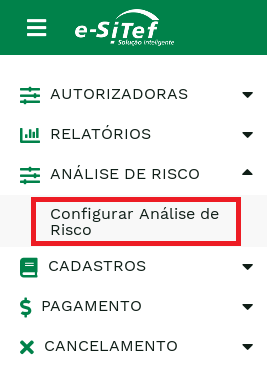
The next figure shows a list of merchants that is presented whenever there are more than one merchant, grouped by user.
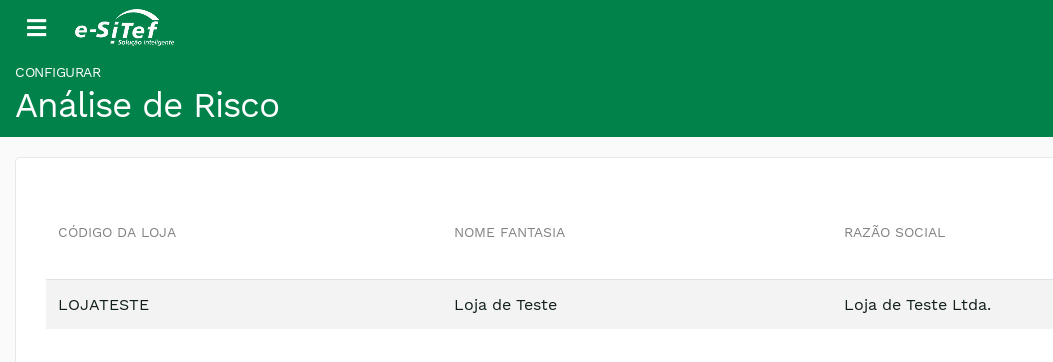
The next figure shows the two fields that need to be configured:
- Tempo de expiração da análise de risco (dias): Response waiting time limit from risk analysis – in days – of which Carat Portal execute an action defined by merchant.
- Atitude após o tempo de expiração: After
Tempo máximo(Maximum Time) is configured, the decision of which action will be executed must be selected in this field - Can be CONFIRM or CANCEL the transaction.
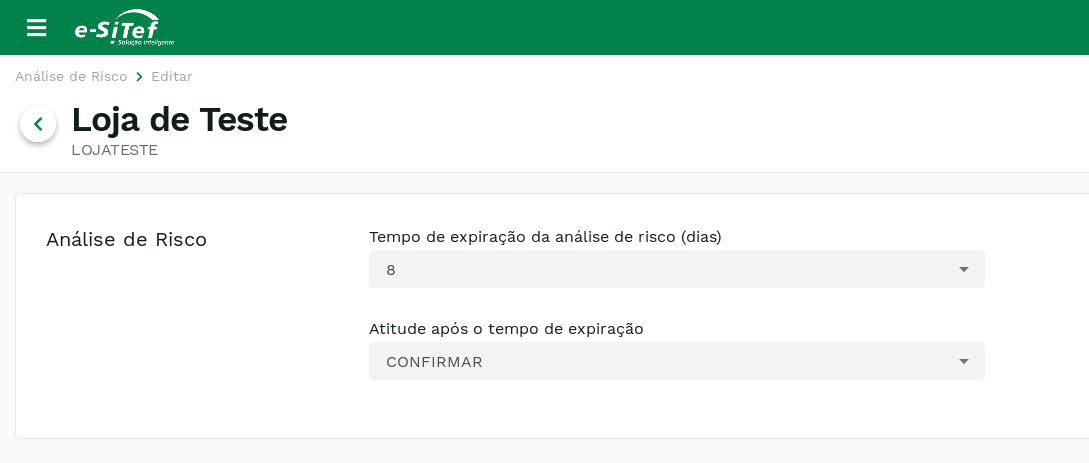
Once the Enviar button is pressed, a message Configurado com sucesso! will be displayed as a confirmation of this modification.
ATTENTION:
This configuration must be changed only by merchant who will assume all responsibilities of selected configuration. The Carat Portal only executes the action chosen by the merchant, according the configuration.
Risk analysis Service on the HTML Interface
Source: https://docs.apis-fiserv.com/latam/docs/risk-analysis-service-on-the-html-interface
After performing the registration alignment with Carat Portal support to enable integration with the anti-fraud service, at the start of a transaction HTML Payment (Learn more) the merchant must configure the property anti_fraud and send the appropriate anti-fraud parameters (depends on the institution that your merchant was set up), both properties must be within the scope of theadditional_data object.
The field anti_fraud determines how anti-fraud is applied and can contain the following values:
enabled_before_auth- Risk analysis will be performed BEFORE authorization of the payment. If the analysis is rejected, payment will not be started.enabled_after_auth- Risk analysis will be performed AFTER authorization of the payment. If the analysis is rejected, the payment that has already been authorized will be canceled.
Attention:
For cases where the limits of intervals for automatic activation of Anti Fraud are configured in the merchant and a value of
anti_fraudis passed in the creation of the transaction, the Carat Portal will only accept the value ofanti_fraudpassed if the transaction is between activation limits. And if the Anti Fraud automatic activation interval limits are configured in the merchant and ananti_fraudvalue is not passed in the transaction, the valueenabled_after_authwill be assumed as default for the anti-fraud type. Important: intervals that allow the use of 3ds and anti-fraud together must not be used.
Anti-fraud parameters
The parameters depend on the institution that provides the anti-fraud service. Therefore, not all anti-fraud parameters available on Carat Portal will be effectively used.
Below are all anti-fraud parameters (regardless of institution).
Some parameters may appear repeatedly (for example, the gift property) and this is due to the risk analysis characteristic of each institution. For more details on how each institution uses each anti-fraud parameter, see the page for each anti-fraud integration.
| Property | Description | Format | Required |
|---|---|---|---|
currency | Payment currency | 3 A | Yes |
b2b_b2c | e-commerce type | 3 A | No |
item_amount | Value in cents of the total sum of the values of the items | < 1024 N | Yes |
total_order_amount | Value in cents of the orders | < 1024 N | Yes |
delivery_time_cd | Delivery time | < 50 A | No |
qty_payment_types | Number of payments | 1 N | No |
ip (deprecated) | Order IP | < 50 A | Yes |
gift | 1 - If order is a gift0 - If order is not a gift | 1 N | No |
gift_message | Gift message | < 8000 A | No |
obs | Order observations | < 8000 A | No |
sla_custom | Analysis SLA | 4 N | No |
origin | Order origin | < 150 A | Yes |
reservation_date | Date of the flight reservation. Only for flight tickets. | Format da data: yyyy-mm-ddThh:mm:ss | No |
nationality | Nationality of the order (for request of international analysis) | < 50 A | No |
list_type_id | List type ID (only for customers that have a specific list) | 1 N | No |
list_id | Store’s list ID | < 200 A | No |
sequential | Sequence of the payment | 1 N | No |
interest | Interest rate. Example: 5.00 | < 4 N | No |
interest_value | Absolute value of interest in cents. Example: 1000 (10 reais). | < 20 N | No |
shipping_type | Shipping type id. The following values are valid:
| < 2 N | No |
items | Purchase item information | Object JSON Array (Learn more) | Yes |
payer | Payer information | Object json (Learn more) | Yes |
billing_data | Bill information | Object json (Learn more) | Yes |
shipment | Shipment information | Object JSON Array (Learn more) | Yes |
browser | Browser information | Object json (Learn more) | Yes |
travel | Air ticket information | Object json (Learn more) | Conditional by institution |
passengers | Air ticket passengers information | Object JSON Array (Learn more) | Yes, if the item is an air ticket |
connections | Air ticket connections information | Object JSON Array (Learn more) | Yes, if the item is an air ticket |
hotel_reservations | Hotel reservation information | Object JSON Array (Learn more) | Yes, if the item is an hotel reservation |
purchase_data | Purchase information | Object json (Learn more) | Yes |
mdd | MDD (Merchant Data) information. Cybersource’s field | Object JSON Array (Learn more) | No |
Object items
items| Property | Description | Format | Required |
|---|---|---|---|
id | Unique Item ID | N | Yes |
sku | Product code of the item | A | Conditional by institution |
title | Product name | A | Yes |
description | Product description | A | No |
quantity | Quantity of items | < 4 N | Yes |
unit_price | Item unit price | < 12 N | Yes |
category_id | Item Category Id. Each institution has a different interpretation. | Conditional by institution | Conditional by institution |
category_name | Product's category name | < 200 A | No |
gift | 1 - If order is a gift0 - If order is not a gift | 1 N | No |
tax_amount | Tax amount | N | No |
discount_amount | Discount amount in cents | N | No |
creation_date | Product publication date in DD/MM/YYYY format. | AN | No |
Object payer
payer| Property | Description | Format | Required |
|---|---|---|---|
id | Identification of the buyer. Usually the CPF. | N | Yes |
name | Payer's name. Each institution has a different interpretation. | Conditional by institution | Conditional by institution |
surname | Payer's surname | < 200 A | Yes |
email | Payer's email | A | Yes |
date_created | Creation date | A | Yes |
password | Password of the buyer on the store | Conditional by institution | Conditional by institution |
city | Address city (without abbreviations) | < 150 A | Yes |
address_street_complement | Address complement (without abbreviations) | < 250 A | No |
address_country | Address country (without abbreviations) | < 150 A | No |
address_county | Address county (without abbreviations) | < 150 A | No |
address_street_number | Address number | < 15 A | No |
state | Address state abbreviation | 2 A | No |
address_street_name | Address street name (without abbreviations) | < 200 A | No |
address_zip_code | Address zip code | < 10 N | No |
address_reference | Landmark (without abbreviations) | < 250 A | No |
legal_document | Payer document | < 100 A | No |
phones | Phones information | Object JSON Array (Learn more) | No |
address | Address information | Object json (Learn more) | No |
Object phones of payer
phones of payer| Property | Description | Format | Required |
|---|---|---|---|
ddi | Phone DDI | 3 N | No |
ddd | Phone DDD | 3 N | No |
number | Phone number | 9 N | No |
Object address of payer
address of payer| Property | Description | Format | Required |
|---|---|---|---|
street_name | Street name. | < 200 A | Yes |
street_name2 | Complement of the street name. | < 200 A | No |
street_number | Number of the address | < 15 A | Yes |
apartment | Apartment | N | No |
complement | Complement of the address | < 250 A | No |
county | County of the address (without abbreviations) | < 150 A | Yes |
city | Address city (without abbreviations) | < 150 A | Yes |
state | Federation Unit abbreviation (UF) | 2 A | Yes |
district | Address district | A | No |
country | Address country | < 150 A | No |
zip_code | Address zip code | < 10 N | Yes |
reference | Address reference | < 250 A | No |
building_number | House number. Example: if it is a condominium, it will be the house number inside the condominium. | < 10 A | No |
Object billing_data
billing_data| Property | Description | Format | Required |
|---|---|---|---|
cliente_id | Customer ID | < 50 A | Yes |
person | 1 - Physical person2 - Legal person | 1 N | Yes |
cnpj_cpf | CPF or CNPJ | < 100 A | Yes |
identification_number | RG or inscrição estadual | < 100 A | No |
name | Customer name | < 500 A | Yes |
birth_date | Date of birth. | Date in format: yyyy-mm-ddThh:mm:ss | Yes |
email | Customer email | < 150 A | No |
gender | M - maleF - female | 1 A | No |
address | Bill address | Object json (Learn more) | No |
phones | Bill phones | Object JSON Array (Learn more) | No |
documents | Bill documents | Object JSON Array (Learn more) | No |
Object address of billing_data
address of billing_data| Property | Description | Format | Required |
|---|---|---|---|
street_name | Street name | < 200 A | Yes |
street_name2 | Complement of the street name | < 200 A | No |
street_number | Street number | < 15 A | Yes |
apartment | Apartment number | N | No |
complement | Complementary address (without abbreviations) | < 250 A | No |
county | Address county (without abbreviations) | < 150 A | Yes |
city | Address city (without abbreviations) | < 150 A | Yes |
state | Address State Acronym - UF | 2 A | Yes |
district | District name | A | No |
country | Address country (without abbreviations). | < 150 A | No |
zip_code | Address zipcode | < 10 N | Yes |
reference | Landmark without abbreviations | < 250 A | No |
building_number | House number. Example: if it is a condominium, it will be the house number inside the condominium. | < 10 A | No |
Object phones of billing_data
phones of billing_data| Property | Description | Format | Required |
|---|---|---|---|
type | Phone type:
| 1 N | Yes |
ddi | Phone DDI | 3 N | No |
ddd | Phone DDD | 3 N | Yes |
number | Phone number | 9 N | Yes |
extension | Phone extension | < 10 A | No |
Object documents of billing_data
documents of billing_data| Property | Description | Format | Required |
|---|---|---|---|
type | Conditional by institution. | A | No |
number | Document number | N | Yes |
Object shipment
shipment| Property | Description | Format | Required |
|---|---|---|---|
id | Customer ID | < 50 A | Yes |
cost | Freight value in cents | < 1024 N | No |
type | Document type 1 - Pessoa Física 2 - Pessoa Jurídica | < 1 N | Yes |
legal_document1 | CPF or CNPJ | < 100 A | Yes |
legal_document2 | RG or Inscrição Estadual | < 100 A | No |
name | Customer's name | < 500 A | Yes |
surname | Customer's surname | < 500 A | Yes |
birth_date | Customer's birth date. | Date in format: yyyy-mm-ddThh:mm:ss | No |
email | < 150 A | No | |
gender | M - maleF - female | 1 A | No |
address | Shipment address | Object json (Learn more) | Conditional by institution |
receiver_address | Shipment address | Object json (Learn more) | Conditional by institution |
phones | Shipment phones | Object JSON Array (Learn more) | Yes |
Object address of shipment
address of shipmentTambém equivale ao object receiver_address do shipment
| Property | Description | Format | Required |
|---|---|---|---|
street_name | Street name | < 200 A | Yes |
street_name2 | Complement of the street name | < 200 A | No |
street_number | Street number | < 15 A | Yes |
apartment | Apartment number | N | No |
complement | Complementary address (without abbreviations) | < 250 A | No |
county | Address county (without abbreviations) | < 150 A | Yes |
city | Address city (without abbreviations) | < 150 A | Yes |
state | Address State Acronym - UF | 2 A | Yes |
country | Address country | < 150 A | Yes |
zip_code | Zip code of the address. | < 10 A | Yes |
building_number | House number. Example: if it is a condominium, it will be the house number inside the condominium. | < 10 A | No |
Object phones of shipment
phones of shipment| Property | Description | Format | Required |
|---|---|---|---|
type | Phone type:
| 1 N | Yes |
ddi | Phone DDI | 3 N | No |
ddd | Phone DDD | 3 N | Yes |
number | Phone Number | 9 N | Yes |
extension | Phone extension | < 10 A | No |
Object browser
browser| Property | Description | Format | Required |
|---|---|---|---|
ip_address | IP address | 15 A | Yes |
Object travel
travel| Property | Description | Format | Required |
|---|---|---|---|
route | Concatenation of the flight routes. To obtain the airport codes, use this link | Value must respect the format: XXX-XXX:XXX-XXX | Yes |
journey_type | Trip type: round_trip or one_way | < 32 A | Yes |
departure_date_time | Date and time of the first flight departure. | Format da data: yyyy-mm-ddThh:mm:ss | Yes |
Object passengers
passengers| Property | Description | Format | Required |
|---|---|---|---|
id | Passenger ID | < 32 A | No |
name | Passenger's name. Conditional by institution | < 100 A | Yes |
last_name | Passenger's last name | < 100 A | Conditional by institution |
frequente_flyer_card | Mileage Card (Fidelity) | < 32 A | No |
legal_document_type | Type of identification document:
| 1 N | Yes |
legal_document | Document number | < 50 A | Yes |
birth_date | Passenger's birth date. | Date in format: yyyy-mm-ddThh:mm:ss | No |
email | Passenger email. Must be unique. | Format: [email protected] | No |
status | Status of the ticket reservation. Example: Reserved | < 32 A | No |
rating | Passenger classification according the ticket price. | < 32 A | No |
type | Passenger classification.
| < 32 A | No |
unit_price | Airfare unit price. | Format (in cents): 1000 (10 reais) | No |
phones | Passenger phones | Object JSON Array (Learn more) | Yes |
Object phones of passengers
phones of passengers| Property | Description | Format | Required |
|---|---|---|---|
ddi | Phone DDI | 3 N | No |
ddd | Phone DDD | 3 N | Yes |
number | Phone number | 9 N | Yes |
Object connections
connections| Property | Description | Format | Required |
|---|---|---|---|
company | Airline name | < 50 A | Yes |
flight_number | Flight number | 6 N | Yes |
flight_date | Date of the flight. | Conditional by institution | Yes |
class | Seat class | < 10 A | Yes |
from | Origin | Conditional by institution | Yes |
to | Destiny | Conditional by institution | Yes |
departure_date | Boarding date. | Date in format: yyyy-mm-ddThh:mm:ss | Yes |
arrival_date | Date of the landing. | Date in format: yyyy-mm-ddThh:mm:ss | Yes |
Object hotel_reservations
hotel_reservations| Property | Description | Format | Required |
|---|---|---|---|
hotel | Hotel name | < 200 A | Yes |
city | Hotel city without abbreviations | < 150 A | Yes |
state | Hotel state without abbreviations | < 150 A | Yes |
country | Hotel country | < 150 A | Yes |
reservation_date | Reservation Date. | Date in format: yyyy-mm-ddThh:mm:ss | Yes |
reservation_expiration_date | Date of expiry of the reservation. | Date in format: yyyy-mm-ddThh:mm:ss | Yes |
checkin_date | Date of arrival. | Date in format: yyyy-mm-ddThh:mm:ss | Yes |
checkout_date | Departure date. | Date in format: yyyy-mm-ddThh:mm:ss | Yes |
Object purchase_data
purchase_data| Property | Description | Format | Required |
|---|---|---|---|
last_date_inserted_mail | Date that the email was last modified. | Date in format: yyyy-mm-ddThh:mm:ss | No |
last_date_change_password | Date of the last change of the password. | Date in format: yyyy-mm-ddThh:mm:ss | No |
last_date_change_phone | Date that the phone was last changed. | Date in format: yyyy-mm-ddThh:mm:ss | No |
last_date_change_mobile_phone | Date that the mobile phone was last changed. | Date in format: yyyy-mm-ddThh:mm:ss | No |
last_date_inserted_address | Date of the last address change. | Date in format: yyyy-mm-ddThh:mm:ss | No |
purchase_logged | Bought authenticated on the store web site | 1 N | No |
purchase_logged_with_facebook | Purchase logged in via Facebook | 1 N | No |
Object mdd
mdd| Property | Description | Format | Required |
|---|---|---|---|
id | It can range from 1 to 100 defined by the merchant in an agreement with Cybersource | < 255 A | No |
value | Value of the field defined by the merchant in an agreement with Cybersource | < 255 A | No |
For payments using Konduto, Cybersource and Antifraude Fiserv: Parameters that exist in
payer,billingandshipmentwhen not passed to the transaction creation service viaadditional_data, will be requested in the payment screen. If the parameters are passed in the transaction creation service, you will not be asked to fill in the fields on the payment screen.
For payments using Konduto, Cybersource and Antifraude Fiserv: Parameters that exist in
payer,billingandshipmentwhen not passed to the transaction creation service viaadditional_data, will be requested in the payment screen. If the parameters are passed in the transaction creation service, you will not be asked to fill in the fields on the payment screen.
Updated 2 months ago